
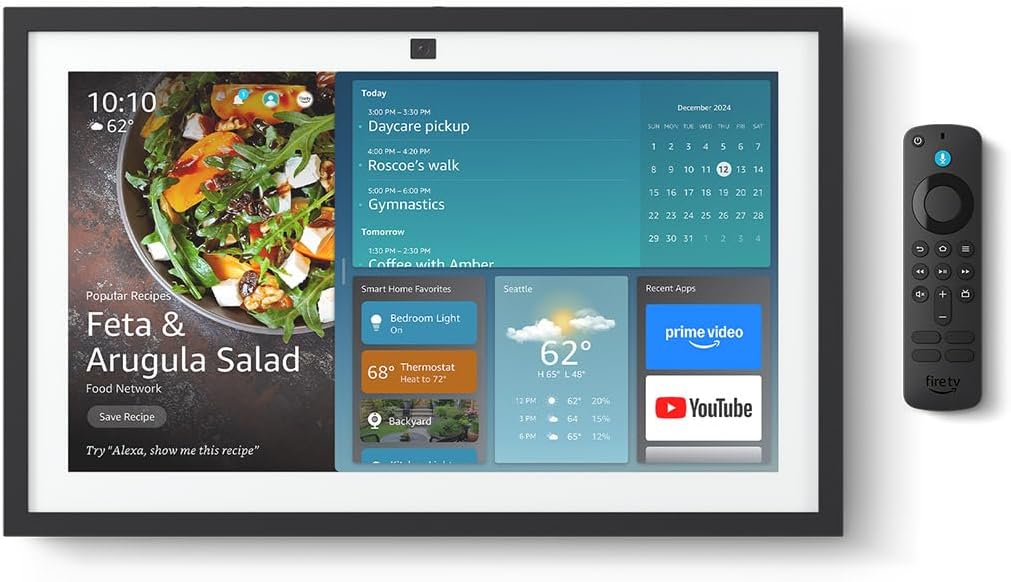

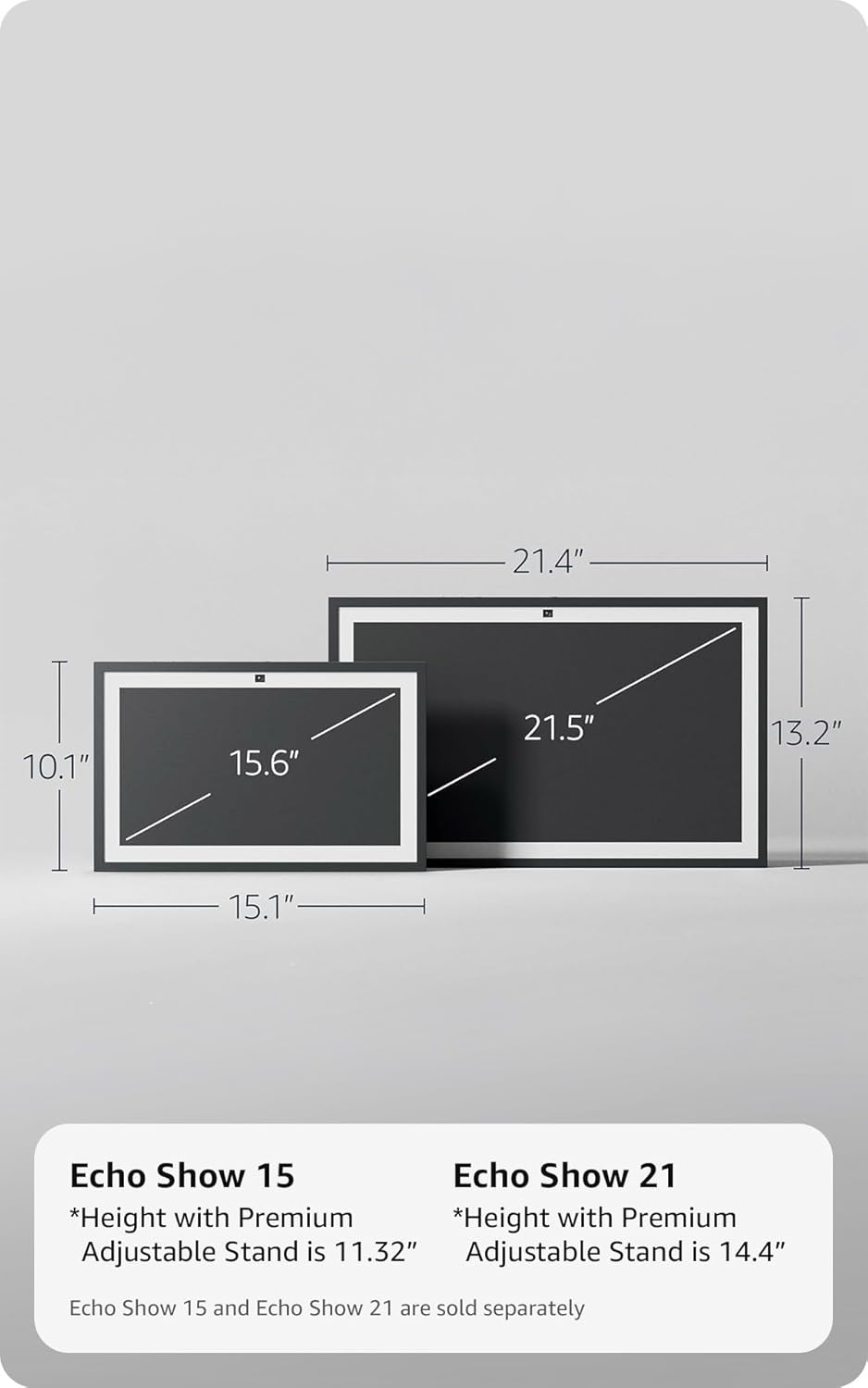

Amazon Echo Show 15 (newest model), Full HD 15.6" kitchen hub for home organization, with built-in Fire TV, Designed for Alexa+
This is an affiliate link. Buyyyah may earn a commission if you buy through it, at no extra cost to you.
Description
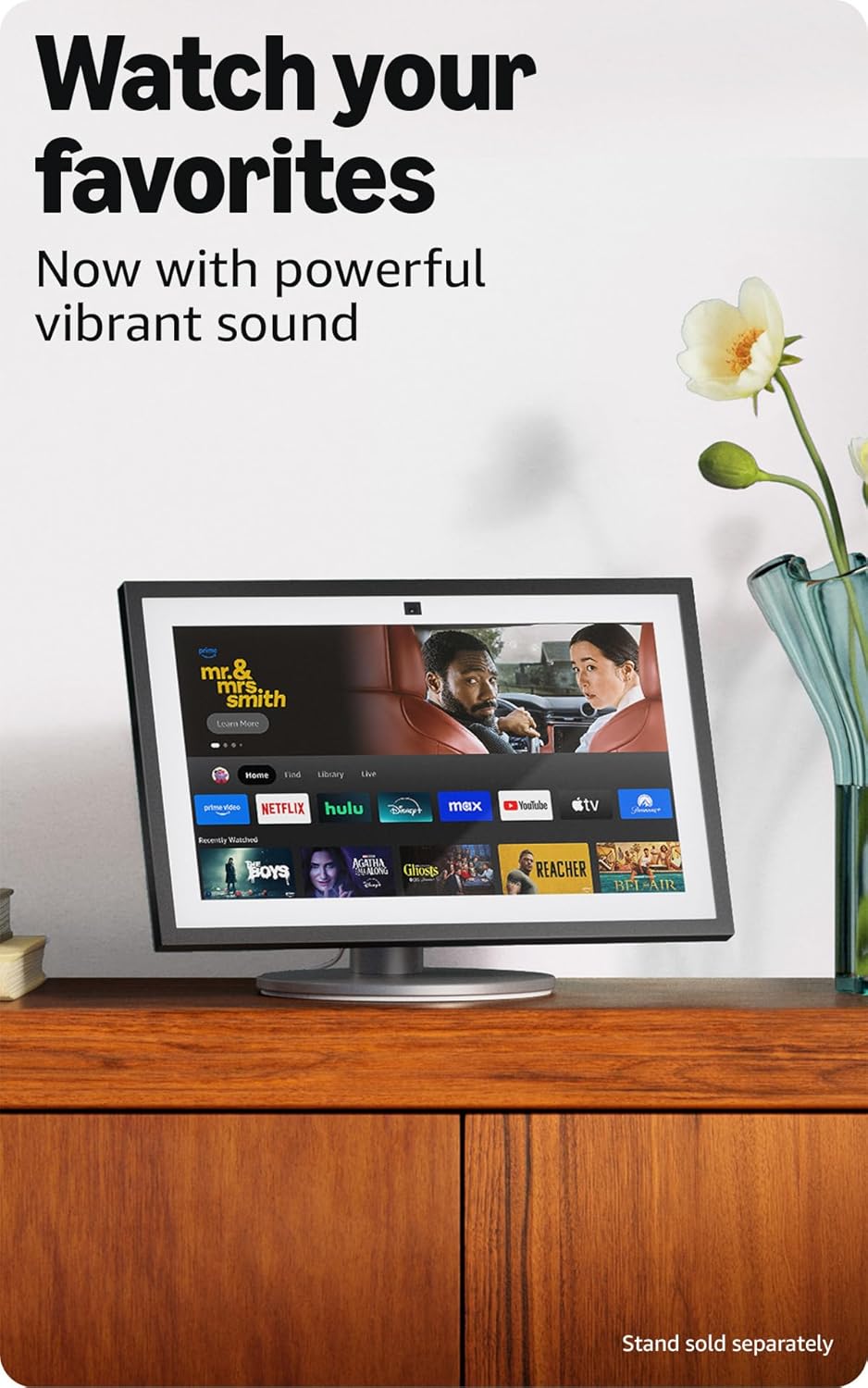
- MEET THE ALL-NEW ECHO SHOW 15 - A stunning 15.6" Full-HD (1080p) smart display that's perfect for your kitchen and ready to show you more. Use customizable widgets to keep your day on track, watch your favorite shows with Fire TV and powerful vibrant sound, and enjoy natural video calling, with 3.3x zoom and wide field of view. - FAMILY ORGANIZATION HUB - See your top widgets at a glance, like your family’s calendars and to-do lists, local weather, smart home, and more. - ALL YOUR FAVORITES, ALL RIGHT HERE - Built-in Fire TV unlocks endless entertainment, so you can enjoy your favorite content from thousands of apps like Prime Video, Netflix, YouTube, Apple TV, and more (subscription may be required). Fire TV remote included. Plus, now you can quickly add a device to play music with Active Media - start playing a song in the kitchen, then add the living room and bedroom on the fly. - SMART HOME CENTRAL - Control smart devices with your voice or a few taps using the smart home dashboard. Easily turn on all your living room lights at once or check live camera feeds to see what's happening around your home. - YOUR FAVORITE MEMORIES ON DISPLAY - Brighten your space (and your day) by turning your home screen into a photo slideshow that displays your favorite memories. Auto curate your images and show off your favorite family memories. - CONNECT LIKE NEVER BEFORE - Video calling with family and friends will feel even more natural with a centered, auto-framing camera, wide field of vision, 3.3x zoom, and noise reduction technology. - DESIGNED TO PROTECT YOUR PRIVACY - Built with multiple layers of privacy controls, including a mic/camera-off button. Use the built-in shutter to cover the camera.
Frequently asked questions
- What is the screen size and resolution?
- The Echo Show 15 has a 15.6-inch Full-HD (1080p) smart display.
- Can I watch streaming services on it?
- Yes, built-in Fire TV provides access to thousands of apps like Prime Video, Netflix, YouTube, and Apple TV (subscription may be required).
- Does it have privacy controls for the camera and microphone?
- Yes, it has multiple layers of privacy controls including a mic/camera-off button and a built-in shutter to cover the camera.
Customer reviews

10 Stars! No issues, read for user tips
I've had so many Echos over the years, beginning with the 1st Gen, can't live without them anymore since so much of our home is Alexa connected. I originally got a refurbished 1st Gen Echo Show 15", not knowing the 2nd gen was coming out. So glad I returned it for the new 21" Echo Show, it's absolutely phenomenal! Streaming video: Easy to set up streaming (which I've done on our 5", 8", and 10" Echos). The best part of the Echo Show is that Fire TV is included. I easily logged into Hulu, Netflix, Amazon, Max, Peacock, Paramount, Disney+, and Apple TV (other Echo shows only allowed me Hulu, Netflix, and Amazon, I believe). The setup and remote is the same as FireTV. Streaming audio: Easy to connect with your Audible account, and Apple Music or Spotify. I can also stream NPR and podcasts. If you are having a problem with Echo playing the right song, try this: "Echo, play Blinding Lights by the Weeknd on Apple Music" instead just saying "Echo, play Blinding Lights." Same "Echo, play Christmas Jazz on Apple Music" instead of "Echo, play Christmas Music." The more specific you are, the better results. Calendar: I tried the Skylight and it is useless. The Echo Show will connect to your Apple Calendars. Our family does shared calendars, and everything shares over to our Echo Show, including announcing events and times to leave. Drop in: It's amazing! The camera will zoom and adjust automatically. Our Echo Show 10 does this, but it's on a swivel and always runs into things. This one is much smarter! You can drop in from another Alexa device, or simple the Alexa app on a smart phone. Photos: We have all of our Echo Shows displaying photos that I have uploaded to Amazon photos and then select which photos to show using the Alexa app. Screen is so clear and large, better than any smart frame I've ever seen. And friends/family can share photos to it. Announcements: Announcements will show on the screen and announce (I also have push notifications to my watch/phone). Echo hears them perfectly and announces them correctly (our Echo 8 has stopped properly listening and announcing). You can also announce from the Alexa app if you are not home, very convenient for parents :) Widgets: Widgets are easy to add and adjust, just be patient and go through the process. Ads: To remove (most) ads, go into settings on the screen and turn everything to off! I barely get any. If you are still getting those annoying "Wicked" ads, it's because you have on the "Theme" setting. Once I turned that off, no more "Wicked" (or other future sponsored theme movies), even though we do like the theme setting (Mario is my favorite!). Pricing: Look for a sale. I got the 21" for $350 on the Black Friday Sale. Would have cost me more than that for a TV, sound bar, and Apple TV for our kitchen (which was our old setup). I LOVE all of our Echo devices. Our Gen 1 is still working amazingly, and glad to add the Echo 21" to our home.
I've had so many Echos over the years, beginning with the 1st Gen, can't live without them anymore since so much of our home is Alexa connected. I originally got a refurbished 1st Gen Echo Show 15", not knowing the 2nd gen was coming out. So glad I returned it for the new 21" Echo Show, it's absolutely phenomenal! Streaming video: Easy to set up streaming (which I've done on our 5", 8", and 10" Echos). The best part of the Echo Show is that Fire TV is included. I easily logged into Hulu, Netflix, Amazon, Max, Peacock, Paramount, Disney+, and Apple TV (other Echo shows only allowed me Hulu, Netflix, and Amazon, I believe). The setup and remote is the same as FireTV. Streaming audio: Easy to connect with your Audible account, and Apple Music or Spotify. I can also stream NPR and podcasts. If you are having a problem with Echo playing the right song, try this: "Echo, play Blinding Lights by the Weeknd on Apple Music" instead just saying "Echo, play Blinding Lights." Same "Echo, play Christmas Jazz on Apple Music" instead of "Echo, play Christmas Music." The more specific you are, the better results. Calendar: I tried the Skylight and it is useless. The Echo Show will connect to your Apple Calendars. Our family does shared calendars, and everything shares over to our Echo Show, including announcing events and times to leave. Drop in: It's amazing! The camera will zoom and adjust automatically. Our Echo Show 10 does this, but it's on a swivel and always runs into things. This one is much smarter! You can drop in from another Alexa device, or simple the Alexa app on a smart phone. Photos: We have all of our Echo Shows displaying photos that I have uploaded to Amazon photos and then select which photos to show using the Alexa app. Screen is so clear and large, better than any smart frame I've ever seen. And friends/family can share photos to it. Announcements: Announcements will show on the screen and announce (I also have push notifications to my watch/phone). Echo hears them perfectly and announces them correctly (our Echo 8 has stopped properly listening and announcing). You can also announce from the Alexa app if you are not home, very convenient for parents :) Widgets: Widgets are easy to add and adjust, just be patient and go through the process. Ads: To remove (most) ads, go into settings on the screen and turn everything to off! I barely get any. If you are still getting those annoying "Wicked" ads, it's because you have on the "Theme" setting. Once I turned that off, no more "Wicked" (or other future sponsored theme movies), even though we do like the theme setting (Mario is my favorite!). Pricing: Look for a sale. I got the 21" for $350 on the Black Friday Sale. Would have cost me more than that for a TV, sound bar, and Apple TV for our kitchen (which was our old setup). I LOVE all of our Echo devices. Our Gen 1 is still working amazingly, and glad to add the Echo 21" to our home.


great resolution and flexibility
Resolution, great. Flexibility, great. Setup instructions, not so great. Had to ask Rufus to find this how to pair the remote. Save you the trouble: These remotes are compatible with Echo devices with a screen: Alexa Voice Remote (3rd Generation) Alexa Voice Remote (2024 Release) Alexa Voice Remote Pro To pair your first remote, say "Go to Settings," and then select Get Started With Fire TV Remote. Follow on-screen instructions to pair. If you already have a remote paired with your device, use the following instructions to pair another one: Say, "Go to Settings," or go to the device settings on your Echo Show: If you're using Alexa+, select the MenuIcon on your screen, and then select Settings. If you're using the original Alexa, swipe down from the top of the screen and select Settings. Select Fire TV. Select Fire TV Remotes. On the Alexa Voice Remote, press and hold the Home Button for 10 seconds. The Echo Show tells you when it discovers the remote. Note: There are no LED indicators on the Alexa Voice Remote. Complete pairing by selecting Connect on your device's screen.
Resolution, great. Flexibility, great. Setup instructions, not so great. Had to ask Rufus to find this how to pair the remote. Save you the trouble: These remotes are compatible with Echo devices with a screen: Alexa Voice Remote (3rd Generation) Alexa Voice Remote (2024 Release) Alexa Voice Remote Pro To pair your first remote, say "Go to Settings," and then select Get Started With Fire TV Remote. Follow on-screen instructions to pair. If you already have a remote paired with your device, use the following instructions to pair another one: Say, "Go to Settings," or go to the device settings on your Echo Show: If you're using Alexa+, select the MenuIcon on your screen, and then select Settings. If you're using the original Alexa, swipe down from the top of the screen and select Settings. Select Fire TV. Select Fire TV Remotes. On the Alexa Voice Remote, press and hold the Home Button for 10 seconds. The Echo Show tells you when it discovers the remote. Note: There are no LED indicators on the Alexa Voice Remote. Complete pairing by selecting Connect on your device's screen.
The ultimate smart home hub – perfect for the kitchen
The Amazon Echo Show 21 (latest model) has completely exceeded my expectations. The 21-inch Full HD display is stunning—large, sharp, and easy to see from anywhere in the room. I use it every day to stay organized. Having my calendar, weather, shopping lists, and to-do lists all in one place is incredibly convenient. The built-in Fire TV is a huge bonus—I can watch shows, follow recipes, or play music while cooking without needing another device. Alexa works flawlessly, responds quickly, and the voice control is super helpful when my hands are busy. I also love that it can be personalized for different family members, which makes it even more useful. Setup was simple, and the sleek design looks great on the wall. It has truly become the center of my home.
The Amazon Echo Show 21 (latest model) has completely exceeded my expectations. The 21-inch Full HD display is stunning—large, sharp, and easy to see from anywhere in the room. I use it every day to stay organized. Having my calendar, weather, shopping lists, and to-do lists all in one place is incredibly convenient. The built-in Fire TV is a huge bonus—I can watch shows, follow recipes, or play music while cooking without needing another device. Alexa works flawlessly, responds quickly, and the voice control is super helpful when my hands are busy. I also love that it can be personalized for different family members, which makes it even more useful. Setup was simple, and the sleek design looks great on the wall. It has truly become the center of my home.


Love the Big Screen & Fire TV!
⭐⭐⭐⭐⭐ Huge Upgrade for Our Kitchen – Love the Big Screen & Fire TV! The Echo Show 21 is fantastic in our kitchen. The 21” display is crystal clear for following recipes, watching news, or checking calendars and to-do lists. Built-in Fire TV with the included remote makes streaming shows effortless. The camera is great for video calls, and smart home controls (lights, cameras) work seamlessly. Sound is much improved with good bass for the size. Setup was easy, and the wall mount keeps it secure. Highly recommend if you want a true family command center!
⭐⭐⭐⭐⭐ Huge Upgrade for Our Kitchen – Love the Big Screen & Fire TV! The Echo Show 21 is fantastic in our kitchen. The 21” display is crystal clear for following recipes, watching news, or checking calendars and to-do lists. Built-in Fire TV with the included remote makes streaming shows effortless. The camera is great for video calls, and smart home controls (lights, cameras) work seamlessly. Sound is much improved with good bass for the size. Setup was easy, and the wall mount keeps it secure. Highly recommend if you want a true family command center!





![Ailun 3 Pack Screen Protector for iPhone 16 [6.1 inch] + 3 Pack Camera Lens Protector with Installation Frame,Case Friendly Tempered Glass Film,[9H Hardness][Not for iPhone 16e/16 Pro/Plus/Pro Max]](https://m.media-amazon.com/images/I/71z4XevAN2L._AC_SY300_SX300_QL70_FMwebp_.jpg)