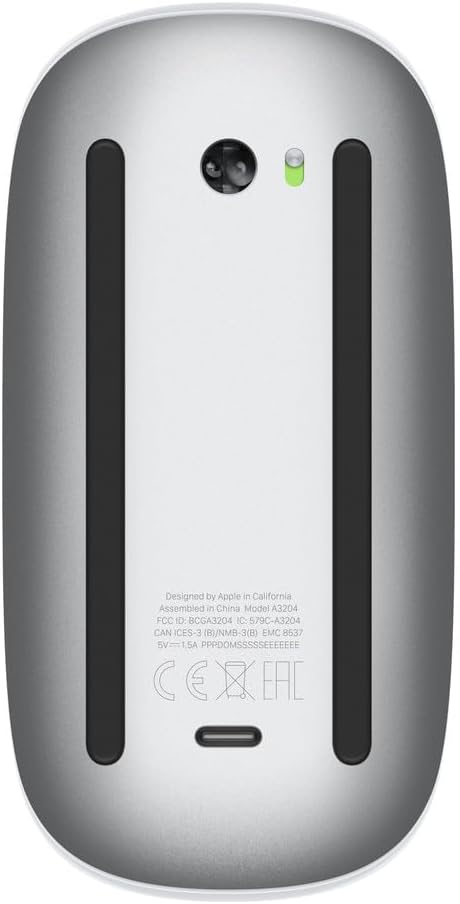


Apple Magic Mouse - White Multi-Touch Surface
This is an affiliate link. Buyyyah may earn a commission if you buy through it, at no extra cost to you.
Description
- Magic Mouse is wireless and rechargeable, with an optimised foot design that lets it glide smoothly across your desk. - The Multi-Touch surface allows you to perform simple gestures such as swiping between web pages and scrolling through documents. - The rechargeable battery will power your Magic Mouse for about a month or more between charges. - It’s ready to go straight out of the box and pairs automatically with your Mac, and it includes a woven USB-C Charge Cable that lets you pair and charge by connecting to a USB-C port on your Mac.
Details
General
- Manufacturer
- Apple
- Item model number
- MXK53AM/A
- Date First Available
- October 28, 2024
Dimensions & Weight
- Product Dimensions
- 5.12 x 2.91 x 1.42 inches
- Item Weight
- 8 ounces
Battery
- Batteries
- 1 Lithium Ion batteries required. (included)
Frequently asked questions
- Is the Magic Mouse rechargeable?
- Yes, it is wireless and rechargeable, with a rechargeable battery that powers the mouse for about a month or more between charges.
- Does it come with a charging cable?
- Yes, it includes a woven USB-C Charge Cable that lets you pair and charge by connecting to a USB-C port on your Mac.
- What are the dimensions of the Magic Mouse?
- The product dimensions are 5.12 x 2.91 x 1.42 inches and it weighs 8 ounces.
Customer reviews

Do you believe in magic?
The Magic Mouse is a sleek, minimalist mouse that looks gorgeous on the desk and fits right into the Apple ecosystem. It pairs instantly with the MacBook Neo, and once it’s connected, it just works — no drivers, no fuss. The multi‑touch surface is the standout feature: you can swipe between desktops, scroll smoothly through long pages, and use simple gestures that feel very natural if you’re already used to a Mac trackpad. Ergonomically, it’s definitely more style than comfort. The low profile can feel a bit flat during long workdays, especially if you prefer a mouse with more of a curve or palm support. It’s perfect for light to moderate daily use, but heavy users or people prone to wrist strain might want something more contoured. Functionally, it shines for everyday productivity and creative work. The tracking is precise, scrolling is super smooth, and gestures are a nice bonus for multitasking across multiple monitors. The downside everyone talks about is the charging design—since the port is on the bottom, you can’t use it while it’s charging, which is pretty inconvenient if it dies in the middle of your day. The good news is that a quick charge lasts a long time, so topping it off periodically becomes a habit. If you love Apple’s clean aesthetic and enjoy gesture‑based navigation, the Magic Mouse is a great companion to your setup. If comfort and all‑day ergonomics are your top priority, it might be worth pairing the with a more traditional mouse instead.
The Magic Mouse is a sleek, minimalist mouse that looks gorgeous on the desk and fits right into the Apple ecosystem. It pairs instantly with the MacBook Neo, and once it’s connected, it just works — no drivers, no fuss. The multi‑touch surface is the standout feature: you can swipe between desktops, scroll smoothly through long pages, and use simple gestures that feel very natural if you’re already used to a Mac trackpad. Ergonomically, it’s definitely more style than comfort. The low profile can feel a bit flat during long workdays, especially if you prefer a mouse with more of a curve or palm support. It’s perfect for light to moderate daily use, but heavy users or people prone to wrist strain might want something more contoured. Functionally, it shines for everyday productivity and creative work. The tracking is precise, scrolling is super smooth, and gestures are a nice bonus for multitasking across multiple monitors. The downside everyone talks about is the charging design—since the port is on the bottom, you can’t use it while it’s charging, which is pretty inconvenient if it dies in the middle of your day. The good news is that a quick charge lasts a long time, so topping it off periodically becomes a habit. If you love Apple’s clean aesthetic and enjoy gesture‑based navigation, the Magic Mouse is a great companion to your setup. If comfort and all‑day ergonomics are your top priority, it might be worth pairing the with a more traditional mouse instead.
Good ergonomics, eliminates need for disposable batteries
I've used a replaceable battery version of the Apple bluetooth mouse for years. It is a great device, but after many years of use, it has been getting progressively harder to pop open the battery compartment. Plus I was using a lot of disposable lithium batteries. This rechargeable version just plugs into your computer to charge without any need to open a plate on the bottom of the mouse. The MacOS gives a readout of the mouse's charge status under the Bluetooth icon at the top of the screen. I haven't had mine for that long, but it seems to be retaining its charge well. One downside is that the charging port is on the bottom of the mouse, so you have to plan ahead to choose a time to charge the mouse when you are not using your computer. The other downside is that when you exhaust the charge cycles, the mouse will no longer be functional and will need to be discarded. Obviously it is too soon to know the number of charge cycles I will get out of the mouse. Otherwise, the ergonomics are just as good as the earlier disposable battery version and it appears as if it will not need to be charged very frequently.
I've used a replaceable battery version of the Apple bluetooth mouse for years. It is a great device, but after many years of use, it has been getting progressively harder to pop open the battery compartment. Plus I was using a lot of disposable lithium batteries. This rechargeable version just plugs into your computer to charge without any need to open a plate on the bottom of the mouse. The MacOS gives a readout of the mouse's charge status under the Bluetooth icon at the top of the screen. I haven't had mine for that long, but it seems to be retaining its charge well. One downside is that the charging port is on the bottom of the mouse, so you have to plan ahead to choose a time to charge the mouse when you are not using your computer. The other downside is that when you exhaust the charge cycles, the mouse will no longer be functional and will need to be discarded. Obviously it is too soon to know the number of charge cycles I will get out of the mouse. Otherwise, the ergonomics are just as good as the earlier disposable battery version and it appears as if it will not need to be charged very frequently.
Amazing product for Mac...not amazing for Windows
So I live in both the Mac world and the Windows world. I recently decided to pick one of these up because I liked how it fit into my laptop bag. It works well for Mac but has a limited feature set for WIndows. Frankly, this didn't suprise me as I had expected it and thus didn't peanilize the product for not working better with Windows. Yes, I know there are utilities to squeeze more functionality out of the mouse for Windows but this is an out of box review. The setup with Mac is as seamless as you would expect for a Mac product and after a couple seconds you are off and running. The scrolling is extremely handy but it will take a little getting used to as there is an art to using this mouse but with a little effort you will see the brilliance of the design. You just have to work through any initial frustrations you might have. Overall, this is a great product and feel it was well worth the money but it is best used with Mac OS.
So I live in both the Mac world and the Windows world. I recently decided to pick one of these up because I liked how it fit into my laptop bag. It works well for Mac but has a limited feature set for WIndows. Frankly, this didn't suprise me as I had expected it and thus didn't peanilize the product for not working better with Windows. Yes, I know there are utilities to squeeze more functionality out of the mouse for Windows but this is an out of box review. The setup with Mac is as seamless as you would expect for a Mac product and after a couple seconds you are off and running. The scrolling is extremely handy but it will take a little getting used to as there is an art to using this mouse but with a little effort you will see the brilliance of the design. You just have to work through any initial frustrations you might have. Overall, this is a great product and feel it was well worth the money but it is best used with Mac OS.
Works smoothly and very responsive
My old Apple mouse was really glitchy and not responsive any more because it was so old but I did use it for many years. It may have been from when my kids were in high school so at least 8 years old. Anyway it was time to get a new one and this one is great. It works like a dream especially compared to the old one and was easy to set up and start using. There is a charging cord that you can just plug in to the computer and you're good to go. Not sure about how long the charge lasts but easy enough to plug in while you're working if you have to. The mouse works smoothly and have had zero issues with connectivity. The weight and feel of it are very pleasant and if the old mouse is any indication, this mouse will be just as sturdy and long lasting. As always, Apple products are designed beautifully and look and feel sleek.
My old Apple mouse was really glitchy and not responsive any more because it was so old but I did use it for many years. It may have been from when my kids were in high school so at least 8 years old. Anyway it was time to get a new one and this one is great. It works like a dream especially compared to the old one and was easy to set up and start using. There is a charging cord that you can just plug in to the computer and you're good to go. Not sure about how long the charge lasts but easy enough to plug in while you're working if you have to. The mouse works smoothly and have had zero issues with connectivity. The weight and feel of it are very pleasant and if the old mouse is any indication, this mouse will be just as sturdy and long lasting. As always, Apple products are designed beautifully and look and feel sleek.