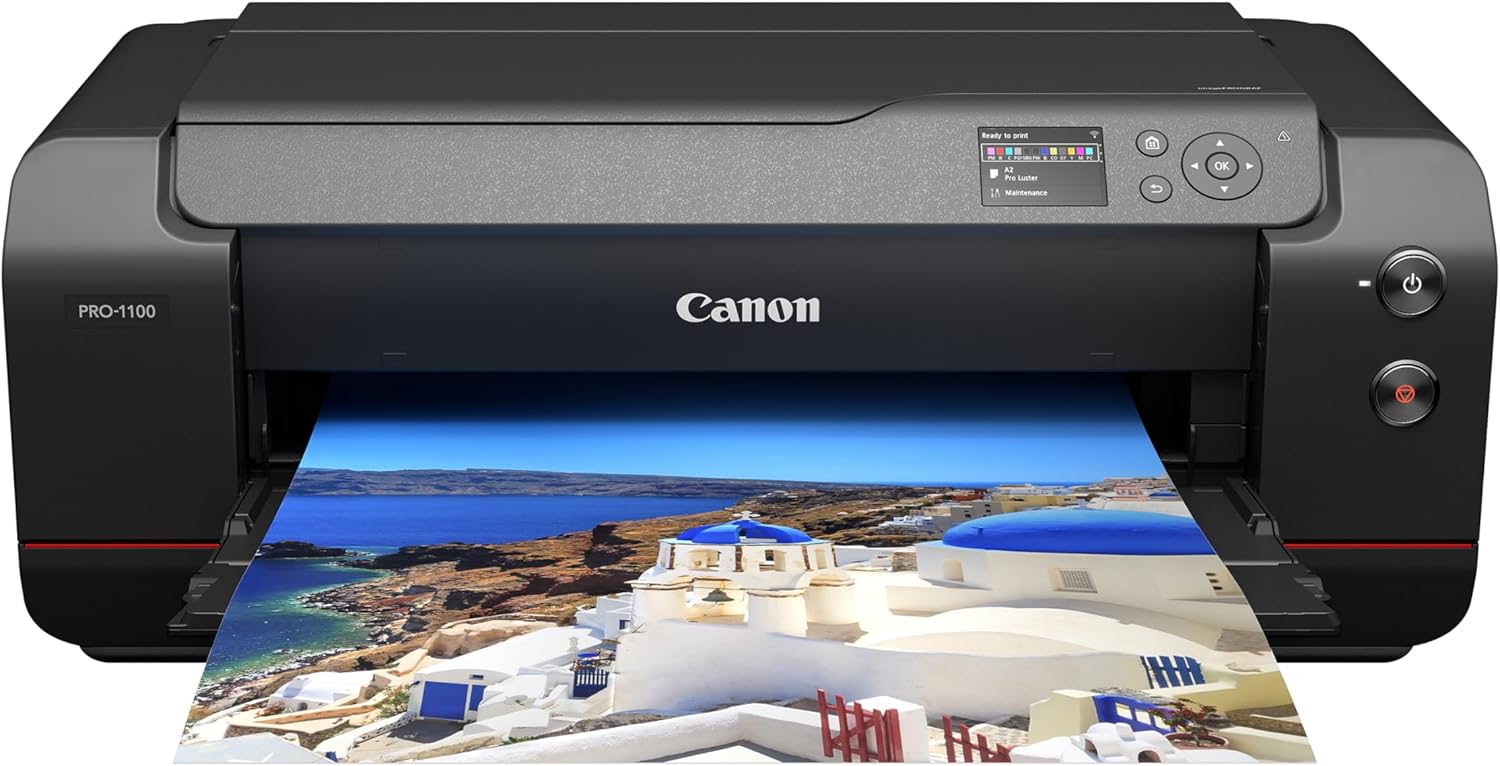


Canon imagePROGRAF PRO-1100: 17” Professional Wireless Inkjet Photo Printer
This is an affiliate link. Buyyyah may earn a commission if you buy through it, at no extra cost to you.
Description
- 11 PIGMENT-BASED INK SYSTEM PLUS CHROMA OPTIMIZER: The 11 pigment-based ink system provides a broad color gamut and improved gloss uniformity for superb glossiness and anti-bronzing. The included Chroma Optimizer ink enhances glossiness, flattens the print surface and expands color range. - WIDE COLOR GAMUT FOR EXCEPTIONAL IMAGE CLARITY: The LUCIA PRO II ink system helps you achieve an improvement in color-reproduction, image clarity, and enhanced darker areas. It faithfully reproduces colors and dark areas crucial for printing works of art. - PROFESSIONAL PRINT & LAYOUT SOFTWARE: This powerful software provides professional photographers with intuitive printing solutions. A standalone application that also can be used as a plug-in from Digital Photo Professional or Adobe software to support seamless output. - PRINTER MANAGEMENT SOLUTIONS: Every detail in your print must be perfect, why not have the same obsession for your workflow? The PRO-1100 is precisely managed with powerful management tools such as the Media Configuration, Color Calibration, and Accounting Manager tools. - ANTI-CLOGGING TECHNOLOGY: Via a FINE print head that controls precise ink ejection. - AIR FEEDING SYSTEM: Prevents paper from skewing for accurate ink placement. - The LUCIA PRO II INK SYSTEM: Produces enhanced gloss uniformity, and scratch resistance. Works with Canon PFI-4100 inks. Each individual ink contains 80mL. - INTEGRATION OF EOS & imagePROGRAF PRO SERIES: Canon's total technological capabilities provide high-quality photo output. - L-COA PRO TECHNOLOGY: Process massive volumes of image data quickly with the image processing engine. - 1-YEAR WARRANTY: Have peace of mind with a 1-year warranty
Details
General Information
- Brand
- Canon
- Model Name
- ImagePROGRAF PRO-1100
- Model Number
- 6856C002
- Model Series
- PRO-1100
- Item Type Name
- Inkjet Printer
- Specific Uses For Product
- Multi-Purpose
- Unit Count
- 1.0 Count
- Ink Color
- Black
- Control Method
- App
- Built-In Media
- 8.5" x 11" Photo Paper Pro Luster (5 Sheets LU-101), Power Cord, Print Head, Printer Setup Sheet, Manual, Warranty Card and Other Documentation, Set of 12 Ink Tanks (PGI-4100; MBK, PBK, C, M, Y, PC, PM, GY, PGY, R, B, CO), imagePROGRAF PRO-1100: 17" Professional Wireless Inkjet Photo Printer
Printer Specifications
- Printer Type
- Inkjet
- Printer Output Type
- Color
- Additional Printer Functions
- Print Only
- Color Depth
- 48 bpp
- Resolution
- 4800 x 2400
- Maximum Print Resolution Color
- 2400x1200 dpi
- Maximum Print Resolution Black and White
- 2400x1200 dpi
- Scanner Type
- Photo
- Other Special Features of the Product
- Borderless Printing
Paper Handling
- Print Media
- Glossy photo paper
- Number of Trays
- 1
- Maximum Media Size
- 17 X 22 Inch
- Maximum Sheet Capacity
- 250
- Output Sheet Capacity
- 250
- Paper Size
- A5, A4, A3 (13" x 19"), A2, B5, B4, B3, Letter (8.5" x 11"), Legal (8.5" x 14"), Ledger (11" x 17"), Hagaki/Return Hagaki/A3+/L/2L/4" x 6", 5" x 7", 9" x 13", 11" x 14", 13" x 19" Super B/US Photo 16" x 20", 17" x 22", 17" x 25", 7" x 10", 8" x 10", 10" x 12", 12" x 12", 14" x 17", 17" x 22" Inches
- Duplex
- Automatic
Print Speed & Copy
- Color Pages per Minute
- 1 ppm
- B&W Pages per Minute
- 1 ppm
- Initial Page Print Time
- 1 minute
- Maximum Copy Speed Black and White
- 1 ppm
- Maximum Copy Resolution Color
- 4800 x 2400 dpi
- Maximum Copy Resolution Black and White
- 4800 x 2400 dpi
Dimensions and Weight
- Item Weight
- 83 Pounds
- Item Dimensions D x W x H
- 17.1"D x 28.5"W x 11.2"H
Connectivity
- Printer Connectivity Type
- USB, Wi-Fi
- Hardware Interface
- USB
- Total USB Ports
- 1
- Compatible Devices
- Wireless Devices
Warranty
- Warranty Type
- 1-year warranty
- Warranty Description
- 1 year manufacturer
- EU Spare Part Availability Duration
- 1 Years
Frequently asked questions
- What is the warranty period for the Canon imagePROGRAF PRO-1100?
- The product comes with a 1-year warranty.
- What type of ink does this printer use?
- It uses an 11 pigment-based ink system with LUCIA PRO II inks, compatible with Canon PFI-4100 ink cartridges.
- Is the Canon imagePROGRAF PRO-1100 wireless?
- Yes, the printer connectivity type includes USB and Wi-Fi, and it is compatible with wireless devices.
Customer reviews

Easily make beautiful big prints that can last more than a lifetime.
Excellent printer. I have a lot of experience with higher end photo oriented inkjets - both Canon and Epson. The 1100 is very, very good. The set up is straight forward, if not a little time consuming. The print quality is just about as good as it gets from any contemporary printer from any brand, with a very broad color gamut. Paper handling is excellent. The Canon drivers and print software is also easy to muse and give great results for anyone who cares to learn just a little about how to use them properly. Keith Cooper at Northlight is a great source for more detailed information. The so-called "banding issue that some buyers have had with the 1100 was totally absent from any prints that I have so far made that should have revealed it; the issue has obviously been resolved with either on going hardware changes in production or firmware changes, or both, so the current supply of 1100's should not have this issue. The only downside to the 1100, besides having the room to use this rather large printer, is that it tends to use a lot of ink - expensive stuff - in regular maintenance. This is true for all high-end photo inkjets, but this latest series of Canon's pro inkjets does seem to use more ink for maintenance than its competitors, and it's something to consider. There are some work-arounds for this readily available to discover on various internet sites, but there is no absolute "cure." However, if you are looking to print frequently, there will be no cost increase for ink as frequent printing does most of this the type of maintenance itself. If you print infrequently, like once a month or every two or three weeks, you should be prepared for incurring the slight extra cost. One the positive side of costs, the 1100 has a replaceable thermal ink head which could theoretically save you a huge amount of money compared to having a clogged head using the non-replaceable piezo inkjet heads in Epson and other brand printers. Regardless, the ink maintenance issue is not that big a deal, and if you follow the best practices with the 1100, it is a quite small added cost. In short, I highly recommend this printer; it's easy to make great photo and graphic arts prints with this machine, the prints will last at least a human lifetime if kept properly, and it will make prints from 4x6 inches, up to 17x25 inches, that you will be proud to display.
Excellent printer. I have a lot of experience with higher end photo oriented inkjets - both Canon and Epson. The 1100 is very, very good. The set up is straight forward, if not a little time consuming. The print quality is just about as good as it gets from any contemporary printer from any brand, with a very broad color gamut. Paper handling is excellent. The Canon drivers and print software is also easy to muse and give great results for anyone who cares to learn just a little about how to use them properly. Keith Cooper at Northlight is a great source for more detailed information. The so-called "banding issue that some buyers have had with the 1100 was totally absent from any prints that I have so far made that should have revealed it; the issue has obviously been resolved with either on going hardware changes in production or firmware changes, or both, so the current supply of 1100's should not have this issue. The only downside to the 1100, besides having the room to use this rather large printer, is that it tends to use a lot of ink - expensive stuff - in regular maintenance. This is true for all high-end photo inkjets, but this latest series of Canon's pro inkjets does seem to use more ink for maintenance than its competitors, and it's something to consider. There are some work-arounds for this readily available to discover on various internet sites, but there is no absolute "cure." However, if you are looking to print frequently, there will be no cost increase for ink as frequent printing does most of this the type of maintenance itself. If you print infrequently, like once a month or every two or three weeks, you should be prepared for incurring the slight extra cost. One the positive side of costs, the 1100 has a replaceable thermal ink head which could theoretically save you a huge amount of money compared to having a clogged head using the non-replaceable piezo inkjet heads in Epson and other brand printers. Regardless, the ink maintenance issue is not that big a deal, and if you follow the best practices with the 1100, it is a quite small added cost. In short, I highly recommend this printer; it's easy to make great photo and graphic arts prints with this machine, the prints will last at least a human lifetime if kept properly, and it will make prints from 4x6 inches, up to 17x25 inches, that you will be proud to display.
Great Prints from Great Printer
Setup was easy enough, and the Canon software for printing made printing easy. First prints looked ok, but some landscape photos looked darker than what showed on my monitors (I have Dell U3223QE monitors). This was no fault of the printer. I figured my monitors needed calibration, so I also purchased the Calibrite Display Pro HL calibrator. After calibrating monitors, prints match what I edit on screen and look great ( I use mix of Adobe Photoshop and Canon editing software). The printer is somewhat heavy, I have it on the floor now and am looking for a desk or stand sturdy enough to hold it. When the printer is printing, it does make some modest noise but nothing that would disturb a quiet office. I’m using the Canon papers for now and they look good for my needs. I don’t sell my prints but just wanted a really great printer that would let me print large. For reference, the last printer I purchased was a Canon i9900 years ago when I did wedding photography. The camera I have is an older EOS 6D. Still takes great photos. But it’s been giving me some error messages lately. May be time for some new gear in the new year? 😊
Setup was easy enough, and the Canon software for printing made printing easy. First prints looked ok, but some landscape photos looked darker than what showed on my monitors (I have Dell U3223QE monitors). This was no fault of the printer. I figured my monitors needed calibration, so I also purchased the Calibrite Display Pro HL calibrator. After calibrating monitors, prints match what I edit on screen and look great ( I use mix of Adobe Photoshop and Canon editing software). The printer is somewhat heavy, I have it on the floor now and am looking for a desk or stand sturdy enough to hold it. When the printer is printing, it does make some modest noise but nothing that would disturb a quiet office. I’m using the Canon papers for now and they look good for my needs. I don’t sell my prints but just wanted a really great printer that would let me print large. For reference, the last printer I purchased was a Canon i9900 years ago when I did wedding photography. The camera I have is an older EOS 6D. Still takes great photos. But it’s been giving me some error messages lately. May be time for some new gear in the new year? 😊

Great printer
My husband purchased this and we have been using it for ~ 9 months. The photo quality is excellent. Definitely worth the money. We were concerned when the low ink indicators came on soon after purchasing but we have printed multiple large prints since with no issue. Setup up was easy if you have any computer skills at all. The window type menu is easy to navigate. The full color prints take a few minutes but are worth waiting for and the richness of the colors and the vibrancy are fabulous. It is heavy so get help to bring it inside. It weighs about 75-80 pounds and once you place it somewhere you will want to keep it in that place. We have printed 13 x 19 but it will print up to 17 x 22. By far the best paper to use is the Canon pro platinum, that metallic finish makes all the difference in landscape and architectural photos. Hubble tries to print something every few days as recommended by other owners to prevent ink wastage. He has a huge collection of beautiful photos that I need a larger place to display!
My husband purchased this and we have been using it for ~ 9 months. The photo quality is excellent. Definitely worth the money. We were concerned when the low ink indicators came on soon after purchasing but we have printed multiple large prints since with no issue. Setup up was easy if you have any computer skills at all. The window type menu is easy to navigate. The full color prints take a few minutes but are worth waiting for and the richness of the colors and the vibrancy are fabulous. It is heavy so get help to bring it inside. It weighs about 75-80 pounds and once you place it somewhere you will want to keep it in that place. We have printed 13 x 19 but it will print up to 17 x 22. By far the best paper to use is the Canon pro platinum, that metallic finish makes all the difference in landscape and architectural photos. Hubble tries to print something every few days as recommended by other owners to prevent ink wastage. He has a huge collection of beautiful photos that I need a larger place to display!
Money Making Machine
This puts other inkjet printers to shame. First it makes beautiful gallery quality prints in your own studio. A little slow for anything other than low volume, but quality is what it is about, not speed. Makes a bit of noise, so maybe you do not want to put it within arms reach. The other thing this printer excels at, is begging for money. Cost per square inch is lower than smaller printers of similar capability, but it makes bigger prints too. Excellent gallery grade paper is expensive, and the Ink is more expensive. Doesn't matter, creating is an addiction. Skip one meal a day to help cover the costs. Nice printer.
This puts other inkjet printers to shame. First it makes beautiful gallery quality prints in your own studio. A little slow for anything other than low volume, but quality is what it is about, not speed. Makes a bit of noise, so maybe you do not want to put it within arms reach. The other thing this printer excels at, is begging for money. Cost per square inch is lower than smaller printers of similar capability, but it makes bigger prints too. Excellent gallery grade paper is expensive, and the Ink is more expensive. Doesn't matter, creating is an addiction. Skip one meal a day to help cover the costs. Nice printer.





![Ailun 3 Pack Screen Protector for iPhone 16 [6.1 inch] + 3 Pack Camera Lens Protector with Installation Frame,Case Friendly Tempered Glass Film,[9H Hardness][Not for iPhone 16e/16 Pro/Plus/Pro Max]](https://m.media-amazon.com/images/I/71z4XevAN2L._AC_SY300_SX300_QL70_FMwebp_.jpg)


