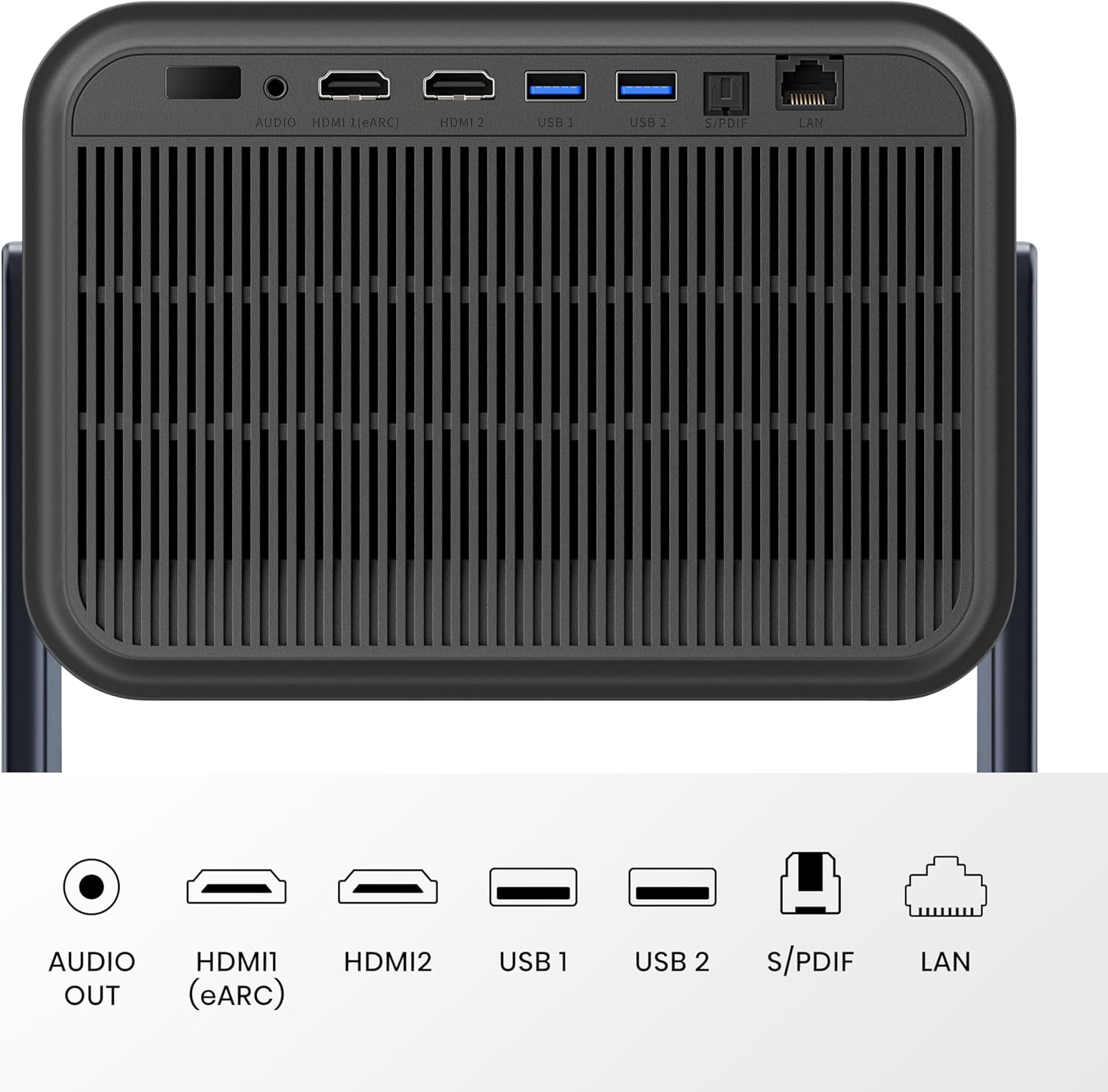

Hisense Laser Mini Projector C2, 65-300", Gimbal Design, 4K, Triple Color Laser, 110% BT.2020, 2000 ANSI Lumens, 1700:1 Native Contrast, Dolby Vision, HSR240, Sound by JBL
This is an affiliate link. Buyyyah may earn a commission if you buy through it, at no extra cost to you.
Description
- 【65"-300" Super Wide Projection Size】C2 supports projection sizes from 65 to 300 inches. Whether it’s a living room wall or an outdoor screen, enjoy a sharp, clear image at any scale—perfect for home entertainment, parties, or backyard movie nights. - 【Gimbal Design】C2 features a gimbal mount with 360° horizontal rotation and 135° vertical tilt, making it easy to project on walls, ceilings, or wherever you’re most comfortable. Whether sitting, lying down, or switching rooms, the viewing angle adjusts effortlessly to fit your space. - 【4K & 4K Upscaler 】C2 delivers true 4K resolution for sharp, detailed images across all screen sizes. With AI-powered upscaling, even HD or SD content is upgraded to near-4K clarity—perfect for movies, TV, gaming, or home videos. Every frame is refined for maximum detail and focus. - 【Pure Triple Color Laser 】C2 uses our most advanced tri-color laser system with 18 laser chips for precise color and deep image quality—far beyond traditional LED projectors. It delivers vibrant colors, high brightness, and eliminates harmful blue light for a more eye-comfortable viewing experience. - 【2000 ANSI Lumens Bright】C2 delivers up to 2000 ANSI lumens of brightness, ensuring vivid images even in well-lit rooms. Combined with a 1700:1 contrast ratio, it reveals both bright highlights and deep shadows with exceptional clarity and detail. - 【110%BT.2020 Super Wide Color Space △E≈0.9 Super High Color Accuracy 1700:1 Native Contrast】 C2 covers 110% BT.2020 with over 1 billion colors for rich, vivid visuals. With △E≈0.9 color accuracy and 1700:1 native contrast, every scene—from natural landscapes to skin tones—looks true to life, detailed, and easy on the eyes. - 【 Dolby Vision】With Dolby Vision, C2 brings out subtle shadows, brighter highlights, and natural contrast in every scene. From quiet dialogue to dark night shots, you see what the director meant you to see—clear, balanced, and true to the story. - 【HSR240Hz Gaming 】C2 delivers ultra-fast 240Hz refresh rate with just 12ms input lag and Auto Low Latency Mode. Whether you're playing fast-paced shooters or racing games, every action stays clear and responsive—no blur, no stutter, just pure performance. - 【Sound by JBL 】Tuned by JBL and enhanced with DTS Virtual:X, C2 delivers deep bass, clear dialogue, and rich surround effects. From soundtracks to special effects, every note feels crisp and close—no extra speakers needed. - 【Digital zoom 】C2 lets you shrink the image to half its original size with a tap—no need to reposition the projector. Thanks to built-in TOF and gyroscope sensors, it precisely adapts to your space, making setup faster and movie nights more flexible than ever.
Details
Features & Specs
- Additional Features
- 65" - 300", AutoMagic Adjustment System, High Refresh Rate 240Hz, Intelligent Eye Protection, Trichrom Triple Laser Light Source
- Connectivity Technology
- Bluetooth, Ethernet, HDMI, USB, Wi-Fi
- Native Resolution
- 3840 x 2160
- Display Resolution Maximum
- 3840 x 2160 Pixels
- Display Type
- Laser
- Form Factor
- Portable
- Mounting Type
- Tabletop Mount
- Brightness
- 2000 Lumen
- Wattage
- 180 watts
- Controller Type
- App Control, Button Control, Remote Control, Voice Control
- Compatible Devices
- Gaming Console, Laptop, Smartphone, Speaker, Tablet
- Contrast Ratio
- 1700:1
- Maximum Throw Distance
- 26.25 Feet
- Light Source Operating Life
- 25000 Hours
- Maximum Image Size
- 300 Inches
- Voltage
- 120 Volts
- Hardware Connectivity
- Bluetooth, Ethernet, HDMI, USB 3.0
- Control Method
- Voice
- Minimum Throw Distance
- 5.6 Feet
- Minimum Image Size
- 65 Inches
- Video Encoding
- H.265
- Projector Maximum White Brightness
- 2000 ANSI Lumens
- Picture Quality Enhancement Technology
- Dolby Vision
Item Details
- Brand
- Hisense
- Antenna Location
- Business, Education, Gaming, Home Cinema
- Built-In Media
- Cleaning Kit, Power Cord, Projector, Remote, User Manual
- Model Name
- C2
- Model Number
- C2
- Manufacturer
- Hisense
- Mfr Part Number
- C2
- Warranty Description
- 1 Year Manufacturer
Measurements
- Item Dimensions L x W x H
- 10"L x 9.7"W x 9.7"H
- Item Weight
- 11.7 Pounds
Frequently asked questions
- Can the Hisense C2 be used in a bright room?
- Yes, it delivers up to 2000 ANSI lumens of brightness, ensuring vivid images even in well-lit rooms.
- Does the projector support gaming with low lag?
- Yes, it delivers a 240Hz refresh rate with just 12ms input lag and Auto Low Latency Mode for responsive gaming.
- What is included in the box with the projector?
- The box includes the projector, power cord, remote, cleaning kit, and user manual.
Customer reviews

Hisense C2 Ultra Review - A Welcome Upgrade Indeed in 2025
Hisense C2 Ultra Review & Settings Shared I bought the C2 Ultra to upgrade from the bang for the buck Viewsonic PX701-4K, which is an amazing offering in its price range but of course lacks HDR10+ as well as Dolby Vision content which is becoming more common. The C2 Ultra handles all modern formats and uses a true RGB laser configuration which is what lead me to this purchase. My theater is a dedicated, 150 inch 1.3 gain matte white screen darkened space with Roku and a Dolby Atmos setup so I can comment from that point of view and experience thus far. I did not buy it for portability, apps / OS or its sound system. There is zero ambient light to contend with in my theater. 3000 lumens is more than enough in here. The quick review is that right out of the box without any tweaks (you should tweak though) the difference was huge. Color is amazing without being over saturated. The sharpness of the image, including captioning text, is incredible. The auto-focus feature does what no human being could accomplish in any amount of time when it comes to perfecting the image, in about 20 seconds. Optical zoom and keystone were very simple to dial in also. Mounting: Ceiling mount, standard 1/4” adapter for lifestyle projectors. My setup required minimal keystone due to the height of my already installed screen. I installed mine at the maximum zoom distance which is about 17 feet back from the 150” screen. I wish it didn't have speakers adding weight to it, but it mounted up fine after I used some good anchors. Setup: The theatrical standard for color temperature is 6500k, so I downloaded a Kelvin Meter app and tested it against LED bulbs and their claimed Kelvin values before using on my screen. I used a YouTube bright white video for reference. The closest modes were CINEMA NIGHT + color STANDARD but were still too cold (well over 7000k). I adjusted the WHITE BALANCE setting to BLUE GAIN -8 to achieve 6500k. I then used 20% and 50% grey YouTube videos to confirm 6500k was also translating to shadow content with this setting, so no offset was needed. I then pulled up a YouTube video with all primary and secondary colors displayed in gradient bars from black to full range and used the COLOR TUNER brightness adjustments for each to be sure the gradients were equal, and arrived at the following settings: Red 0, Green -2, Blue 0, Yellow -1, Cyan -3, Magenta +1 This is a poor man's setup but it translates as I watch movies I am familiar with in theatrical release viewings, aka good enough for me. My eyes gave me no reason to believe that hue or saturation needed to be adjusted and I don't have real test equipment to even confirm in depth decisions like that. Tweaking: Using YouTube videos (see Murideo Black Pluge for brightness and White Pluge for contrast, and explainer web or video info on how to use them) and a LUX meter app I arrived at the following settings for SDR content. CINEMA NIGHT mode LASER LUMINANCE: 4* BRIGHTNESS: 44* CONTRAST: 88* SHARPNESS: 0 COLOR SATURATION: 50 COLOR GAMUT: AUTO ADAPTIVE CONTRAST: HIGH* SUPER RESOLUTION: ON MOTION SMOOTHING: CUSTOM 0 GAMMA: BT.1886 (in my room this was critical for black and shadow detail) *After software update P0315 from Hisense I was able to move brightness down, contrast up, adaptive contrast to high and laser luminance down to 4. It appears as though that update allows deeper blacks and higher contrast as I had already dialed in settings before it prompted me to install the update. Most of these settings translate across all Dolby and HDR modes, I assume the C2 Ultra treats those settings as universal and adjusts curves and responses accordingly. Many of these settings, like color tuner and white balance, are universal. I had to seek out content to force each of the following modes individually as content delivery changes (I am 100% streaming from Roku, you may not be). HDR10+ THEATER: Adaptive Contrast: Medium HDR NIGHT: Adaptive Contrast: Medium, Dynamic Tone Mapping on DOLBY VISION CUSTOM: Adaptive Contrast: Medium, Laser locks at 8 I now have each mode tailored for my room and preferences. Most streaming content at this time is still just 4K HD without metadata processing, so the most common mode I am in is CINEMA NIGHT. I preferred DOLBY VISION CUSTOM mode for its default 8 laser luminance setting in my room. I find adaptive contrast medium is better suited to HDR content which already enhances contrast. Notes: Gamma BT.1886 is far superior for SDR content. I suspect many early users and reviewers have not examined the difference it makes in this mode. Its response curve is maximizing black vs highlights in a way no other setting does, and allows for less tweaking or software reliance otherwise in this mode. FILMMAKER mode in my setup is only triggered when using Vidaa OS apps and the two things to know are (1) it defaults to a Kelvin rating that is well below standard and (2) you can tweak it and save it however you like which to me defeats the purpose, unless you consider it a secondary mode. Even then I would think setting it up to reflect theatrical standards would make sense but Hisense thinks Warm1 among other defaults are what you should see. The Kelvin rating was around 5400k which is way off what a filmmaker would expect you to see. Color modes like Warm1 (default) are pleasing with higher red levels for some exaggerated flesh tone and you could easily prefer this if you're not striving for more balanced viewing as I am. SCENARIO ENHANCEMENT (originally HIGH DYNAMIC before the software update) I do not prefer as it tends to raise brightness levels overall. I could see it being useful in ambient light situations though. DARK DETAIL can be amazing on some content but overall I didn't want blacks raised to more grey just because a scene is dark. DYNAMIC TONE MAPPING in the one HDR mode that allowed it is incredible and vibrant. I did not prefer any of the INTELLIGENT MODE SETTINGS so they are all off. Each mode will have greyed out menu options that you cannot tweak. The Vidaa OS is perfectly fine, but my family enjoys and is familiar with the Roku Ultra which offers more apps as well. For some reason on my unit the home page coloring on Vidaa OS is really over-saturated and blown out, especially the reds. It appears as though it might be using “native” color gamut as a default. Not a concern for me just an observation. My Roku HDMI is slightly darker than using internal apps which would affect the brightness and contrast settings for me if I used their OS instead. The C2 Ultra handles 24P / 24Hz just fine regardless of some reviewers getting this wrong (Hisense support confirmed this as well). Using the internal Vidaa apps or setting my Roku Ultra output to frame rate match accomplishes this. You can double check the resolution as well as frame rate and color gamut / bit depth by entering the SUPPORT>SELF DIAGNOSIS>SIGNAL INFO menu to view this info while content is playing. Some apps in Roku and Vidaa do not obey the frame matching rules, so certainly the C2 Ultra is using “pull down” to accomplish a 24 frame rate for cinema in those cases. Setting judder to CUSTOM 0 seems like nonsense but it stopped a little bit of stuttering I was seeing only in end scene scrolling credits on certain apps that don't obey frame matching as well as say Netflix or MAX. Dolby Vision's superior color and dynamic range easily best HDR10+ processing, and the C2 will default to whatever the app or device is feeding it. Just a commentary on the two dynamic HDR processes, there really is no comparison. In fact I've noticed more than once that good ol' static HDR10 looked better than HDR10+ to me. I reported a LUX reading of 151 at the screen and 41 at my seat, and Grok calculated that my room is very close to the 14 foot lamberts rating of a cinema. I am the theater often and my eyeballs already kind of knew I was at least close. The remote is great, I like the backlighting and available settings. eArc works with no issues with my Atmos receiver, as a passthrough. Fan noise is lower than the PX701-4K I replaced. There is an animated “curtain close” when turning it off that is an interesting vibe and touch. You can even change the length, I prefer 5 seconds. My kids love it. My wife and kids noticed the image difference and they're not critical viewers at all. Lots of comments about how clear text is now. All of my setup process included bouncing between multiple apps and resolutions to find the best balance among them so I don't have to tweak for each movie. Dune, Furiosa, The Batman, Captain America Civil War, 2001: A Space Odyssey, The Tomorrow War, The Meg and Jurassic World were the most used and would force the projector into different modes to tweak each one along to save. It's all about averaging and balance. I find the unit itself to have a sleek, modern yet cinema sort of appeal so it looks nice. Hisense support, while not knowledgeable of specifications level info (they cannot tell you what modes = what Kelvin ratings for example) are available and responsive enough. You wouldn't call them and ask setup questions but I bet they are helpful if you have service issues. Edit: I updated after software update P0315.
Hisense C2 Ultra Review & Settings Shared I bought the C2 Ultra to upgrade from the bang for the buck Viewsonic PX701-4K, which is an amazing offering in its price range but of course lacks HDR10+ as well as Dolby Vision content which is becoming more common. The C2 Ultra handles all modern formats and uses a true RGB laser configuration which is what lead me to this purchase. My theater is a dedicated, 150 inch 1.3 gain matte white screen darkened space with Roku and a Dolby Atmos setup so I can comment from that point of view and experience thus far. I did not buy it for portability, apps / OS or its sound system. There is zero ambient light to contend with in my theater. 3000 lumens is more than enough in here. The quick review is that right out of the box without any tweaks (you should tweak though) the difference was huge. Color is amazing without being over saturated. The sharpness of the image, including captioning text, is incredible. The auto-focus feature does what no human being could accomplish in any amount of time when it comes to perfecting the image, in about 20 seconds. Optical zoom and keystone were very simple to dial in also. Mounting: Ceiling mount, standard 1/4” adapter for lifestyle projectors. My setup required minimal keystone due to the height of my already installed screen. I installed mine at the maximum zoom distance which is about 17 feet back from the 150” screen. I wish it didn't have speakers adding weight to it, but it mounted up fine after I used some good anchors. Setup: The theatrical standard for color temperature is 6500k, so I downloaded a Kelvin Meter app and tested it against LED bulbs and their claimed Kelvin values before using on my screen. I used a YouTube bright white video for reference. The closest modes were CINEMA NIGHT + color STANDARD but were still too cold (well over 7000k). I adjusted the WHITE BALANCE setting to BLUE GAIN -8 to achieve 6500k. I then used 20% and 50% grey YouTube videos to confirm 6500k was also translating to shadow content with this setting, so no offset was needed. I then pulled up a YouTube video with all primary and secondary colors displayed in gradient bars from black to full range and used the COLOR TUNER brightness adjustments for each to be sure the gradients were equal, and arrived at the following settings: Red 0, Green -2, Blue 0, Yellow -1, Cyan -3, Magenta +1 This is a poor man's setup but it translates as I watch movies I am familiar with in theatrical release viewings, aka good enough for me. My eyes gave me no reason to believe that hue or saturation needed to be adjusted and I don't have real test equipment to even confirm in depth decisions like that. Tweaking: Using YouTube videos (see Murideo Black Pluge for brightness and White Pluge for contrast, and explainer web or video info on how to use them) and a LUX meter app I arrived at the following settings for SDR content. CINEMA NIGHT mode LASER LUMINANCE: 4* BRIGHTNESS: 44* CONTRAST: 88* SHARPNESS: 0 COLOR SATURATION: 50 COLOR GAMUT: AUTO ADAPTIVE CONTRAST: HIGH* SUPER RESOLUTION: ON MOTION SMOOTHING: CUSTOM 0 GAMMA: BT.1886 (in my room this was critical for black and shadow detail) *After software update P0315 from Hisense I was able to move brightness down, contrast up, adaptive contrast to high and laser luminance down to 4. It appears as though that update allows deeper blacks and higher contrast as I had already dialed in settings before it prompted me to install the update. Most of these settings translate across all Dolby and HDR modes, I assume the C2 Ultra treats those settings as universal and adjusts curves and responses accordingly. Many of these settings, like color tuner and white balance, are universal. I had to seek out content to force each of the following modes individually as content delivery changes (I am 100% streaming from Roku, you may not be). HDR10+ THEATER: Adaptive Contrast: Medium HDR NIGHT: Adaptive Contrast: Medium, Dynamic Tone Mapping on DOLBY VISION CUSTOM: Adaptive Contrast: Medium, Laser locks at 8 I now have each mode tailored for my room and preferences. Most streaming content at this time is still just 4K HD without metadata processing, so the most common mode I am in is CINEMA NIGHT. I preferred DOLBY VISION CUSTOM mode for its default 8 laser luminance setting in my room. I find adaptive contrast medium is better suited to HDR content which already enhances contrast. Notes: Gamma BT.1886 is far superior for SDR content. I suspect many early users and reviewers have not examined the difference it makes in this mode. Its response curve is maximizing black vs highlights in a way no other setting does, and allows for less tweaking or software reliance otherwise in this mode. FILMMAKER mode in my setup is only triggered when using Vidaa OS apps and the two things to know are (1) it defaults to a Kelvin rating that is well below standard and (2) you can tweak it and save it however you like which to me defeats the purpose, unless you consider it a secondary mode. Even then I would think setting it up to reflect theatrical standards would make sense but Hisense thinks Warm1 among other defaults are what you should see. The Kelvin rating was around 5400k which is way off what a filmmaker would expect you to see. Color modes like Warm1 (default) are pleasing with higher red levels for some exaggerated flesh tone and you could easily prefer this if you're not striving for more balanced viewing as I am. SCENARIO ENHANCEMENT (originally HIGH DYNAMIC before the software update) I do not prefer as it tends to raise brightness levels overall. I could see it being useful in ambient light situations though. DARK DETAIL can be amazing on some content but overall I didn't want blacks raised to more grey just because a scene is dark. DYNAMIC TONE MAPPING in the one HDR mode that allowed it is incredible and vibrant. I did not prefer any of the INTELLIGENT MODE SETTINGS so they are all off. Each mode will have greyed out menu options that you cannot tweak. The Vidaa OS is perfectly fine, but my family enjoys and is familiar with the Roku Ultra which offers more apps as well. For some reason on my unit the home page coloring on Vidaa OS is really over-saturated and blown out, especially the reds. It appears as though it might be using “native” color gamut as a default. Not a concern for me just an observation. My Roku HDMI is slightly darker than using internal apps which would affect the brightness and contrast settings for me if I used their OS instead. The C2 Ultra handles 24P / 24Hz just fine regardless of some reviewers getting this wrong (Hisense support confirmed this as well). Using the internal Vidaa apps or setting my Roku Ultra output to frame rate match accomplishes this. You can double check the resolution as well as frame rate and color gamut / bit depth by entering the SUPPORT>SELF DIAGNOSIS>SIGNAL INFO menu to view this info while content is playing. Some apps in Roku and Vidaa do not obey the frame matching rules, so certainly the C2 Ultra is using “pull down” to accomplish a 24 frame rate for cinema in those cases. Setting judder to CUSTOM 0 seems like nonsense but it stopped a little bit of stuttering I was seeing only in end scene scrolling credits on certain apps that don't obey frame matching as well as say Netflix or MAX. Dolby Vision's superior color and dynamic range easily best HDR10+ processing, and the C2 will default to whatever the app or device is feeding it. Just a commentary on the two dynamic HDR processes, there really is no comparison. In fact I've noticed more than once that good ol' static HDR10 looked better than HDR10+ to me. I reported a LUX reading of 151 at the screen and 41 at my seat, and Grok calculated that my room is very close to the 14 foot lamberts rating of a cinema. I am the theater often and my eyeballs already kind of knew I was at least close. The remote is great, I like the backlighting and available settings. eArc works with no issues with my Atmos receiver, as a passthrough. Fan noise is lower than the PX701-4K I replaced. There is an animated “curtain close” when turning it off that is an interesting vibe and touch. You can even change the length, I prefer 5 seconds. My kids love it. My wife and kids noticed the image difference and they're not critical viewers at all. Lots of comments about how clear text is now. All of my setup process included bouncing between multiple apps and resolutions to find the best balance among them so I don't have to tweak for each movie. Dune, Furiosa, The Batman, Captain America Civil War, 2001: A Space Odyssey, The Tomorrow War, The Meg and Jurassic World were the most used and would force the projector into different modes to tweak each one along to save. It's all about averaging and balance. I find the unit itself to have a sleek, modern yet cinema sort of appeal so it looks nice. Hisense support, while not knowledgeable of specifications level info (they cannot tell you what modes = what Kelvin ratings for example) are available and responsive enough. You wouldn't call them and ask setup questions but I bet they are helpful if you have service issues. Edit: I updated after software update P0315.


⭐️⭐️⭐️⭐️⭐️ A Stunning Surprise: The Hisense C2 Base Model is a Sleeper Hit in High End Projection.
💡 Brightness & Color With around 2,000 ANSI lumens, the projector performs well and this important in semi dark rooms while maintaining vivid colors at higher brightness levels. HDR content benefits greatly from its balanced light output and consistent color accuracy. 🧠 VIDAA OS & Ads Clarification Running on VIDAA OS, the system is lightweight, responsive, and includes essential streaming apps like Netflix, YouTube, Disney+, and Apple TV. While some users mention ads, they are limited to a static banner on the home screen, usually FIFA related or streaming suggestions. There are no popups or interruptions during content playback. 🔊 Audio & Connectivity Built-in stereo speakers are adequate for casual use, but the real strength lies in Dolby Atmos passthrough via HDMI eARC, making it easy to integrate with premium soundbars or home theater systems. It includes HDMI 2.1, USB, LAN, Bluetooth, and Wi-Fi, and supports CEC for universal remote functionality. 🔧 Long-Term Usage After using it for over a month at 8 hours per day in “Filmmaker” mode, it has proven to be highly stable and reliable. There have been no overheating issues, no dimming, and the fan remains quiet even under heavy use. 🎨 Laser Speckle & Screen Choice Like most RGB laser projectors, the C2 Base may show minor laser speckle, especially on ALR or gray screens. This is completely resolved by using a matte white screen delivering clean, speckle free images with soft gradients and realistic skin tones. ⚖️ Comparison with C2 Pro & Ultra All C2 variants share the same Tri-Laser engine, the same one Hisense supplies to Valerion, a premium home theater brand. The C2 Base is essentially the little brother of the Valerion Vision Master Pro, offering 90% of the performance at nearly half the price. The main differences in the Pro and Ultra lie in brightness, audio, and CMS tools not core image quality. 🎮 Gaming Performance Low Latency, High Refresh, and Turbo DLP Smoothness Gaming on the Hisense C2 Base Model is far beyond what most users expect from a laser projector. Thanks to its DLP based imaging system and HDMI 2.1 connectivity, the C2 Base unlocks gaming specific performance features rarely seen at this price point. It supports up to 240Hz refresh rate at 1080p and 120Hz at 4K, delivering ultra smooth motion for fast paced titles. When Turbo DLP Mode is enabled, the projector optimizes processing and prioritizes responsiveness, reducing input lag to below 16ms at 4K/60Hz and even lower at 1080p. For comparison, this puts it within reach of many gaming monitors and significantly better than most LCD or lamp based projectors ✅ Final Verdict The Hisense C2 Base Model is a balanced, powerful, and reliable laser projector. Whether you’re into movies, gaming, or need a long-lasting display for everyday use, it delivers premium performance at a fair price. It’s not just a budget laser. a high end moderno experience for less than 2,000$.
💡 Brightness & Color With around 2,000 ANSI lumens, the projector performs well and this important in semi dark rooms while maintaining vivid colors at higher brightness levels. HDR content benefits greatly from its balanced light output and consistent color accuracy. 🧠 VIDAA OS & Ads Clarification Running on VIDAA OS, the system is lightweight, responsive, and includes essential streaming apps like Netflix, YouTube, Disney+, and Apple TV. While some users mention ads, they are limited to a static banner on the home screen, usually FIFA related or streaming suggestions. There are no popups or interruptions during content playback. 🔊 Audio & Connectivity Built-in stereo speakers are adequate for casual use, but the real strength lies in Dolby Atmos passthrough via HDMI eARC, making it easy to integrate with premium soundbars or home theater systems. It includes HDMI 2.1, USB, LAN, Bluetooth, and Wi-Fi, and supports CEC for universal remote functionality. 🔧 Long-Term Usage After using it for over a month at 8 hours per day in “Filmmaker” mode, it has proven to be highly stable and reliable. There have been no overheating issues, no dimming, and the fan remains quiet even under heavy use. 🎨 Laser Speckle & Screen Choice Like most RGB laser projectors, the C2 Base may show minor laser speckle, especially on ALR or gray screens. This is completely resolved by using a matte white screen delivering clean, speckle free images with soft gradients and realistic skin tones. ⚖️ Comparison with C2 Pro & Ultra All C2 variants share the same Tri-Laser engine, the same one Hisense supplies to Valerion, a premium home theater brand. The C2 Base is essentially the little brother of the Valerion Vision Master Pro, offering 90% of the performance at nearly half the price. The main differences in the Pro and Ultra lie in brightness, audio, and CMS tools not core image quality. 🎮 Gaming Performance Low Latency, High Refresh, and Turbo DLP Smoothness Gaming on the Hisense C2 Base Model is far beyond what most users expect from a laser projector. Thanks to its DLP based imaging system and HDMI 2.1 connectivity, the C2 Base unlocks gaming specific performance features rarely seen at this price point. It supports up to 240Hz refresh rate at 1080p and 120Hz at 4K, delivering ultra smooth motion for fast paced titles. When Turbo DLP Mode is enabled, the projector optimizes processing and prioritizes responsiveness, reducing input lag to below 16ms at 4K/60Hz and even lower at 1080p. For comparison, this puts it within reach of many gaming monitors and significantly better than most LCD or lamp based projectors ✅ Final Verdict The Hisense C2 Base Model is a balanced, powerful, and reliable laser projector. Whether you’re into movies, gaming, or need a long-lasting display for everyday use, it delivers premium performance at a fair price. It’s not just a budget laser. a high end moderno experience for less than 2,000$.


Believe the hype, for lifestyle or home theater.
I was on the fence between this and the epson model that was a few thousand more. I liked epsons 3 year warranty compared to the 1 year of this device. I went with the C2 Pro as it can handle dolby vision and hdr10+, uses a lazer and not a bulb, making it future proof in todays market. Pixel shift is fine with me. I did not need the extra 400 lumens of the ultra as it's in my basement theater setup. The C2 did not disappoint. Out of the box, the picture quality is immersive. Brighter than my previous 4000 lumen viewsonic projector. I did have to turn off the auto features for the lense adjustments as im not using it as a moveable lifestyle projector. After some minor calibration and adjustments, I was blown away at how it rivaled some 4k tvs with its picture quality. Yes, you read that correctly. The black levels are darker and more lively than I imagined, but not perfect. Contrast is very defining. This unit offers a dark level enhancer that seems to work well with all sdr and hdr content. The C2 also offers motion enhancing if your into it, also known as MEMC. Gaming was pleasing while playing fps like cod, but I dont think I'll be using it for that purpose too often as i perfer my gaming monitor. Graphics were detailed and I didn't feel like I was missing out on any frame delay, smooth response times. Colors are super accurate. Watching movies from my plex setup like Ready player one, Godzilla v Kong, the details pop out on the screen and I couldn't be more pleased with the colors. Skyscraper and Dune 2 looked amazing as well, again, even in the dark scenes. All 1080p contents looks better than it did on my last projector as well. Football looks really good. I have this mounted on my ceiling paired with an custom 126" frame and elite screens cinewhite a8k acoustic transparent screen, audio is 7.3.4 audio setup. Ui is fast and efficient, however I use an external device for all of my streaming, the Nvidia Shield. If this unit holds up, it will become even more of a game changer than it already is. Don't hesitate to buy this. The picture rivals that of big brand projectors in the $4k range, may even be a better option as it has tech that they dont offer (dolby vision, hdr10, hdr10+). New tech seems to be the way to go. Believe the hype on this one!
I was on the fence between this and the epson model that was a few thousand more. I liked epsons 3 year warranty compared to the 1 year of this device. I went with the C2 Pro as it can handle dolby vision and hdr10+, uses a lazer and not a bulb, making it future proof in todays market. Pixel shift is fine with me. I did not need the extra 400 lumens of the ultra as it's in my basement theater setup. The C2 did not disappoint. Out of the box, the picture quality is immersive. Brighter than my previous 4000 lumen viewsonic projector. I did have to turn off the auto features for the lense adjustments as im not using it as a moveable lifestyle projector. After some minor calibration and adjustments, I was blown away at how it rivaled some 4k tvs with its picture quality. Yes, you read that correctly. The black levels are darker and more lively than I imagined, but not perfect. Contrast is very defining. This unit offers a dark level enhancer that seems to work well with all sdr and hdr content. The C2 also offers motion enhancing if your into it, also known as MEMC. Gaming was pleasing while playing fps like cod, but I dont think I'll be using it for that purpose too often as i perfer my gaming monitor. Graphics were detailed and I didn't feel like I was missing out on any frame delay, smooth response times. Colors are super accurate. Watching movies from my plex setup like Ready player one, Godzilla v Kong, the details pop out on the screen and I couldn't be more pleased with the colors. Skyscraper and Dune 2 looked amazing as well, again, even in the dark scenes. All 1080p contents looks better than it did on my last projector as well. Football looks really good. I have this mounted on my ceiling paired with an custom 126" frame and elite screens cinewhite a8k acoustic transparent screen, audio is 7.3.4 audio setup. Ui is fast and efficient, however I use an external device for all of my streaming, the Nvidia Shield. If this unit holds up, it will become even more of a game changer than it already is. Don't hesitate to buy this. The picture rivals that of big brand projectors in the $4k range, may even be a better option as it has tech that they dont offer (dolby vision, hdr10, hdr10+). New tech seems to be the way to go. Believe the hype on this one!


Ultimate 4K Laser Projector for Home Theater & Gaming – C2 Review
The C2 projector is more than just a projector for our family—it's a premium cinematic experience built for both inside and outdoor movie nights. Whether we are projecting in our cozy living room or expanding to a massive 300” screen in our backyard, this device handles it with ease and precision. Picture Quality: Stunning and True to Life --Thanks to its Triple Laser Light Source, the color precision is jaw-dropping. Every frame is rich with detail, contrast, and depth. Brightness and Versatility -- With 2000 ANSI lumens, we get a vibrant, clear picture even when there is light in the room. Whether it's a dark thriller or a bright animated feature, the contrast and brightness levels deliver an immersive viewing experience. Smart Adjustments – Hassle-Free Setup -- One of the best features is the auto keystone correction and auto focus. It was so easy to set-up. The projector instantly adjusted to our screen and space, keeping the image sharp and perfectly proportioned without constant fiddling. Pair that with the gimbal-style angle adjuster, allowing 360° horizontal and 180° vertical movement, and everything was super flexible projector. Gaming Ready -- The Gamers in our family also love this projector. It handles fast-paced, high-resolution gaming with zero lag or motion blur. The experience is smooth and immersive. Final Verdict --The C2 projector combines cutting-edge technology with practical usability. From ultra-precise color and 4K clarity to effortless setup and lag-free gaming, this projector exceeded our expectations. It’s a premium investment—but it's absolutely worth it.
The C2 projector is more than just a projector for our family—it's a premium cinematic experience built for both inside and outdoor movie nights. Whether we are projecting in our cozy living room or expanding to a massive 300” screen in our backyard, this device handles it with ease and precision. Picture Quality: Stunning and True to Life --Thanks to its Triple Laser Light Source, the color precision is jaw-dropping. Every frame is rich with detail, contrast, and depth. Brightness and Versatility -- With 2000 ANSI lumens, we get a vibrant, clear picture even when there is light in the room. Whether it's a dark thriller or a bright animated feature, the contrast and brightness levels deliver an immersive viewing experience. Smart Adjustments – Hassle-Free Setup -- One of the best features is the auto keystone correction and auto focus. It was so easy to set-up. The projector instantly adjusted to our screen and space, keeping the image sharp and perfectly proportioned without constant fiddling. Pair that with the gimbal-style angle adjuster, allowing 360° horizontal and 180° vertical movement, and everything was super flexible projector. Gaming Ready -- The Gamers in our family also love this projector. It handles fast-paced, high-resolution gaming with zero lag or motion blur. The experience is smooth and immersive. Final Verdict --The C2 projector combines cutting-edge technology with practical usability. From ultra-precise color and 4K clarity to effortless setup and lag-free gaming, this projector exceeded our expectations. It’s a premium investment—but it's absolutely worth it.