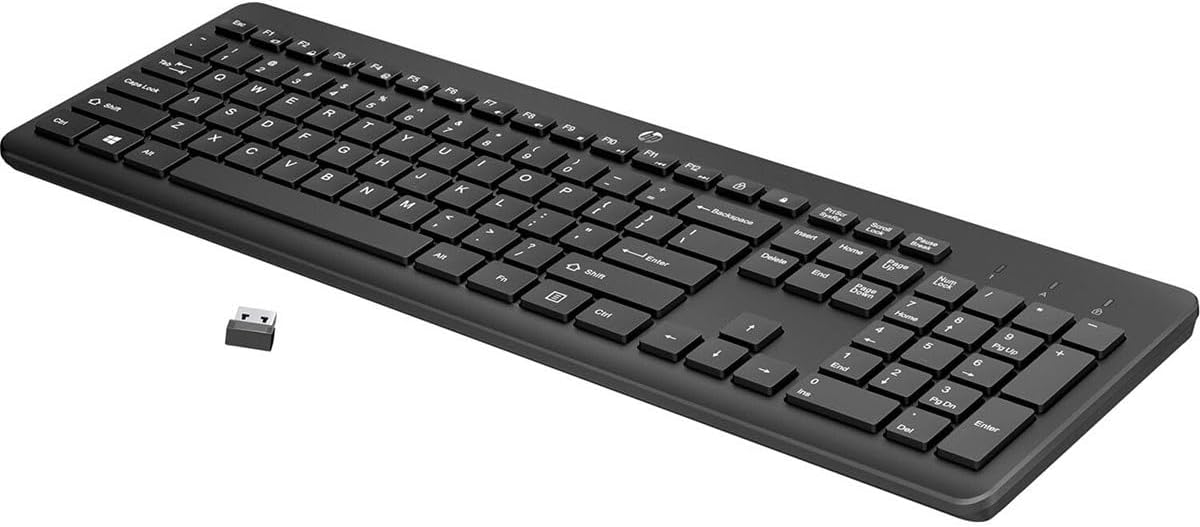


HP 230 Wireless Keyboard - Wireless Connection - Low-Profile, Quiet Design - Windows & Mac OS - Laptop, PC Compatible - Shortcut Keys & Number Pad - Long Battery Life (3L1E7AA#ABA),Black
This is an affiliate link. Buyyyah may earn a commission if you buy through it, at no extra cost to you.
Description
- STYLISH & QUIET PRODUCTIVITY – Sleek, ergonomic keyboard with numeric keypad features low-profile chiclet keys for accurate typing with minimal noise - GO WIRELESS – Eliminate cord clutter with wireless keyboard connectivity and enjoy lag-free wireless movement (1), whether you're using a desktop computer or laptop PC - PRODUCTIVITY AT YOUR FINGERTIPS – Wireless HP keyboard with integrated number pad features easy-to-access keycap shortcuts to 12 popular functions that can be activated with just one keypress - LONG BATTERY LIFE – Stay productive without interruption with up to 16 months of keyboard use with 2 included AAA batteries (2) - PORTABLE FLEXIBILITY – Cordless, battery-powered design makes this wireless keyboard easy to use at the kitchen table, the library, or anywhere you need a full-sized computer keyboard and number pad - PRODUCT DIMENSIONS: 17.32"L x 5.76"W x 1.09"H
Details
Features & Specs
- Compatible Devices
- Laptop, PC
- Connectivity Technology
- wireless
- Additional Features
- Ergonomic, Wireless Keyboard
- Number of Batteries Required
- 2
- Power Source
- Battery Powered
- Switch Type
- Linear
- Keyboard Layout
- QWERTY
- Hand Orientation
- Ambidextrous
- Button Quantity
- 83
- Water Resistance Level
- Not Water Resistant
- Minimum Required Operating System Version
- Windows 7
- Compatible Operating System Family
- MacOS, Windows
- Is Electric
- No
- Number of Keys
- 105
- Number of Sections
- 3
- Color
- Black
- Style Name
- Keyboard
- Theme
- Game of Thrones
Additional Details
- Item Dimensions L x W x H
- 17"L x 7"W x 1"H
- Enclosure Material
- Plastic
Item Details
- Brand
- HP
- Keyboard Description
- Wireless
- Antenna Location
- Everyday Use
- Built-In Media
- Keyboard; Receiver; 2 AAA batteries; Quick Start guide; Warranty card
- Model Number
- 3L1E7AA#ABA
- Model Name
- HP 230 Wireless Keyboard
- Series Number
- 230
- Unit Count
- 1.0 Count
- Manufacturer
- HP INC.
- Mfr Part Number
- 3L1E7AA#ABA
- Item Type Name
- Keyboard
- External Testing Certification
- Não aplicável
- Item Weight
- 1.1 Pounds
- Warranty Description
- Peace-of-mind coverage: Rest easy with an HP standard one-year limited warranty
Frequently asked questions
- What operating systems is this keyboard compatible with?
- It is compatible with MacOS and Windows (minimum required version Windows 7).
- How long does the battery last?
- The keyboard has up to 16 months of use with 2 included AAA batteries.
- Does it have a numeric keypad?
- Yes, it features an integrated number pad for easy data entry.
Customer reviews

Perfect Office Keyboard for Medium/Large Hands
I recently purchased the HP 230 Wireless Keyboard, and it has been an excellent addition to my workspace. Pros: Office Keyboard Feel: This keyboard feels just like an office keyboard. The keys have a satisfying tactile response that makes typing comfortable and efficient. Ideal Size: It's not too big or slim—just the perfect size. It's especially great for folks with medium to large hands, providing ample space without being bulky. Wireless Convenience: The wireless connection works seamlessly with Windows and Mac OS. It makes my desk look cleaner without the clutter of cables. Battery-Powered: The keyboard uses batteries, which last a long time, ensuring that I don't have to worry about frequent recharging. Quiet Design: The low-profile, calm design is perfect for working in shared spaces without disturbing others. Functional Layout: It includes shortcut keys and a number pad, which enhances productivity, especially for those who work with numbers frequently. Long Battery Life: The long battery life is a significant plus. I've been using it for weeks without any sign of needing to replace the batteries. Cons: None! This keyboard has met all my expectations and more. Overall, the HP 230 Wireless Keyboard is an outstanding choice for anyone looking for a reliable, comfortable, well-designed keyboard. It's perfect for medium to large hands, feels great to type on, and has a fantastic battery life. It is highly recommended!
I recently purchased the HP 230 Wireless Keyboard, and it has been an excellent addition to my workspace. Pros: Office Keyboard Feel: This keyboard feels just like an office keyboard. The keys have a satisfying tactile response that makes typing comfortable and efficient. Ideal Size: It's not too big or slim—just the perfect size. It's especially great for folks with medium to large hands, providing ample space without being bulky. Wireless Convenience: The wireless connection works seamlessly with Windows and Mac OS. It makes my desk look cleaner without the clutter of cables. Battery-Powered: The keyboard uses batteries, which last a long time, ensuring that I don't have to worry about frequent recharging. Quiet Design: The low-profile, calm design is perfect for working in shared spaces without disturbing others. Functional Layout: It includes shortcut keys and a number pad, which enhances productivity, especially for those who work with numbers frequently. Long Battery Life: The long battery life is a significant plus. I've been using it for weeks without any sign of needing to replace the batteries. Cons: None! This keyboard has met all my expectations and more. Overall, the HP 230 Wireless Keyboard is an outstanding choice for anyone looking for a reliable, comfortable, well-designed keyboard. It's perfect for medium to large hands, feels great to type on, and has a fantastic battery life. It is highly recommended!

Works with Mac (see review for key mappings)
I loved the price, and it DOES work with my Mac. But you need to know that the HP keyboard is designed for Windows, so the key mappings are odd for a Mac user. But you don't really have to do anything to use it on a Mac. The 'windows' key is already mapped to the 'command' key functionality of a Mac, and the Windows 'Alt' key is mapped to the Mac 'Option' functionality. The keyboard comes with a USB-A dongle that you have to plug into your Mac, as the transmitter on the keyboard does not connect to the Mac bluetooth without the dongle. And the Mac won't even see it as a connected bluetooth device, but it was relatively easy to connect. I followed the on-screen instructions during setup and had to indicate that it was a non-standard keyboard, but then the Mac was able to see it. The keyboard comes with 2 AA batteries that you can install into the back edge. If you don't see the location at first, keep looking. It's there. I had a bit of trouble opening it up and was lucky the damn thing didn't break. The keyboard itself is not backlit, but it works fine. At this price, no complaints. The only thing I have not yet discovered is how to find out the charge level of the batteries without opening it back up and using a physical battery tester. You cannot see the charge level in the Mac's System Settings because, again, the Mac doesn't even recognized it as a bluetooth connected device.
I loved the price, and it DOES work with my Mac. But you need to know that the HP keyboard is designed for Windows, so the key mappings are odd for a Mac user. But you don't really have to do anything to use it on a Mac. The 'windows' key is already mapped to the 'command' key functionality of a Mac, and the Windows 'Alt' key is mapped to the Mac 'Option' functionality. The keyboard comes with a USB-A dongle that you have to plug into your Mac, as the transmitter on the keyboard does not connect to the Mac bluetooth without the dongle. And the Mac won't even see it as a connected bluetooth device, but it was relatively easy to connect. I followed the on-screen instructions during setup and had to indicate that it was a non-standard keyboard, but then the Mac was able to see it. The keyboard comes with 2 AA batteries that you can install into the back edge. If you don't see the location at first, keep looking. It's there. I had a bit of trouble opening it up and was lucky the damn thing didn't break. The keyboard itself is not backlit, but it works fine. At this price, no complaints. The only thing I have not yet discovered is how to find out the charge level of the batteries without opening it back up and using a physical battery tester. You cannot see the charge level in the Mac's System Settings because, again, the Mac doesn't even recognized it as a bluetooth connected device.
Super quiet, good feel, wireless.
What do you hear? Not much… What do you see? Not cords… This keyboard is super quiet. I cannot believe how quiet it is. The only key that makes any noise is the space bar. The keys are textured, it is light, has all of what I expect in a keyboard. The enter button is exactly where I expect it to be. Not offset and weird to get to with my pinky finger. There is no power button, so we will see how long the batteries last. It takes two AAA batteries, at least it is not 4-8 of them like some of the older wireless keyboards. I like to use my laptop at home in a closed manner with two monitors, wireless mouse and wireless keyboard so I can place them out of the way when not in use. This is exactly what I have been needing. The reduced typing sound is nice because it won’t wake my family while I am trying to work early in the morning or late at night. If you are looking of regular keyboard for typing that is wireless for easy storage and clutter free use, then I highly recommend this one.
What do you hear? Not much… What do you see? Not cords… This keyboard is super quiet. I cannot believe how quiet it is. The only key that makes any noise is the space bar. The keys are textured, it is light, has all of what I expect in a keyboard. The enter button is exactly where I expect it to be. Not offset and weird to get to with my pinky finger. There is no power button, so we will see how long the batteries last. It takes two AAA batteries, at least it is not 4-8 of them like some of the older wireless keyboards. I like to use my laptop at home in a closed manner with two monitors, wireless mouse and wireless keyboard so I can place them out of the way when not in use. This is exactly what I have been needing. The reduced typing sound is nice because it won’t wake my family while I am trying to work early in the morning or late at night. If you are looking of regular keyboard for typing that is wireless for easy storage and clutter free use, then I highly recommend this one.


Quiet, Lovely Keyboard
I got this keyboard for my boufriend and he loves it. So far it's held up very well, and I think we've only had to change it's batteries once since we got it and he's using it daily. He's a gamer, but it's quiet. It doesn't have that loud, annoying CLANK CLANK CLANK of some keyboards. The tapping gets so annoying with others, but this one has been nice and quiet. Which is a boon, because if all I could ever hear from him was CLACK CLACK TAP TAP CLACK I think I'd pull my hair out.
I got this keyboard for my boufriend and he loves it. So far it's held up very well, and I think we've only had to change it's batteries once since we got it and he's using it daily. He's a gamer, but it's quiet. It doesn't have that loud, annoying CLANK CLANK CLANK of some keyboards. The tapping gets so annoying with others, but this one has been nice and quiet. Which is a boon, because if all I could ever hear from him was CLACK CLACK TAP TAP CLACK I think I'd pull my hair out.


![Ailun 3 Pack Screen Protector for iPhone 16 [6.1 inch] + 3 Pack Camera Lens Protector with Installation Frame,Case Friendly Tempered Glass Film,[9H Hardness][Not for iPhone 16e/16 Pro/Plus/Pro Max]](https://m.media-amazon.com/images/I/71z4XevAN2L._AC_SY300_SX300_QL70_FMwebp_.jpg)


