




HP Envy 6555 Wireless All-in-One Color Inkjet Printer, Print, Scan, Copy, Duplex Printing Best-for-Home, 3 Month Trial of Instant Ink Included, AI-Capable (C2XR6A) Portobello
This is an affiliate link. Buyyyah may earn a commission if you buy through it, at no extra cost to you.
Description
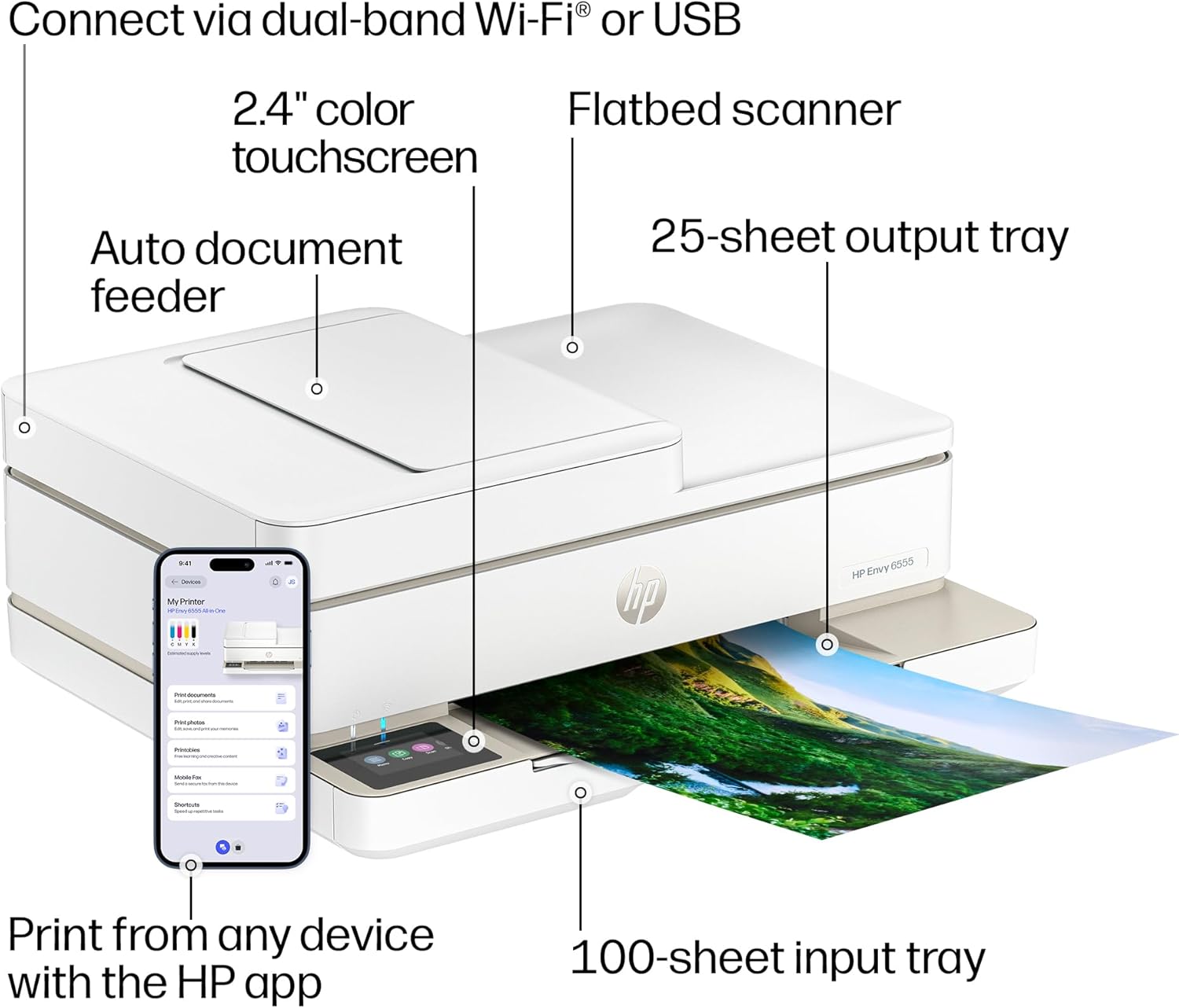
- FROM AMERICA'S MOST TRUSTED PRINTER BRAND – The Envy 6555 is perfect for homes printing everyday high-quality color documents like homework and borderless photos. Print speeds up to 10 ppm black, 7 ppm color. - 3 MONTH TRIAL OF INSTANT INK – Subscribe to the Instant Ink delivery service to get ink delivered directly to your door before you run out, and you save up to 50% on ink. After 3 months, a monthly fee applies unless cancelled. - KEY FEATURES – Color print, copy and scan, plus auto 2-sided printing, a 35-sheet auto document feeder and a 100-sheet input tray - HP'S MOST INTUITIVE COLOR TOUCHSCREEN – Smoothly navigate your printer with the easy-to-use 2.4" touchscreen - WIRELESS PRINTING – Stay connected with our most reliable dual-band Wi-Fi, which automatically detects and resolves connection issues - TRUE-TO-SCREEN TECH – Print documents and photos that look as vibrant as they do on your screen with HP's P3 technology - HP APP – Print, scan, copy, or fax right from your smartphone with the easy-to-use print app - OPTIMIZE PRINT FORMATTING WITH HP AI – Print web pages and emails with precision—no wasted pages or awkward layouts; HP AI easily removes unwanted content, so your prints are just the way you want - SUSTAINABLE DESIGN – Made with at least 60% recycled plastic content - This printer is intended to work only with cartridges with original HP chips or circuitry and will block cartridges using non-HP chips or circuitry. Periodic firmware updates will maintain the effectiveness of these measures.
Details
General Specifications
- Printer Type
- HP Thermal Inkjet
- Other Special Features of the Product
- Wireless; Scan to email; Print from phone or tablet; Two-sided printing; Automatic document feeder; Touchscreen; Scan to HP Cloud; True to screen photo printing (P3); 5x5 and 4x12 panoramic photo printing; 4x6 double sided photo and card printing; Borderless photo printing
- Printer Output Type
- Color
- Item Weight
- 13.5 Pounds
- Item Dimensions D x W x H
- 14.21"D x 17.05"W x 6.73"H
- Print media
- Unknown
- Scanner Type
- Flatbed
- Maximum Copy Speed Black and White
- 8 ppm
- Compatible Devices
- Laptops, PC, Smartphones
- Warranty Type
- One-year limited warranty. For more info please visit us at support.hp.com .
- Maximum Copies Per Run
- Up to 99 copies
- Ink Color
- Black; Cyan; Magenta; Yellow
- Additional Printer Functions
- All In One
- Compatible Cartridge
- HP 68 Black Original Ink Cartridge 7FP21TN; HP 68 Tri-Color Original Ink Cartridge 7FP20TN; HP 68e EvoMore Black Original Ink Cartridge 7FP22TN.
- Number of Trays
- 1
- Processor Count
- 1
Paper Handling
- Maximum Media Size
- 8.5 x 11.7 in
- Maximum Sheet Capacity
- 100
- Paper Size
- 8.5 x 11;8.27 x 11.7;4 x 6;7.16 x 10.12;7.25 x 10.5; Inches
Print Resolution
- Maximum print Resolution Color
- Up to 4800 x 1200 optimized dpi color (when printing from a computer on selected HP photo papers and 1200 input dpi) Dots Per Inch
- Maximum Print Resolution Black and White
- Up to 1200 x 1200 rendered dpi (when printing from a computer) Dots Per Inch
Power
- Power Consumption
- 4.25 Watts
Duplex Printing
- Dual-sided printing
- Yes
- Duplex
- Automatic
Item details
- Brand
- HP
- Model Name
- HP Envy 6555 All-in-One Printer
- Model Number
- 6555
- Built-In Media
- HP Envy 6555 All-in-One Printer; HP 68 Setup Black Cartridge (~120 pages yield); HP 68 Setup Tri-Color Cartridge (~75 pages yield); Regulatory flyer; Setup guide; Reference guide; Power cord
- Model Series
- Envy
- Specific Uses For Product
- Home
- Manufacturer
- HP
- Warranty Description
- One-year limited warranty. For more info please visit us at support.hp.com .
- Item Type Name
- Inkjet printers
- Unit Count
- 1.0 Count
Print Speed
- Color Pages per Minute
- 7 ppm
- B&W Pages per Minute
- 10 ppm
- Initial Page Print Time
- 22 Seconds
Color
- Color
- White
- Color Depth
- 24 Bits
Connectivity
- Printer Connectivity Type
- Apple AirPrint; USB; Wireless (Wi-Fi); WWCB (Works with Chromebook); Print Anywhere
- Hardware Interface
- USB
- Total Usb Ports
- 1
Copy Resolution
- Maximum Copy Resolution Color
- 300 x 300 dpi
- Maximum Copy Resolution Black and White
- Up to 300 x 300 dpi
Frequently asked questions
- What is the print speed of the HP Envy 6555?
- The print speed is up to 10 ppm (pages per minute) for black and 7 ppm for color.
- Does this printer support automatic duplex printing?
- Yes, the HP Envy 6555 features auto 2-sided (duplex) printing as stated in the key features.
- What ink cartridges are compatible with the HP Envy 6555?
- The compatible cartridges are HP 68 Black Original Ink Cartridge (7FP21TN), HP 68 Tri-Color Original Ink Cartridge (7FP20TN), and HP 68e EvoMore Black Original Ink Cartridge (7FP22TN).
Customer reviews

Bought a Printer… Accidentally Started a Cat Photography Business
I bought this printer for typical home-office tasks, but the very first thing I printed wasn't a document. It was a picture of my orange cat. Then another. Then another. Before I knew it, I had somehow created an entire collection of professionally printed cat photos and was evaluating image quality based on whether Potato's majestic orange fur was being properly represented. Thankfully, the printer passed the test. Setup was straightforward, the wireless connection was easy to configure, and I was printing within minutes. The print quality for both documents and photos has been excellent. Colors look vibrant, text comes out sharp, and photo prints are surprisingly impressive for a home all-in-one printer. I also appreciate having all of these features in one device: - Printing - Scanning - Copying - Automatic duplex printing The duplex printing has already saved me from wasting paper, and scanning documents is quick and painless. One thing I wasn't expecting was how often I'd use the wireless printing feature. Being able to send prints directly from my phone (way more often than you probably imagine) or computer without dealing with cables is incredibly convenient. The included Instant Ink trial is also a nice bonus, especially for anyone who prints regularly. I print but not that often so I plan to cancel that. What I like most is that this printer simply works. No mysterious setup rituals. No spending an hour convincing the printer that Wi-Fi exists. No dramatic printer-versus-human battles. Instead, I clicked print and received a high-quality photograph of an orange cat staring judgmentally into the distance... exactly as intended! Whether you're printing family photos, school documents, work materials, or an entirely unreasonable number of cat pictures, this printer does an excellent job. Highly recommended.
I bought this printer for typical home-office tasks, but the very first thing I printed wasn't a document. It was a picture of my orange cat. Then another. Then another. Before I knew it, I had somehow created an entire collection of professionally printed cat photos and was evaluating image quality based on whether Potato's majestic orange fur was being properly represented. Thankfully, the printer passed the test. Setup was straightforward, the wireless connection was easy to configure, and I was printing within minutes. The print quality for both documents and photos has been excellent. Colors look vibrant, text comes out sharp, and photo prints are surprisingly impressive for a home all-in-one printer. I also appreciate having all of these features in one device: - Printing - Scanning - Copying - Automatic duplex printing The duplex printing has already saved me from wasting paper, and scanning documents is quick and painless. One thing I wasn't expecting was how often I'd use the wireless printing feature. Being able to send prints directly from my phone (way more often than you probably imagine) or computer without dealing with cables is incredibly convenient. The included Instant Ink trial is also a nice bonus, especially for anyone who prints regularly. I print but not that often so I plan to cancel that. What I like most is that this printer simply works. No mysterious setup rituals. No spending an hour convincing the printer that Wi-Fi exists. No dramatic printer-versus-human battles. Instead, I clicked print and received a high-quality photograph of an orange cat staring judgmentally into the distance... exactly as intended! Whether you're printing family photos, school documents, work materials, or an entirely unreasonable number of cat pictures, this printer does an excellent job. Highly recommended.

Versatile, small form factor color inkjet printer and scanner for regular usage
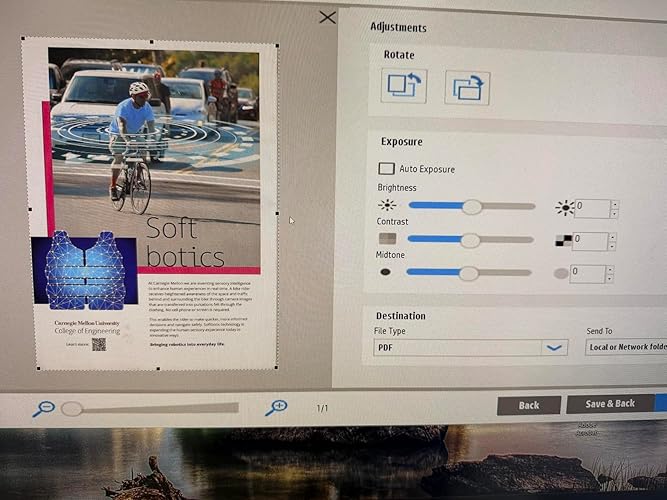
I was looking for a small footprint relatively inexpensive inkjet printer and scanner for regular usage and this Envy 6555 printer scanner model from HP appears perfect for that. Setting it up was easy with the instructions provided through the QR code. The app-based setup was easy but then it failed to get on to the network. I ended up using the touchscreen display on the printer for the wireless connection which, though a bit cumbersome and challenging due to the small screen size did eventually work. The printer then showed up on the app as well and rest of the setup including firmware update and setting up the scanner was very easy. I did also download the drivers from the HP support site for the scanner software and to track the inkjet cartridges remaining life better. The print quality as well as the scanning quality was surprising better than what I had expected given it’s three-in-one color and one basic cartridge. I would not print photos with this but it proved itself more than capable of scanning and printing full color pages fairly quickly and accurately on a regular multipurpose paper. I assume the initial set of cartridges will have a shorter life and will need replacements soon. HP, during the setup, does push the user to subscribe to their inkjet cartridge buying program. That program may work for some. Overall, I am, so far very happy with the printer and its performance and now it is our default printer on our Windows home network. Given its pricepoint I think this is a great buy for those who need an inexpensive printer which still delivers very good printing and scanning performance.
I was looking for a small footprint relatively inexpensive inkjet printer and scanner for regular usage and this Envy 6555 printer scanner model from HP appears perfect for that. Setting it up was easy with the instructions provided through the QR code. The app-based setup was easy but then it failed to get on to the network. I ended up using the touchscreen display on the printer for the wireless connection which, though a bit cumbersome and challenging due to the small screen size did eventually work. The printer then showed up on the app as well and rest of the setup including firmware update and setting up the scanner was very easy. I did also download the drivers from the HP support site for the scanner software and to track the inkjet cartridges remaining life better. The print quality as well as the scanning quality was surprising better than what I had expected given it’s three-in-one color and one basic cartridge. I would not print photos with this but it proved itself more than capable of scanning and printing full color pages fairly quickly and accurately on a regular multipurpose paper. I assume the initial set of cartridges will have a shorter life and will need replacements soon. HP, during the setup, does push the user to subscribe to their inkjet cartridge buying program. That program may work for some. Overall, I am, so far very happy with the printer and its performance and now it is our default printer on our Windows home network. Given its pricepoint I think this is a great buy for those who need an inexpensive printer which still delivers very good printing and scanning performance.


Recommend this Printer
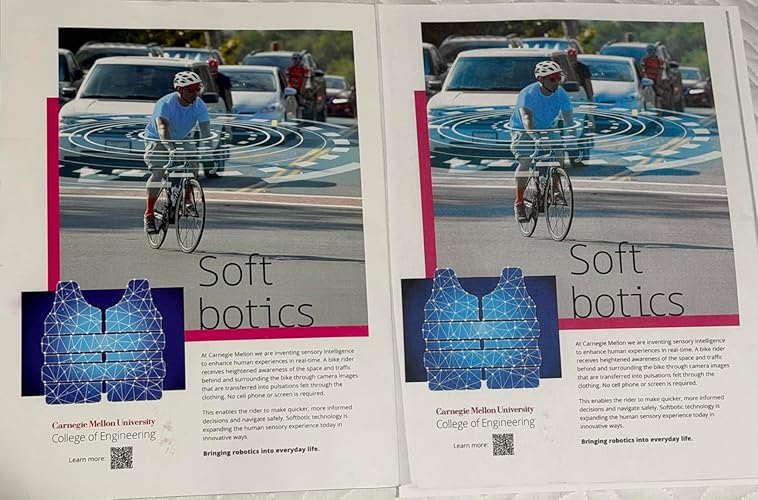
Arrived securely packaged and on time. The printer is light is sleek and attractive. Installation instructions require Internet access and installation of the HP app (which I suggest be done prior to beginning the process). Note the pin number on the back of the unit as you will need that during the set up process. The QR code did not access the.HP website with my iPhone or iPad so I manually connected using my laptop. The instructions are easy to follow however,it took a couple of tries before the ink cartridges locked in. The transfer of my automatic ink delivery for my old unit to this new one was seamless. Once installed I tested printing from the Internet and had no problems. The copies are crisp, beautiful and colors are true to original. I highly recommend this printer to anyone for moderate use. (it comes with a one year warranty.)
Arrived securely packaged and on time. The printer is light is sleek and attractive. Installation instructions require Internet access and installation of the HP app (which I suggest be done prior to beginning the process). Note the pin number on the back of the unit as you will need that during the set up process. The QR code did not access the.HP website with my iPhone or iPad so I manually connected using my laptop. The instructions are easy to follow however,it took a couple of tries before the ink cartridges locked in. The transfer of my automatic ink delivery for my old unit to this new one was seamless. Once installed I tested printing from the Internet and had no problems. The copies are crisp, beautiful and colors are true to original. I highly recommend this printer to anyone for moderate use. (it comes with a one year warranty.)


![Ailun 3 Pack Screen Protector for iPhone 16 [6.1 inch] + 3 Pack Camera Lens Protector with Installation Frame,Case Friendly Tempered Glass Film,[9H Hardness][Not for iPhone 16e/16 Pro/Plus/Pro Max]](https://m.media-amazon.com/images/I/71z4XevAN2L._AC_SY300_SX300_QL70_FMwebp_.jpg)


