
KODAK Step Instant Smartphone Photo Printer, Portable Mini Color Wireless Mobile Printer, Zink 2x3” (5.1x7.5 cm) Sticky-Back Photos, Bluetooth Compatible with iOS & Android Devices, Editing App, White
This is an affiliate link. Buyyyah may earn a commission if you buy through it, at no extra cost to you.
Description
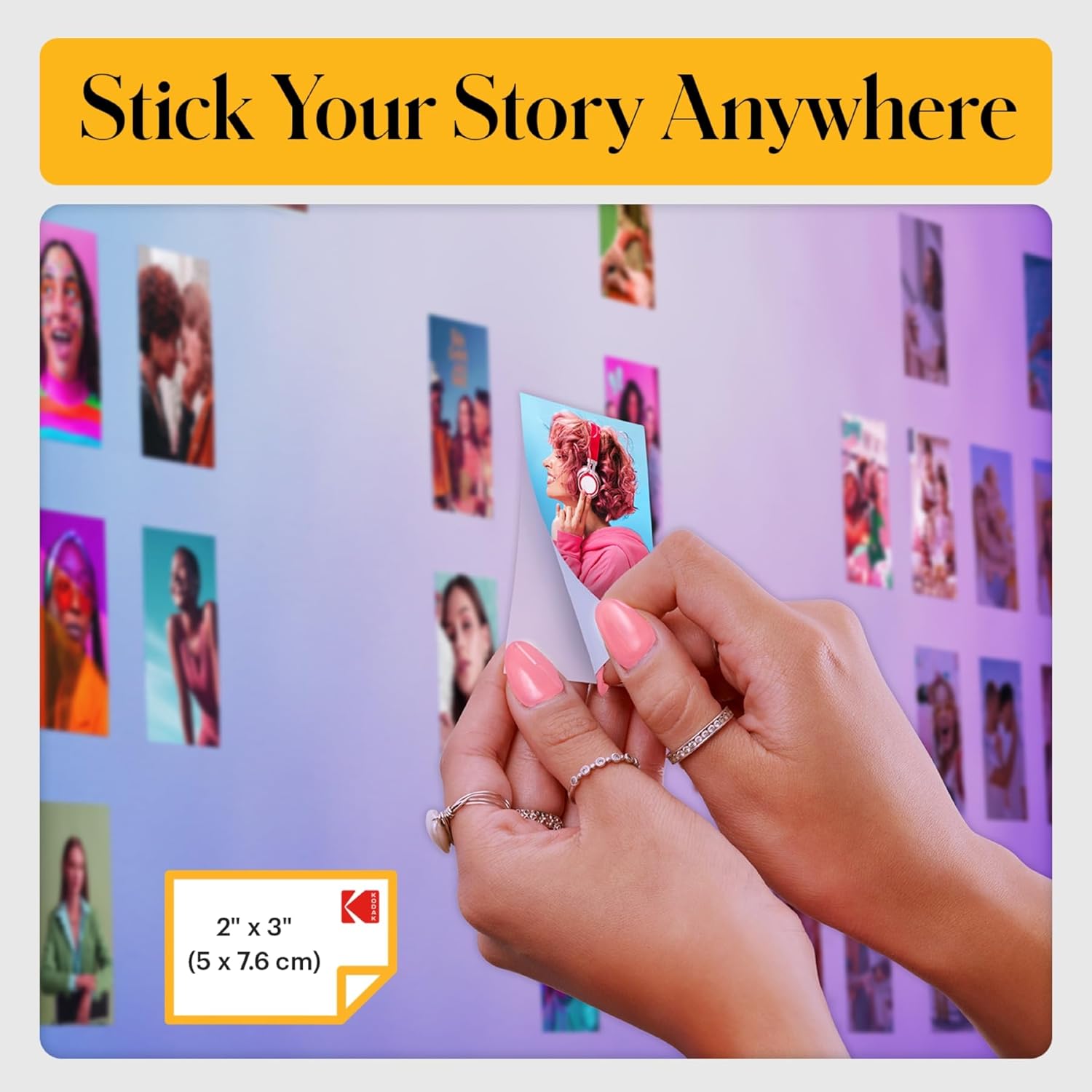
- STEP UP YOUR PRINTING GAME. KODAK Step Printer Connects to Any iOS or Android Device [Via Bluetooth or NFC] Turn Your Selfies, Portraits, Social Media Posts Into Physical Photos.Package Includes : KODAK STEP Instant Mobile Photo Printer, Micro USB Charging Cable, Starter Pack of KODAK ZINK Photo Paper, Quick Start Guide, Limited Warranty - AMAZING ZERO-INK TECHNOLOGY. ZINK 2” x 3” Sticky-Back Paper with Embedded Dye Crystals Delivers High-Quality, Durable, Affordable, Beautifully Detailed Prints That are Resistant to Moisture, Rips, Tears & Smudges. - FULL EDITING SUITE VIA APP. Download the KODAK App to Create Collages & Customize Your Snaps with Stunning Filters, Interesting Borders, Cool Stickers, Funny Text & Other Personalized Flair. - TAKE YOUR PROJECTS TO GO. Our Palm-Sized Printer Weighs Less Than a Pound, Sets Up Fast & Delivers Gorgeous Prints You Can Peel & Stick Everywhere. - CUTE, COMPACT & COLORFUL. Step Printer is Designed for Photo-Loving Influencers & Crafters of All Ages & Skill Levels! Portable, Lightweight Device Features Built-In Lithium-Ion Rechargeable Battery [Prints 25 Photo on a Full Charge]
Details
General
- Brand
- KODAK
- Model Name
- Kodak Step Instant Photo Printer
- Model Number
- RODMP20AMZW
- Series Number
- 20
- Model Series
- 20
- Item Type Name
- Kodak Step Instant Photo Printer
- Color
- White
- Item Weight
- 0.07 Kilograms
- Item Dimensions D x W x H
- 1"D x 2"W x 3"H
- Specific Uses For Product
- Home, School
- Manufacturer
- C&A Marketing Inc.
- Built-In Media
- Printer and accessories
- Unit Count
- 1.0 Count
- Other Special Features of the Product
- Compact, Lightweight, Portable
- Processor Count
- 1
Printer Technology
- Printer Type
- Zink Technology
- Printer Output Type
- Color
- Ink Color
- Inkless
- Print media
- Glossy photo paper
- Additional Printer Functions
- Print Only
- Scanner Type
- Portable
Print Specifications
- Maximum Print Resolution Color
- 313 x 400 dpi
- Maximum Print Resolution Black and White
- 300 dots_per_inch
- Color Depth
- 24 bits_per_pixel
- Resolution
- 300 x 300
- Print Speed Color Pages per Minute
- 1 ppm
- B&W Pages per Minute
- 1 ppm
- Maximum Copy Speed Black and White
- 1 ppm
- Maximum Copy Resolution Color
- 313 x 400 Dots Per Inch
- Maximum Copy Resolution Black and White
- 300 x 300
Connectivity
- Printer Connectivity Type
- Bluetooth, NFC
- Hardware Interface
- Bluetooth
- Controller Type
- Android, iOS
- Compatible Devices
- Smartphones
- Control Method
- App
Paper Handling
- Maximum Media Size
- 2x3
- Maximum Sheet Capacity
- 10
- Paper Size
- 2x3 inches
- Output sheet capacity
- 10
Power
- Power Consumption
- 7.4 Watts
- Wattage
- 7.4 watts
Duplex Printing
- Dual-sided printing
- Yes
- Duplex
- Automatic
Warranty
- Warranty Type
- limited warranty
- Warranty Description
- 1 year limited warranty
Frequently asked questions
- What type of paper does the KODAK Step Printer use?
- It uses ZINK 2” x 3” Sticky-Back Paper with embedded dye crystals.
- How does the printer connect to a smartphone?
- It connects via Bluetooth or NFC to any iOS or Android device.
- How many photos can I print on a full charge?
- The built-in lithium-ion rechargeable battery prints up to 25 photos on a full charge.
Customer reviews

Easy to use, picture quality not brilliant but perfectly fine
Easy to use and connect to mobile app. It’s about the same size as a small portable hard-drive, and lightweight. Picture quality is great, not brilliant but perfectly fine for a relatively cheap mini photo printer. If you’re looking for something that prints top quality photographs, then a printer that uses non-zinc paper, like ones made by Canon would be better, though they are pricier. To place the photo paper in: Slide back off the printer and place the paper in with the blue calibration card first facing down and then the photo paper on top (back facing down - ie. plain white side facing up) App is downloadable on the AppStore using the QR code found in the quick start guide. There are several other Kodak apps, so make sure it’s the Kodak Step Prints app. NB: if you don’t have the QR code to hand, then simply connect to the printer via Bluetooth via your mobile settings (press and hold power button on the side of printer until white light shows) and it will take you to the AppStore link. Charges via USB, but no plug adapter is included, so will either need to plug directly into a USB charge socket, or use any other plug adapter (phone, camera etc) that has a USB port. Can’t speak for Android, but have had no problems connecting to the app using iOS. There size of the photos are 2x3, so may need to edit photos, but can do so easily in the app which has a useful indicator of what will be printed. There are other editing tools within the app and the ability to add borders too. Also included with the pack are five sticky borders that you can stick onto the photo. Very pleased with this so far! Only downside is that there are only five photos sheets included so will need to purchase more! Edited to add more info: Still going strong several months later - occasionally a thin line will appear on the prints. If this happens, just recalibrate the device with the calibration card. Also, the printer will take any 2x3 zinc paper so it doesn’t have to be the Kodak stuff. Only thing to note here is that you’ll need to keep the original blue Kodak calibration card as the other cards (i.e. Canon do not work).
Easy to use and connect to mobile app. It’s about the same size as a small portable hard-drive, and lightweight. Picture quality is great, not brilliant but perfectly fine for a relatively cheap mini photo printer. If you’re looking for something that prints top quality photographs, then a printer that uses non-zinc paper, like ones made by Canon would be better, though they are pricier. To place the photo paper in: Slide back off the printer and place the paper in with the blue calibration card first facing down and then the photo paper on top (back facing down - ie. plain white side facing up) App is downloadable on the AppStore using the QR code found in the quick start guide. There are several other Kodak apps, so make sure it’s the Kodak Step Prints app. NB: if you don’t have the QR code to hand, then simply connect to the printer via Bluetooth via your mobile settings (press and hold power button on the side of printer until white light shows) and it will take you to the AppStore link. Charges via USB, but no plug adapter is included, so will either need to plug directly into a USB charge socket, or use any other plug adapter (phone, camera etc) that has a USB port. Can’t speak for Android, but have had no problems connecting to the app using iOS. There size of the photos are 2x3, so may need to edit photos, but can do so easily in the app which has a useful indicator of what will be printed. There are other editing tools within the app and the ability to add borders too. Also included with the pack are five sticky borders that you can stick onto the photo. Very pleased with this so far! Only downside is that there are only five photos sheets included so will need to purchase more! Edited to add more info: Still going strong several months later - occasionally a thin line will appear on the prints. If this happens, just recalibrate the device with the calibration card. Also, the printer will take any 2x3 zinc paper so it doesn’t have to be the Kodak stuff. Only thing to note here is that you’ll need to keep the original blue Kodak calibration card as the other cards (i.e. Canon do not work).


Great for casual journaling
I ADORE my little picture machine. I just need it to add pics to my journal, and it's so much easier than having to go to Walgreens or something. The quality is about what you would expect from a small and relatively inexpensive printer but I'm not looking to hang gallery art here, it's more than good enough for journaling. I had a blast and used up all fifty of the extra papers I got on the first day. I have noticed that the color tends to lean toward pink by default, but if I take a second to edit the color values of a picture to be a bit blue-ish before printing then I can get the original photo color pretty accurate. After the first ten there came a bit of streaking but it went away. Anyway, highly recommend. It's easy to use and just what I need for daily, informal pictures.
I ADORE my little picture machine. I just need it to add pics to my journal, and it's so much easier than having to go to Walgreens or something. The quality is about what you would expect from a small and relatively inexpensive printer but I'm not looking to hang gallery art here, it's more than good enough for journaling. I had a blast and used up all fifty of the extra papers I got on the first day. I have noticed that the color tends to lean toward pink by default, but if I take a second to edit the color values of a picture to be a bit blue-ish before printing then I can get the original photo color pretty accurate. After the first ten there came a bit of streaking but it went away. Anyway, highly recommend. It's easy to use and just what I need for daily, informal pictures.
Great little printer!
I absolutely love this printer!! Being able to take pictures from my phone and print them into stickers for my scrapbook or reading journal is so much easier than printing them out them on the printer and then cutting them in to much smaller pieces. Setting it all up was so easy and quick. I was able to print my first picture within minutes of taking it out of the box for the first time. I haven’t had any issues with jamming or with the print quality. Definitely recommend getting if you want a small printer that doesn’t take ink cartridges.
I absolutely love this printer!! Being able to take pictures from my phone and print them into stickers for my scrapbook or reading journal is so much easier than printing them out them on the printer and then cutting them in to much smaller pieces. Setting it all up was so easy and quick. I was able to print my first picture within minutes of taking it out of the box for the first time. I haven’t had any issues with jamming or with the print quality. Definitely recommend getting if you want a small printer that doesn’t take ink cartridges.


Easy to set up and very nice quality
Brought this for my 12 year old daughter to start journaling and what a fantastic product. Easy to set up with the app and the print quality was far better than I expected from other reviews. Does the job perfectly. Super happy with this, it only arrived a couple of hours ago but it’s already printed about 20 pictures and they look fab! Would recommend!
Brought this for my 12 year old daughter to start journaling and what a fantastic product. Easy to set up with the app and the print quality was far better than I expected from other reviews. Does the job perfectly. Super happy with this, it only arrived a couple of hours ago but it’s already printed about 20 pictures and they look fab! Would recommend!