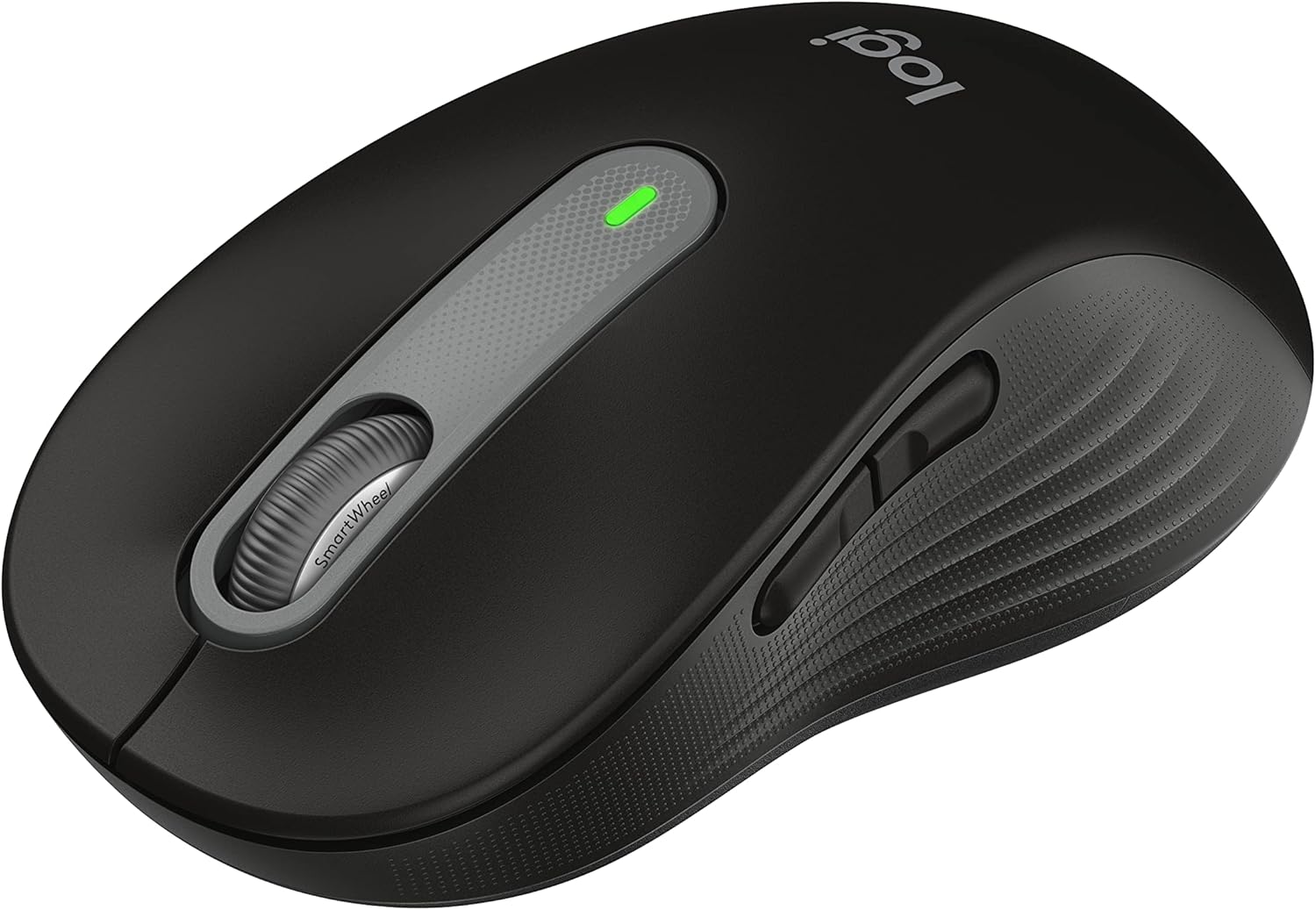


Logitech Signature M650 L Full Size Wireless Mouse - for Large Sized Hands, 2-Year Battery, Silent Clicks, Customizable Side Buttons, Bluetooth, for PC/Mac/Multi-Device/Chromebook - Black
This is an affiliate link. Buyyyah may earn a commission if you buy through it, at no extra cost to you.
Description
- Scroll smarter: With Logitech Signature M650 Wireless Mouse you get line-by-line precision for documents and super-fast scrolling for long web pages; simply switch modes with a flick of the SmartWheel - Upgrade your comfort: This mouse provides long hours of comfort thanks to its shape, soft thumb area and rubber side grips that keep your hand snug. Sizes and handedness available. - Connect the way you like: Connect this cordless computer mouse in an instant via Bluetooth Low Energy or Logi Bolt USB receiver - Less noise, more focus: Whether working at the office or at home, Logitech Signature M650 is a quiet mouse, allowing you to enjoy 90 percent less click noise with SilentTouch technology* - Customizable side buttons: Customize the side buttons on the computer mouse with Logitech Options+, available on Windows and macOS, to your favorite shortcuts – like back/forward or copy/paste - 24 month battery life: Work for up to 2 years on the single AA battery that comes with your multi-device mouse** - Works on multiple platforms: Experience seamless compatibility with Windows, macOS, Linux, ChromeOS, iPadOS, and Android operating systems; it is also a Works with Chromebook certified product - Plastic parts in Signature M650 L include certified post-consumer recycled plastic (Graphite/Black: Minimum 65%; Red/Blue: 57% Off-White/Rose plastics: Minimum 26%****)
Details
Features & Specs
- Connectivity Technology
- Bluetooth, Wi-Fi
- Additional Features
- Lightweight, Portable, Soundless, Wireless
- Movement Detection
- Optical
- Button Quantity
- 3
- Hand Orientation
- Right
- Compatible Devices
- Personal Computer
- Operating System
- Chrome OS, Linux
- Battery Average Life
- 24 months
- Number of Batteries
- 1 AA batteries required. (included)
- Hardware Platform
- Linux, Mac, PC
- Power Source
- Battery Powered
- Mouse Maximum Sensitivity
- 4000 Dots per Inch
- Minimum Required Operating System Version
- ChromeOS 137
- Range
- 30.0 feet
Style
- Color
- Black
- Style Name
- Right Handed
- Pattern
- Large Size | Right Handed
Materials & Care
- Enclosure Material
- Rubber
Item details
- Brand
- Logitech
- Model Name
- M650 L
- Antenna Location
- Gaming, Office
- Model Number
- 910-006265
- Are Batteries Included
- Yes
- Are Batteries Required
- Yes
- Manufacturer
- Logitech
- Mfr Part Number
- 910-006265
- Warranty Description
- Manufacturer’s warranty can be requested from customer service.
Measurements
- Item Weight
- 111.2 Grams
- Item Dimensions L x W
- 4.65"L x 2.58"W
- Unit Count
- 1.0 Count
Additional details
- EU Spare Part Availability Duration
- 2 Years
Frequently asked questions
- Is this mouse suitable for people with large hands?
- Yes, the product is described as 'for Large Sized Hands' and the pattern is 'Large Size | Right Handed'.
- Does this mouse have silent clicks?
- Yes, it features SilentTouch technology that allows you to enjoy 90 percent less click noise.
- How long does the battery last?
- The mouse can work for up to 2 years on the single AA battery that comes with it.
Customer reviews

Good for 1.5 Years so far. Was a bit off then easily fixed it.
Jul 2025 Update: Had it at four stars, but changed it to five. After a few days I was able to open the mouse easily with two screws and fix and dust it very easily. The button was misaligned because of the plastic flexing weird? Love repairable and maintainable tech. Now the buttons are all back to normal. I'll update again if this changes. If it makes it to two years it'll be worth the cost. $20 per year is average these days. Some of the logitech G series mice don't even last this long without issue. ----- Jul 2025: I have been using this mouse for a year and five months now. It was good but if I knew it was going to last 1.5 years, I would have spent the $35 dollars towards a mouse that would last 3 years instead. If it was $15-20 it wouldn't be so bad. I love how quiet the clicks are. Never really had a problem with it until today. When the left click button started to have problems. I am used to computer mouse lasting longer than this. Some mice from the 90s still work, so I don't know why modern mice should be different. Pros: Ease of setup: Plug and play Scrolling speed: decent, you can change it in settings Battery Life: Amazing Size: L version fit my large hands well. Sleek: Good for any purpose or setting. No bright lights Some issues I had: Accuracy: There were some issues with the accuracy at times but turning it on and off fixed it. Dongle: When I used the USB dongle on Linux the system detected it as a wireless receiver which would interfere with wireless connectivity of the computer. Passing it through a USB hub prevented this issue somehow. Life: Lasted 1.5 years of office work and browsing. My next mouse will probably be an upright mouse for better ergonomics.
Jul 2025 Update: Had it at four stars, but changed it to five. After a few days I was able to open the mouse easily with two screws and fix and dust it very easily. The button was misaligned because of the plastic flexing weird? Love repairable and maintainable tech. Now the buttons are all back to normal. I'll update again if this changes. If it makes it to two years it'll be worth the cost. $20 per year is average these days. Some of the logitech G series mice don't even last this long without issue. ----- Jul 2025: I have been using this mouse for a year and five months now. It was good but if I knew it was going to last 1.5 years, I would have spent the $35 dollars towards a mouse that would last 3 years instead. If it was $15-20 it wouldn't be so bad. I love how quiet the clicks are. Never really had a problem with it until today. When the left click button started to have problems. I am used to computer mouse lasting longer than this. Some mice from the 90s still work, so I don't know why modern mice should be different. Pros: Ease of setup: Plug and play Scrolling speed: decent, you can change it in settings Battery Life: Amazing Size: L version fit my large hands well. Sleek: Good for any purpose or setting. No bright lights Some issues I had: Accuracy: There were some issues with the accuracy at times but turning it on and off fixed it. Dongle: When I used the USB dongle on Linux the system detected it as a wireless receiver which would interfere with wireless connectivity of the computer. Passing it through a USB hub prevented this issue somehow. Life: Lasted 1.5 years of office work and browsing. My next mouse will probably be an upright mouse for better ergonomics.
This is a solid, affordable, all around silent mouse for productivity
I've been looking for a reasonably priced mouse that is both quiet and efficient. This absolutely fits the bill. First it's compact and light (a bit too compact for me, unfortunately), and the mouse buttons are absolutely silent. I use this in an office setting, so I like my keyboard and mouse clicks quiet, especially when I'm on calls. Paired with an MX keyboard, this is an ideal accessory. I could see students appreciating this in a dorm room or in a library when studying. The mouse comes with a standard AA battery (not rechargeable), with a USB-A universal dongle inside the battery compartment, which is convenient. My windows system immediately recognized the mouse on both Bluetooth and 2.4 Ghz, so pairing was super easy. There are two side buttons, which are initially used for going forward/backward on web pages, but you can reprogram the keys using the logitech software. I don't love that you have to download the software and keep it running on your machine, I'd rather have a web-based interface. One thing to note, the side buttons are NOT silent like the main mouse buttons, but they aren't too loud. One feature I do appreciate is the fast/line-by-line scrolling wheel so you can scroll quickly or slowly. It's not as smooth or as fast as the MX Master 3 mouse, but it's better than any other mouse for this feature. For the price it's a great deal, the only caveat here is that it's a bit on the small side for me, and I have regularly sized hands for an adult male. Still usable, and some people may even prefer this, but for me I'm going to go with the larger size.
I've been looking for a reasonably priced mouse that is both quiet and efficient. This absolutely fits the bill. First it's compact and light (a bit too compact for me, unfortunately), and the mouse buttons are absolutely silent. I use this in an office setting, so I like my keyboard and mouse clicks quiet, especially when I'm on calls. Paired with an MX keyboard, this is an ideal accessory. I could see students appreciating this in a dorm room or in a library when studying. The mouse comes with a standard AA battery (not rechargeable), with a USB-A universal dongle inside the battery compartment, which is convenient. My windows system immediately recognized the mouse on both Bluetooth and 2.4 Ghz, so pairing was super easy. There are two side buttons, which are initially used for going forward/backward on web pages, but you can reprogram the keys using the logitech software. I don't love that you have to download the software and keep it running on your machine, I'd rather have a web-based interface. One thing to note, the side buttons are NOT silent like the main mouse buttons, but they aren't too loud. One feature I do appreciate is the fast/line-by-line scrolling wheel so you can scroll quickly or slowly. It's not as smooth or as fast as the MX Master 3 mouse, but it's better than any other mouse for this feature. For the price it's a great deal, the only caveat here is that it's a bit on the small side for me, and I have regularly sized hands for an adult male. Still usable, and some people may even prefer this, but for me I'm going to go with the larger size.

The best mouse I have have ever used!
The review is a little late! I bought this a little over 2 years ago. I just came to buy another one for my laptop, so I thought I would leave my thoughts. I have one of these for my work office, home office and now I am getting one to replace my (More expensive) thin mouse, for my laptop. Pros: 1. Quiet clicking! I personally prefer this from my mouse and keyboard and after 2 years, its still smooth and quiet with every click. 2. Smooth Gliding! It still glides silky smooth, over my pad with no friction! 3. Connection! I have never experienced lag with this mouse! It controls the cursor absolutely perfectly. It precisely syncs with whatever cursor speed you select and it absolutely spot on, every time. 4. Amazing Infinity Wheel! It is absolutely perfect! It spins with so much freedom, but the necessary preciseness needed when scrolling. 5. Size! I am 6’4 and have an XL hand. This fits absolutely perfectly! So much so, using a smaller mouse has become unfamiliar and just doesn’t feel right. I think this would be fitting for even a large hand, but luckily they make a smaller version for smaller hands. 6. Battery Life! I use my office mouse every day. I have changed the battery 1 time in 2 years. I have used my work office mouse much less but still consistently and have yet to change the battery, in 2 years. Cons: 1. Battery. (Not really a Con, but a preference) I would prefer to have a USB C style, rechargeable version. But once again, the battery life is great as it is, I would just prefer rechargeable, myself.
The review is a little late! I bought this a little over 2 years ago. I just came to buy another one for my laptop, so I thought I would leave my thoughts. I have one of these for my work office, home office and now I am getting one to replace my (More expensive) thin mouse, for my laptop. Pros: 1. Quiet clicking! I personally prefer this from my mouse and keyboard and after 2 years, its still smooth and quiet with every click. 2. Smooth Gliding! It still glides silky smooth, over my pad with no friction! 3. Connection! I have never experienced lag with this mouse! It controls the cursor absolutely perfectly. It precisely syncs with whatever cursor speed you select and it absolutely spot on, every time. 4. Amazing Infinity Wheel! It is absolutely perfect! It spins with so much freedom, but the necessary preciseness needed when scrolling. 5. Size! I am 6’4 and have an XL hand. This fits absolutely perfectly! So much so, using a smaller mouse has become unfamiliar and just doesn’t feel right. I think this would be fitting for even a large hand, but luckily they make a smaller version for smaller hands. 6. Battery Life! I use my office mouse every day. I have changed the battery 1 time in 2 years. I have used my work office mouse much less but still consistently and have yet to change the battery, in 2 years. Cons: 1. Battery. (Not really a Con, but a preference) I would prefer to have a USB C style, rechargeable version. But once again, the battery life is great as it is, I would just prefer rechargeable, myself.
The Quietest Mouse
I have tried SEVERAL silent mouses. This one and the logitech LIFT which I think has the same switches, are the quietest by far. The MX Master 4 is significantly louder than this mouse and also much heavier which you wouldnt think matters but it does if youre used to moving your mouse quickly. I have used a M650 regular size for a couple years and have had no issues with it apart from the rubber on the sides wearing down a bit but not to the extent that it causes any issues. The build quality of the M650 is very high and the logitech usb dongle is great because you can reprogram it to other logitech mouses or get a new one if you ever lose it for like 15$ (happened to me once). I decided to try the M650L because I have a somewhat large hand it it is a noticeable improvement for me as far as ergonomics go. Battery lasts super long on the M650 (over a year of near daily use). It is a great value and edges out the MX Master 4 in my opinion mainly due to the sound difference which is the main feature I care about. Overall, its a great mouse, feels good in the hand, click quietly, and scrolls well. Solid value for the price.
I have tried SEVERAL silent mouses. This one and the logitech LIFT which I think has the same switches, are the quietest by far. The MX Master 4 is significantly louder than this mouse and also much heavier which you wouldnt think matters but it does if youre used to moving your mouse quickly. I have used a M650 regular size for a couple years and have had no issues with it apart from the rubber on the sides wearing down a bit but not to the extent that it causes any issues. The build quality of the M650 is very high and the logitech usb dongle is great because you can reprogram it to other logitech mouses or get a new one if you ever lose it for like 15$ (happened to me once). I decided to try the M650L because I have a somewhat large hand it it is a noticeable improvement for me as far as ergonomics go. Battery lasts super long on the M650 (over a year of near daily use). It is a great value and edges out the MX Master 4 in my opinion mainly due to the sound difference which is the main feature I care about. Overall, its a great mouse, feels good in the hand, click quietly, and scrolls well. Solid value for the price.

![Ailun 3 Pack Screen Protector for iPhone 16 [6.1 inch] + 3 Pack Camera Lens Protector with Installation Frame,Case Friendly Tempered Glass Film,[9H Hardness][Not for iPhone 16e/16 Pro/Plus/Pro Max]](https://m.media-amazon.com/images/I/71z4XevAN2L._AC_SY300_SX300_QL70_FMwebp_.jpg)


