


NexiGo TriVision Ultra, 4K Tri-LED-Laser Portable Projector, 2600 Lumens, 100,000:1 Dynamic Contrast, No Laser Speckle, No Eye Strain, Dolby Vision, HDR10+, 3D, Fire TV Storage Slot
This is an affiliate link. Buyyyah may earn a commission if you buy through it, at no extra cost to you.
Description
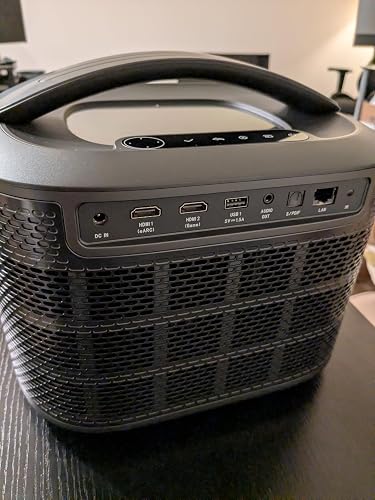
【Brilliant Visuals】The NexiGo TriVision Ultra uses a brand new hybrid light source: Tri-LED-Laser. Blending tri-color LED and tri-color laser into one powerful engine, this projector achieves a wider color gamut with higher brightness and no laser speckle. It's also healthier to watch for extended periods compared to regular laser projectors, which can cause eye fatigue. Perfect for movies, games, or content creation on a screen of up to 300" across. 【Note:】For optimal viewing, we recommend a projection size of 80" to 150". 【Incredible Color】The TriVision Ultra delivers an impressive 110% BT.2020 color gamut coverage with exceptional color accuracy of ΔE < 1. Each projector includes a unique color calibration report, ensuring minimal color deviation from the original source. In addition, it supports Dolby Vision, HDR10+, and HLG for enhanced visuals. With Active 3D movie support, the TriVision Ultra takes home entertainment to new heights. Featuring Full Fade to Black, the projector achieves an exceptional dynamic contrast ratio of over 100,000:1. 【Immersive Sound】Dolby Audio and DTS Virtual: X create an unparalleled sound experience. Whether you're engrossed in cinematic masterpieces or intense gaming sessions, savor lifelike audio that enhances every moment. You can also connect external speakers or headphones via 3.5 mm audio jack, HDMI eARC, or Bluetooth 5.2, all of which offer a quick and stable connection. 【Low Latency】The TriVision Ultra is optimized for gaming with MEMC for ultra-smooth motion and minimal ghosting. It's ultra responsive with a low latency of 4.2 ms ~ 8 ms. This projector also comes equipped with three HDMI 2.1 ports, with eARC support on HDMI 1. In addition, the TriVision Ultra stands out as one of the few projectors that supports 4K@120Hz input. 【Grab & Go】The NexiGo TriVision Ultra combines the portability of a mini projector with the high-quality performance of a home theater projector. Set it up anywhere in seconds with intelligent AI Autofocus and Auto Keystone Correction. Additionally, the TriVision Ultra is equipped with a hidden storage compartment at the bottom for a Fire TV Stick (not included), saving you space and reducing the number of necessary cables.
Details
General
- Brand
- NexiGo
- Model Number
- PJ95
- Manufacturer
- Nexight INC
- Mfr Part Number
- PJ95
- Antenna Location
- Home Cinema
- Compatible Devices
- Gaming Console, Laptop, Smartphone, Speaker
Display
- Native Resolution
- 3840 x 2160
- Display Resolution Maximum
- 3840 x 2160 Pixels
- Display Type
- DLP
- Brightness
- 2600 Lumen
- Projector Maximum White Brightness
- 2600 ANSI Lumens
- Contrast Ratio
- 2000:1
- Maximum Image Size
- 300 Inches
- Minimum Image Size
- 60 Inches
- Maximum Throw Distance
- 27.67 Feet
- Minimum Throw Distance
- 3.5 Feet
- Light Source Operating Life
- 25000 Hours
- Video Encoding
- H.265, VP9, AV1
- Picture Quality Enhancement Technology
- HDR, Dolby Vision, HDR10+
Connectivity
- Connectivity Technology
- Bluetooth, Wi-Fi, USB, HDMI 2.1 (eARC), 3.5mm Jack
- Hardware Connectivity
- 3.5mm Audio, Bluetooth, Ethernet, HDMI, S/PDIF, USB
Control
- Controller Type
- Button Control, Remote Control
- Control Method
- Remote, Touch
Physical
- Form Factor
- Portable
- Mounting Type
- Ceiling Mount/Tripod Mount/Tabletop Mount/ Wall Mount/ Floor Mount
- Color
- Black
- Item Weight
- 8.89 Kilograms
Additional Features
- Additional Features
- ①Tri-LED-Laser Light Source ②Out-of-the-box color accuracy③ Hidden Fire TV Storage Slot④Dolby Vision & HDR10+ ⑤4ms Input Lag⑥Cinematic Sound with 30W Speakers ⑦110% Rec.2020 color gamut
Frequently asked questions
- What is the brightness and contrast ratio of this projector?
- It has 2600 ANSI lumens brightness and a dynamic contrast ratio of over 100,000:1.
- Does it support HDR formats?
- Yes, it supports Dolby Vision, HDR10+, and HLG.
- What is the input lag for gaming?
- It has a low latency of 4.2 ms to 8 ms and supports 4K@120Hz input.
Customer reviews

An excellent projector with several outstanding qualities
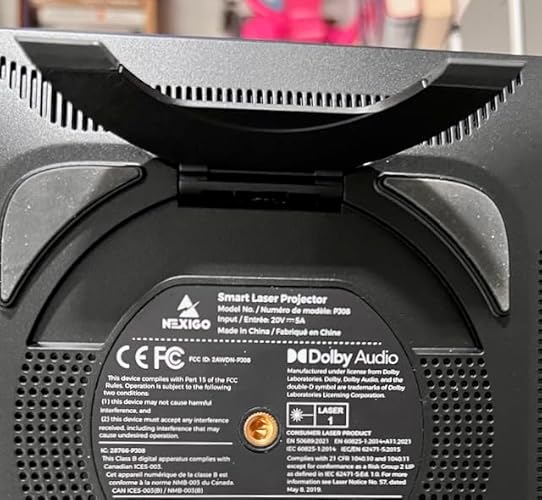
Unboxing: The projector unit and its components came with a clean presentation, being well organized and supported within the box. I read through the Safety guide, User Manual, and Quick start guide - they were very well written and easy to understand especially in comparison to other technology manuals. I immediately noticed how sleek the projector’s physical design is, and I really like the built in handle. It almost reminds me of a guitar amp, and is much more practical than many other projector designs including the PJ40 (Nexigo - this was my last projector from the same company). Using no backscreen, just a white wall: I performed the initial setup of my projector without a backscreen and only a white wall, and I was not disappointed with the results. The brightness of the projector and resulting image quality was robust enough to not even notice the wall texturing, nor was there any distracting shine or reflection coming from the wall. With 100 inch backscreen: The quality was just as good as the white wall that I am currently using. That said, if your wall has any glare or reflection then I think using a back screen is essential. While using the backscreen I found a really cool feature - at the beginning when the projector starts up it calibrates the image. It was able to detect the size of the screen and auto calibrate to resize the image to fit the backscreen perfectly. Ease of focus for picture quality: Upon booting up the projector for the first time, the software did a walkthrough that was quick and painless, auto adjusting the focus and allowing easy manual adjustments to be made using the Projector remote. The auto focus worked so well, I did not even need to do any manual adjustment! Compared to my other projector this is very efficient. Oftentimes while using my older projector I would find myself having to use the knob on the projector to manually adjust the focal length if I ever bumped the desk it rests on, or if the projector position moved a couple inches. User interface: I found navigating through the menus to be easy and straightforward, with the shortcuts and tabs ordered in an easily findable way. The aesthetic was clean and used cool colors that are easy to look at for long periods of time. It was easy enough to use where you don’t even really need to read the manual to figure out most of the features. My hardware setup: I prefer to watch movies in complete darkness, which is always the best choice if you’re looking for the most cinematic atmosphere. However, I was very surprised to see that partial light from a lamp did not significantly wash out the image on the screen and it remained incredibly visible. At most, the partial light may have reduced image quality by about 1-5%. My projector setup was pointing toward the wall, positioned behind me and about 12 feet away. Performance use with other Hardware: I first tried Streaming TV with my PS4. I typically like to stream on Tubi, HBO max, Amazon Prime, and Hulu. I recently streamed Kong X Godzilla in 4k on prime and it was great! The image quality felt just like being at the movies, and that is even with using a white wall as a projection surface. Streaming TV with Amazon Fire Stick: First off, there is a special slot at the bottom of the projector that is intended to fit the Firestick hardware perfectly. In order to install it, all you need is a Phillips head screwdriver and about 5-10 minutes of patience. The process was very straightforward, and the slot it was inserted to was labeled HDMI 3. After installation, the firestick has worked seamlessly and my wife couldn’t be happier : ) DVD movies with PS4: I watched Tron:Legacy and found that the quality was really good, however it was certainly not 4k. After watching a 4k film by streaming, it is clear to me that the constraints for Video quality comes from the hardware being used or the source of the film file. Steam deck gaming with specific games: I mention some of my experience with Hades in the latency section, but I found the gameplay to be tight and responsive while simultaneously maintaining excellent presentation of the image and artwork quality. I would say it performs excellently with Hades. That said, I think it was even better with Forgive Me Father. The vibrancy of the games cell shaded graphics really popped with the projector's image quality. Outside of that, I found casual web browsing via steam deck to work out with the browsers scaling well a resolution that is more than adequate. Adjusting picture quality: One of the coolest and most convenient features of this projector is its autofocus ability. When powering up the Trivision Ultra, it will automatically calibrate and autofocus the lens based on its current projection distance and total size, and does not need to be manually adjusted (in my many personal experiences). If you happen to move the projector during this process, it will restart calibration. This is very different than many other projectors I’ve used which require a degree of manual lens adjustment whenever powering it on to account for changes in distance and angle. Sound quality: I wanted to see if the speakers emitting from the Projector would be good enough to use. I found that the sound is excellent and did not sound like it was coming from a tin can, speech was clearly audible, and I was surprised by the bass capability it has. I watched 4k Kong/Godzilla and the sound quality was very impressive. That said, my older projector quality is not bad either but it does not project its sound in the same way, nor does it have a solid bass. Connecting speakers and headphones with bluetooth was no problem, and as expected the sound projects very well. Brightness: My previous projector was a PJ40 which has an improved brightness white incandescent bulb. While that projector was dependable, the brightness doesn’t compare to the Trivision Ultra. The Trivision Ultra does not wash out on the edges with indirect partial room lighting, and even with full room lighting the brightness is substantial and capable of watching movies in the same way one would do with a television. The image is clear, crisp, bright, and complete throughout the projection even along the edges while viewing on a white wall. Latency: I played Hades on my steam deck using the projector and a wireless PS4 controller. While I noticed a very slight bit of latency, as is with all projectors and wireless controllers, it was in no way interfering with my gameplay and I was still able to easily win my run without an issue. I would say with a wired controller, there would be nearly no latency at all. Saturation: I’ve been blown away by the vibrant yet natural saturation of the colors using the projector. I watched Kong X Godzilla in 4k and was absolutely blown away by the color, image quality, and realistic fidelity. Contrast: The best test that I’ve done for this is the ability to play Hades on the projector at a fast pace and still be able to easily perform and track what is going on. The dark and light coloration is easily discernible and stands out well enough that details are very easily discernible. Immersion: Due to the image quality, the level of immersion is such that you can even feel queasiness when a film is showing first person flight maneuvers due to the realism. That is a super impressive effect! Portability: The Tri LED-Laser projector is very compact, but it also has a very sturdy handle that is built into the unit. It doesn't feel very heavy (feels like a 10-20 lb dumb-bell to me), and the weight distribution was not awkward. Color performance: The color is super vibrant and there is no blur, even around the edges and parts that are not center screen. Connectivity: I have streamed television shows using a PS4 and an Amazon firestick, including 4k movies (Kong X Godzilla) without experiencing any dropped connections, lag, or other issues. I noticed a couple 2 second quality drops that looked like video buffering, but that was a result of my internet connection and not the connection to the internet itself. Daily casual use: I personally think it is simply enough for anyone to use. It only took about 10 minutes to set up. My wife uses it with only a few basic tips from me. Hot tip - turn on the auto-detect feature so your projector will automatically switch over to whichever port it is receiving a signal from. That saves time and no longer requires you to change input manually. I personally love this feature. Maintenance: The fan is almost completely silent, even after using the projector for a 3+ hour session of streaming a movie on 4K. I think it has something to do with the LED laser technology being used, as opposed to the heat generated by the traditional projector bulb. Unlike my previous projector which has a removable filter that is recommended to be cleaned every 60 hours, the Tri-LED does not have a filter that is needed to be cleaned by the user. This is a HUGE improvement. The only other part of the projector that requires maintenance is the glass covering over the lens, and that is if I accidentally touch it or smear fingerprints on it. This is as needed, and is very uncommon for it to occur. Overall: This projector is a huge upgrade to my previous one and any other television / Monitor that I have owned in the past. The resolution and image quality, paired with the portability, and the incredibly adjustable screen size and features, I think it is preferable to a large TV at the same price point. Due to the portability alone, I would choose this projector over any television and feel good about it due to its quality and even 3D capability.
Unboxing: The projector unit and its components came with a clean presentation, being well organized and supported within the box. I read through the Safety guide, User Manual, and Quick start guide - they were very well written and easy to understand especially in comparison to other technology manuals. I immediately noticed how sleek the projector’s physical design is, and I really like the built in handle. It almost reminds me of a guitar amp, and is much more practical than many other projector designs including the PJ40 (Nexigo - this was my last projector from the same company). Using no backscreen, just a white wall: I performed the initial setup of my projector without a backscreen and only a white wall, and I was not disappointed with the results. The brightness of the projector and resulting image quality was robust enough to not even notice the wall texturing, nor was there any distracting shine or reflection coming from the wall. With 100 inch backscreen: The quality was just as good as the white wall that I am currently using. That said, if your wall has any glare or reflection then I think using a back screen is essential. While using the backscreen I found a really cool feature - at the beginning when the projector starts up it calibrates the image. It was able to detect the size of the screen and auto calibrate to resize the image to fit the backscreen perfectly. Ease of focus for picture quality: Upon booting up the projector for the first time, the software did a walkthrough that was quick and painless, auto adjusting the focus and allowing easy manual adjustments to be made using the Projector remote. The auto focus worked so well, I did not even need to do any manual adjustment! Compared to my other projector this is very efficient. Oftentimes while using my older projector I would find myself having to use the knob on the projector to manually adjust the focal length if I ever bumped the desk it rests on, or if the projector position moved a couple inches. User interface: I found navigating through the menus to be easy and straightforward, with the shortcuts and tabs ordered in an easily findable way. The aesthetic was clean and used cool colors that are easy to look at for long periods of time. It was easy enough to use where you don’t even really need to read the manual to figure out most of the features. My hardware setup: I prefer to watch movies in complete darkness, which is always the best choice if you’re looking for the most cinematic atmosphere. However, I was very surprised to see that partial light from a lamp did not significantly wash out the image on the screen and it remained incredibly visible. At most, the partial light may have reduced image quality by about 1-5%. My projector setup was pointing toward the wall, positioned behind me and about 12 feet away. Performance use with other Hardware: I first tried Streaming TV with my PS4. I typically like to stream on Tubi, HBO max, Amazon Prime, and Hulu. I recently streamed Kong X Godzilla in 4k on prime and it was great! The image quality felt just like being at the movies, and that is even with using a white wall as a projection surface. Streaming TV with Amazon Fire Stick: First off, there is a special slot at the bottom of the projector that is intended to fit the Firestick hardware perfectly. In order to install it, all you need is a Phillips head screwdriver and about 5-10 minutes of patience. The process was very straightforward, and the slot it was inserted to was labeled HDMI 3. After installation, the firestick has worked seamlessly and my wife couldn’t be happier : ) DVD movies with PS4: I watched Tron:Legacy and found that the quality was really good, however it was certainly not 4k. After watching a 4k film by streaming, it is clear to me that the constraints for Video quality comes from the hardware being used or the source of the film file. Steam deck gaming with specific games: I mention some of my experience with Hades in the latency section, but I found the gameplay to be tight and responsive while simultaneously maintaining excellent presentation of the image and artwork quality. I would say it performs excellently with Hades. That said, I think it was even better with Forgive Me Father. The vibrancy of the games cell shaded graphics really popped with the projector's image quality. Outside of that, I found casual web browsing via steam deck to work out with the browsers scaling well a resolution that is more than adequate. Adjusting picture quality: One of the coolest and most convenient features of this projector is its autofocus ability. When powering up the Trivision Ultra, it will automatically calibrate and autofocus the lens based on its current projection distance and total size, and does not need to be manually adjusted (in my many personal experiences). If you happen to move the projector during this process, it will restart calibration. This is very different than many other projectors I’ve used which require a degree of manual lens adjustment whenever powering it on to account for changes in distance and angle. Sound quality: I wanted to see if the speakers emitting from the Projector would be good enough to use. I found that the sound is excellent and did not sound like it was coming from a tin can, speech was clearly audible, and I was surprised by the bass capability it has. I watched 4k Kong/Godzilla and the sound quality was very impressive. That said, my older projector quality is not bad either but it does not project its sound in the same way, nor does it have a solid bass. Connecting speakers and headphones with bluetooth was no problem, and as expected the sound projects very well. Brightness: My previous projector was a PJ40 which has an improved brightness white incandescent bulb. While that projector was dependable, the brightness doesn’t compare to the Trivision Ultra. The Trivision Ultra does not wash out on the edges with indirect partial room lighting, and even with full room lighting the brightness is substantial and capable of watching movies in the same way one would do with a television. The image is clear, crisp, bright, and complete throughout the projection even along the edges while viewing on a white wall. Latency: I played Hades on my steam deck using the projector and a wireless PS4 controller. While I noticed a very slight bit of latency, as is with all projectors and wireless controllers, it was in no way interfering with my gameplay and I was still able to easily win my run without an issue. I would say with a wired controller, there would be nearly no latency at all. Saturation: I’ve been blown away by the vibrant yet natural saturation of the colors using the projector. I watched Kong X Godzilla in 4k and was absolutely blown away by the color, image quality, and realistic fidelity. Contrast: The best test that I’ve done for this is the ability to play Hades on the projector at a fast pace and still be able to easily perform and track what is going on. The dark and light coloration is easily discernible and stands out well enough that details are very easily discernible. Immersion: Due to the image quality, the level of immersion is such that you can even feel queasiness when a film is showing first person flight maneuvers due to the realism. That is a super impressive effect! Portability: The Tri LED-Laser projector is very compact, but it also has a very sturdy handle that is built into the unit. It doesn't feel very heavy (feels like a 10-20 lb dumb-bell to me), and the weight distribution was not awkward. Color performance: The color is super vibrant and there is no blur, even around the edges and parts that are not center screen. Connectivity: I have streamed television shows using a PS4 and an Amazon firestick, including 4k movies (Kong X Godzilla) without experiencing any dropped connections, lag, or other issues. I noticed a couple 2 second quality drops that looked like video buffering, but that was a result of my internet connection and not the connection to the internet itself. Daily casual use: I personally think it is simply enough for anyone to use. It only took about 10 minutes to set up. My wife uses it with only a few basic tips from me. Hot tip - turn on the auto-detect feature so your projector will automatically switch over to whichever port it is receiving a signal from. That saves time and no longer requires you to change input manually. I personally love this feature. Maintenance: The fan is almost completely silent, even after using the projector for a 3+ hour session of streaming a movie on 4K. I think it has something to do with the LED laser technology being used, as opposed to the heat generated by the traditional projector bulb. Unlike my previous projector which has a removable filter that is recommended to be cleaned every 60 hours, the Tri-LED does not have a filter that is needed to be cleaned by the user. This is a HUGE improvement. The only other part of the projector that requires maintenance is the glass covering over the lens, and that is if I accidentally touch it or smear fingerprints on it. This is as needed, and is very uncommon for it to occur. Overall: This projector is a huge upgrade to my previous one and any other television / Monitor that I have owned in the past. The resolution and image quality, paired with the portability, and the incredibly adjustable screen size and features, I think it is preferable to a large TV at the same price point. Due to the portability alone, I would choose this projector over any television and feel good about it due to its quality and even 3D capability.



Geheimtipp!
Über die Jahre habe ich viele Projektoren getestet (Acer, Epson, LG, Xiaomi, Xgimi, Jmgo, Hisense, Formovie, Valerion), deshalb habe ich mich entschieden, unerfahrene Leute bei ihrer Kaufentscheidung bezüglich des NexiGo TriVision Ultra zu helfen, um sie vor einem Fehlkauf zu bewahren. Um den NexiGo TriVision Ultra in meinem kleinen abgedunkelten Heimkinoraum (aber nicht dediziert)also weiße Decke und Wände auf der sehr glatten weißen 4 Meter breiten Wand nutzen zu können, musste ich 2 zusätzliche Dinge bei Amazon kaufen: 1. Bracwiser Monitor Ständer (11,49 €) Mein Regal ist 48 cm hoch, der Nexigo steht viel zu tief. 2. STRONG LEAP-S3+V2 Streaming Smart TV Box (50,99 € Gebraucht - Mint) Von der Verwendung des Amazon Firesticks rate ich ab. Die Strong TV Box harmoniert sehr gut mit dem Nexigo Gerät, man kann einfach Festplatten an die TV Box anschließen und alles abspielen wenn man die VLC player App installiert hat. Die TV Box habe ich über e-arc HDMI angeschlossen, also nur eine Fernbedienung um alles zu bedienen. Die anderen Anschlüsse brauche ich nicht, da ich nur die TV Box benutze. Den NexiGo TriVision Ultra konnte ich für 999,00 € Gebraucht (wie neu) kaufen. Also alles für 1061,48 Euro. Nun kann der Heimkinospaß beginnen :-) Nach richtiger Positionierung erhielt ich ein etwas über 120 Zoll großes Bild mit einem Abstand von 3,70 Meter zur Projektionsfläche, aber auweia, die werkseitigen Voreinstellungen sind sehr schlecht. Nach mehreren Stunden Einstellungen für meine Projektionsflache und der STRONG Streaming Smart TV Box, endlich das Resultat, ein klares, scharfes, sehr natürliches und leuchtstarkes Bild. Nexigo hat also nicht übertrieben, die brandneue hybride Lichtquelle Tri-LED-Laser beseitigt Körnigkeit und Farbsäume, viel besser als der Xgimi Horizon S Max. Ich verwende den Nexigo Projektor nur mit Laserhelligkeitsstufe 10, weil alles schön poppt :-) aber der Nachteil ist der Lüfter ist hörbar, jedoch für mich absolut im akzeptablen Bereich. Der Xgimi Horizon S Max ist sehr leise, aber dafür auch nicht so leuchtstark. Der NexiGo TriVision Ultra und der Xgimi Horizon S Max stehen bei mir nebeneinander im Regal. Ich bevorzuge auch den Klang des Nexigo Gerätes, da die Lautsprecher zur Seite abstrahlen und der Sound von den Regalwänden reflektiert wird, es ist also keine Soundbar oder zusätzliche Box notwendig. Als Hauptgerät benutze ich natürlich ein Valerion Gerät, die derzeit, die besten Projektoren sind für den normalen Gebrauch in einem abgedunkelten Wohnraum (ohne dediziert zu sein). Der NexiGo TriVision Ultra kann nicht mit einem Valerion- oder Hisense-Gerät mithalten, ist aber zum Beispiel besser in der Bildqualität als ein Xgimi Horizon S Max, Dangbei MP1 MAX oder auch JMGO N1S Ultimate. Empfehlung: Für 999 Euro, sofort kaufen, 1399 Euro ist zu viel, dafür kriegt man schon ein Valerion Gerät. Für weitere Infos siehe die The Hook Up YouTube Reviews. Nachtrag:................. Keine Kontrastleinwand oder so was verwenden, eine einfache mattweiße Leinwand ist am besten, aber offen gesagt, eine glatte weiße Wand reicht vollkommen aus. Meine sehr glatte weiße Wand ist noch extra bearbeitet und das Bild sieht sogar besser aus als auf einer Leinwand. Es ist als habe man einen 120 Zoll LED-Flachbildschirm an der Wand, ohne Spiegelungen, Augenbelastung oder Laserspeckle. Wichtigste Regel bei Verwendung eines Projektors ist und bleibt, der Raum muss völlig abgedunkelt werden, dann kriegt man auch bei weißer Decke und hellen Wänden mit dem NexiGo TriVision Ultra ein Bild, was mit einem LED-TV vergleichbar ist. Ich benutze schwere schwarze Verdunklungsvorhänge, das Licht, welches bei Tagenlicht, oben und an den Seiten des Vorhangs durchscheint, mildert die Qualität des Bildes kaum, weil der TriVision Ultra so leuchtstark ist. Ich verwende schon seit über 15 Jahren keinen TV mehr und vermisse gar nichts. Leute, die bei Tageslicht schauen wollen, ohne abzudunkeln, sollten lieber bei einem TV bleiben, dies ist mit einem Projektor unmöglich. Nexigo holt das beste aus der Technik raus, nicht zu lichtstark, aber auch nicht zu lichtschwach für ein tolles 120 Zoll Bild in einem normalen abgedunkelten Raum.
Über die Jahre habe ich viele Projektoren getestet (Acer, Epson, LG, Xiaomi, Xgimi, Jmgo, Hisense, Formovie, Valerion), deshalb habe ich mich entschieden, unerfahrene Leute bei ihrer Kaufentscheidung bezüglich des NexiGo TriVision Ultra zu helfen, um sie vor einem Fehlkauf zu bewahren. Um den NexiGo TriVision Ultra in meinem kleinen abgedunkelten Heimkinoraum (aber nicht dediziert)also weiße Decke und Wände auf der sehr glatten weißen 4 Meter breiten Wand nutzen zu können, musste ich 2 zusätzliche Dinge bei Amazon kaufen: 1. Bracwiser Monitor Ständer (11,49 €) Mein Regal ist 48 cm hoch, der Nexigo steht viel zu tief. 2. STRONG LEAP-S3+V2 Streaming Smart TV Box (50,99 € Gebraucht - Mint) Von der Verwendung des Amazon Firesticks rate ich ab. Die Strong TV Box harmoniert sehr gut mit dem Nexigo Gerät, man kann einfach Festplatten an die TV Box anschließen und alles abspielen wenn man die VLC player App installiert hat. Die TV Box habe ich über e-arc HDMI angeschlossen, also nur eine Fernbedienung um alles zu bedienen. Die anderen Anschlüsse brauche ich nicht, da ich nur die TV Box benutze. Den NexiGo TriVision Ultra konnte ich für 999,00 € Gebraucht (wie neu) kaufen. Also alles für 1061,48 Euro. Nun kann der Heimkinospaß beginnen :-) Nach richtiger Positionierung erhielt ich ein etwas über 120 Zoll großes Bild mit einem Abstand von 3,70 Meter zur Projektionsfläche, aber auweia, die werkseitigen Voreinstellungen sind sehr schlecht. Nach mehreren Stunden Einstellungen für meine Projektionsflache und der STRONG Streaming Smart TV Box, endlich das Resultat, ein klares, scharfes, sehr natürliches und leuchtstarkes Bild. Nexigo hat also nicht übertrieben, die brandneue hybride Lichtquelle Tri-LED-Laser beseitigt Körnigkeit und Farbsäume, viel besser als der Xgimi Horizon S Max. Ich verwende den Nexigo Projektor nur mit Laserhelligkeitsstufe 10, weil alles schön poppt :-) aber der Nachteil ist der Lüfter ist hörbar, jedoch für mich absolut im akzeptablen Bereich. Der Xgimi Horizon S Max ist sehr leise, aber dafür auch nicht so leuchtstark. Der NexiGo TriVision Ultra und der Xgimi Horizon S Max stehen bei mir nebeneinander im Regal. Ich bevorzuge auch den Klang des Nexigo Gerätes, da die Lautsprecher zur Seite abstrahlen und der Sound von den Regalwänden reflektiert wird, es ist also keine Soundbar oder zusätzliche Box notwendig. Als Hauptgerät benutze ich natürlich ein Valerion Gerät, die derzeit, die besten Projektoren sind für den normalen Gebrauch in einem abgedunkelten Wohnraum (ohne dediziert zu sein). Der NexiGo TriVision Ultra kann nicht mit einem Valerion- oder Hisense-Gerät mithalten, ist aber zum Beispiel besser in der Bildqualität als ein Xgimi Horizon S Max, Dangbei MP1 MAX oder auch JMGO N1S Ultimate. Empfehlung: Für 999 Euro, sofort kaufen, 1399 Euro ist zu viel, dafür kriegt man schon ein Valerion Gerät. Für weitere Infos siehe die The Hook Up YouTube Reviews. Nachtrag:................. Keine Kontrastleinwand oder so was verwenden, eine einfache mattweiße Leinwand ist am besten, aber offen gesagt, eine glatte weiße Wand reicht vollkommen aus. Meine sehr glatte weiße Wand ist noch extra bearbeitet und das Bild sieht sogar besser aus als auf einer Leinwand. Es ist als habe man einen 120 Zoll LED-Flachbildschirm an der Wand, ohne Spiegelungen, Augenbelastung oder Laserspeckle. Wichtigste Regel bei Verwendung eines Projektors ist und bleibt, der Raum muss völlig abgedunkelt werden, dann kriegt man auch bei weißer Decke und hellen Wänden mit dem NexiGo TriVision Ultra ein Bild, was mit einem LED-TV vergleichbar ist. Ich benutze schwere schwarze Verdunklungsvorhänge, das Licht, welches bei Tagenlicht, oben und an den Seiten des Vorhangs durchscheint, mildert die Qualität des Bildes kaum, weil der TriVision Ultra so leuchtstark ist. Ich verwende schon seit über 15 Jahren keinen TV mehr und vermisse gar nichts. Leute, die bei Tageslicht schauen wollen, ohne abzudunkeln, sollten lieber bei einem TV bleiben, dies ist mit einem Projektor unmöglich. Nexigo holt das beste aus der Technik raus, nicht zu lichtstark, aber auch nicht zu lichtschwach für ein tolles 120 Zoll Bild in einem normalen abgedunkelten Raum.


Google TV makes this the perfect home entertainment projector
I’ve wanted a projector for home entertainment for a while. The idea was to set something up in the living room where the family could get together and watch a movie. After trying several projectors in the past, I always found it to be too cumbersome as you had to have a computer or a separate streaming device hooked up. The NexiGo Nova Mini finally fixes that issue due to its inclusion of Google TV. Setup of the projector was simple. Power it on, connect to your home network, and login to your Google account. After that, it spends some time downloading the latest software. Here is the first big advantage. You are not dependent on NexiGo to provide software updates. They are coming directly from Google and once done you have the latest version of Google TV on your device. Next up is configuring for your screen. Bring the projector back far enough from the screen that the image overlaps the edges. If you have the projector set to its defaults, it will redo its auto-focus and adjust keystone to have the image fit on the screen. I found that this was good enough to get up and running but wasn’t precise at getting right to the edges of the screen. It worked better for me to have the auto-keystone run when the projector first powers on, but to let me do a manual adjustment afterward. The interface for keystone adjustment is really easy to use and only took a few seconds to get the four corners right at the edge of the screen. Finally, pick your evening entertainment and watch. I have a Google Streamer on my main TV with all of my streaming services (Netflix, Prime, & Disney+) configured. It only took a minute to get logged into those services and I was ready to start watching. First family movie night was from Disney+, Snow White. Being bright and colorful you could really see what the projector was capable of. The laser projects a bright enough image that in a dark room some scene changes could cause you squint. The image was much sharper and brighter than any projector I’d used before, which were all LCD based. Sound was one of the few hits this projector has to take. The onboard speaker is not very strong which prevents it from having crisp sound. However, for how small the projector is, you can’t expect full room sound. It is good enough in a pinch. The projector does have Bluetooth onboard, so any speaker system you want to setup can handle audio. I had a fairly old powered speaker that I used. It is old enough that the Bluetooth has never had good audio-video sync so I hooked it up with a cable instead. Worked like a champ and switched to the aux audio as soon as the cable was plugged in. Now, what sort of rating does this projector deserve? If it was just a projector, I would probably put it at 3.5 to 4 stars. It is good, but nothing spectacular. However, once you add in Google TV, it becomes a definite five-star home entertainment device. The Google TV interface is far beyond what you typically see in the onboard software for projectors. You never leave Google TV either. All projector setup functions are handled through menu option in Google TV, which gives you the same clean interface. This projector would not be the best for a business or classroom environment. However, for home entertainment, you would be hard pressed to find something better with an easier to use or more comprehensive interface. If you don’t want to drag half a dozen devices to your watching location, this is the integrated projector with Google TV you are looking for.
I’ve wanted a projector for home entertainment for a while. The idea was to set something up in the living room where the family could get together and watch a movie. After trying several projectors in the past, I always found it to be too cumbersome as you had to have a computer or a separate streaming device hooked up. The NexiGo Nova Mini finally fixes that issue due to its inclusion of Google TV. Setup of the projector was simple. Power it on, connect to your home network, and login to your Google account. After that, it spends some time downloading the latest software. Here is the first big advantage. You are not dependent on NexiGo to provide software updates. They are coming directly from Google and once done you have the latest version of Google TV on your device. Next up is configuring for your screen. Bring the projector back far enough from the screen that the image overlaps the edges. If you have the projector set to its defaults, it will redo its auto-focus and adjust keystone to have the image fit on the screen. I found that this was good enough to get up and running but wasn’t precise at getting right to the edges of the screen. It worked better for me to have the auto-keystone run when the projector first powers on, but to let me do a manual adjustment afterward. The interface for keystone adjustment is really easy to use and only took a few seconds to get the four corners right at the edge of the screen. Finally, pick your evening entertainment and watch. I have a Google Streamer on my main TV with all of my streaming services (Netflix, Prime, & Disney+) configured. It only took a minute to get logged into those services and I was ready to start watching. First family movie night was from Disney+, Snow White. Being bright and colorful you could really see what the projector was capable of. The laser projects a bright enough image that in a dark room some scene changes could cause you squint. The image was much sharper and brighter than any projector I’d used before, which were all LCD based. Sound was one of the few hits this projector has to take. The onboard speaker is not very strong which prevents it from having crisp sound. However, for how small the projector is, you can’t expect full room sound. It is good enough in a pinch. The projector does have Bluetooth onboard, so any speaker system you want to setup can handle audio. I had a fairly old powered speaker that I used. It is old enough that the Bluetooth has never had good audio-video sync so I hooked it up with a cable instead. Worked like a champ and switched to the aux audio as soon as the cable was plugged in. Now, what sort of rating does this projector deserve? If it was just a projector, I would probably put it at 3.5 to 4 stars. It is good, but nothing spectacular. However, once you add in Google TV, it becomes a definite five-star home entertainment device. The Google TV interface is far beyond what you typically see in the onboard software for projectors. You never leave Google TV either. All projector setup functions are handled through menu option in Google TV, which gives you the same clean interface. This projector would not be the best for a business or classroom environment. However, for home entertainment, you would be hard pressed to find something better with an easier to use or more comprehensive interface. If you don’t want to drag half a dozen devices to your watching location, this is the integrated projector with Google TV you are looking for.


“‘How Do I Love Thee?’ Let Me Count the Ways… A Mini Projector That Delivers!”
“Oh, wow, what a beauty!” That was my very first reaction when I opened the box. I was instantly impressed…it’s compact, lightweight, and beautifully made, with packaging that reminded me of Apple’s sleek presentation (that’s a compliment!). Design-wise, it looks and feels premium. The top appears to be glass (or something similar)…sleek and smooth like a smartphone screen. It gives it that extra “wow” factor. This little projector weighs just about 3 pounds, which makes it very portable. It has a built-in adjustable stand and a tripod mount, so you can set it anywhere…on a table indoors, outside on the patio, or even take it camping. Just grab it and go! One small thing…after pressing the power button, there’s a brief moment where you’re not quite sure it’s starting up. It came on in about 15–20 seconds and was ready to go. Setup was a breeze. I did a firmware update right away and that was quick, and pairing the remote was simple. Speaking of the remote…I thought it was excellent! It’s so bright at night that you just can’t miss it, and the buttons are easy to read and logically placed. Navigating the interface was intuitive. I easily connected to Google, signed into my apps, and had no issues streaming Netflix, Apple TV, Amazon Prime, YouTube, etc. Everything loaded quickly and ran smoothly. Now for the picture…well, THAT’S a WOW! The 1080p full HD resolution (and 4K support via input) produces an image that’s crisp and vibrant. Even in daylight…and you can tell from my photos when it was daylight outside or dark by looking at the door on the right hand side…the picture was bright and easy to see. It’s rated around 700 to 800 ANSI lumens, which really shows. The contrast ratio is excellent too; colors pop, and the darks are clean without losing detail. The auto-focus and auto-keystone correction are fantastic (one of my very favorite features)… fast, smooth, and accurate every time. It’s the kind of feature you don’t realize you need until you have it. I briefly played with the manual focus ring, which was a bit confusing at first but easy enough to figure out. The sound quality is decent…I’d probably rate it 3.5 to 4 out of 5. It’s clear and perfectly fine for everyday use. If you’re hosting a movie night or want a bit more depth, I’d pair it with a Bluetooth speaker. The fan is so quiet I actually wondered if it was even on! You can’t hear it at all during playback, even in a quiet room. (It does have one, doesn’t it?) And can we talk about value? For the picture quality, features, portability, and price, this projector is an outstanding buy. NexiGo really nailed the balance of form and function. If I had to nitpick, it’d be the manual’s black pages with white text — they look cool but are hard on the eyes. Luckily, NexiGo’s online setup video is excellent and made everything easy. So, to sum it up for you: Easy setup and intuitive controls Bright, sharp, colorful picture (even in daylight!) Auto focus & keystone correction that just work Quiet operation Stylish, smart, portable, and performs beautifully. Excellent value for the money How do I love thee, little NexiGo? Let me count the ways…
“Oh, wow, what a beauty!” That was my very first reaction when I opened the box. I was instantly impressed…it’s compact, lightweight, and beautifully made, with packaging that reminded me of Apple’s sleek presentation (that’s a compliment!). Design-wise, it looks and feels premium. The top appears to be glass (or something similar)…sleek and smooth like a smartphone screen. It gives it that extra “wow” factor. This little projector weighs just about 3 pounds, which makes it very portable. It has a built-in adjustable stand and a tripod mount, so you can set it anywhere…on a table indoors, outside on the patio, or even take it camping. Just grab it and go! One small thing…after pressing the power button, there’s a brief moment where you’re not quite sure it’s starting up. It came on in about 15–20 seconds and was ready to go. Setup was a breeze. I did a firmware update right away and that was quick, and pairing the remote was simple. Speaking of the remote…I thought it was excellent! It’s so bright at night that you just can’t miss it, and the buttons are easy to read and logically placed. Navigating the interface was intuitive. I easily connected to Google, signed into my apps, and had no issues streaming Netflix, Apple TV, Amazon Prime, YouTube, etc. Everything loaded quickly and ran smoothly. Now for the picture…well, THAT’S a WOW! The 1080p full HD resolution (and 4K support via input) produces an image that’s crisp and vibrant. Even in daylight…and you can tell from my photos when it was daylight outside or dark by looking at the door on the right hand side…the picture was bright and easy to see. It’s rated around 700 to 800 ANSI lumens, which really shows. The contrast ratio is excellent too; colors pop, and the darks are clean without losing detail. The auto-focus and auto-keystone correction are fantastic (one of my very favorite features)… fast, smooth, and accurate every time. It’s the kind of feature you don’t realize you need until you have it. I briefly played with the manual focus ring, which was a bit confusing at first but easy enough to figure out. The sound quality is decent…I’d probably rate it 3.5 to 4 out of 5. It’s clear and perfectly fine for everyday use. If you’re hosting a movie night or want a bit more depth, I’d pair it with a Bluetooth speaker. The fan is so quiet I actually wondered if it was even on! You can’t hear it at all during playback, even in a quiet room. (It does have one, doesn’t it?) And can we talk about value? For the picture quality, features, portability, and price, this projector is an outstanding buy. NexiGo really nailed the balance of form and function. If I had to nitpick, it’d be the manual’s black pages with white text — they look cool but are hard on the eyes. Luckily, NexiGo’s online setup video is excellent and made everything easy. So, to sum it up for you: Easy setup and intuitive controls Bright, sharp, colorful picture (even in daylight!) Auto focus & keystone correction that just work Quiet operation Stylish, smart, portable, and performs beautifully. Excellent value for the money How do I love thee, little NexiGo? Let me count the ways…







![Ailun 3 Pack Screen Protector for iPhone 16 [6.1 inch] + 3 Pack Camera Lens Protector with Installation Frame,Case Friendly Tempered Glass Film,[9H Hardness][Not for iPhone 16e/16 Pro/Plus/Pro Max]](https://m.media-amazon.com/images/I/71z4XevAN2L._AC_SY300_SX300_QL70_FMwebp_.jpg)


