
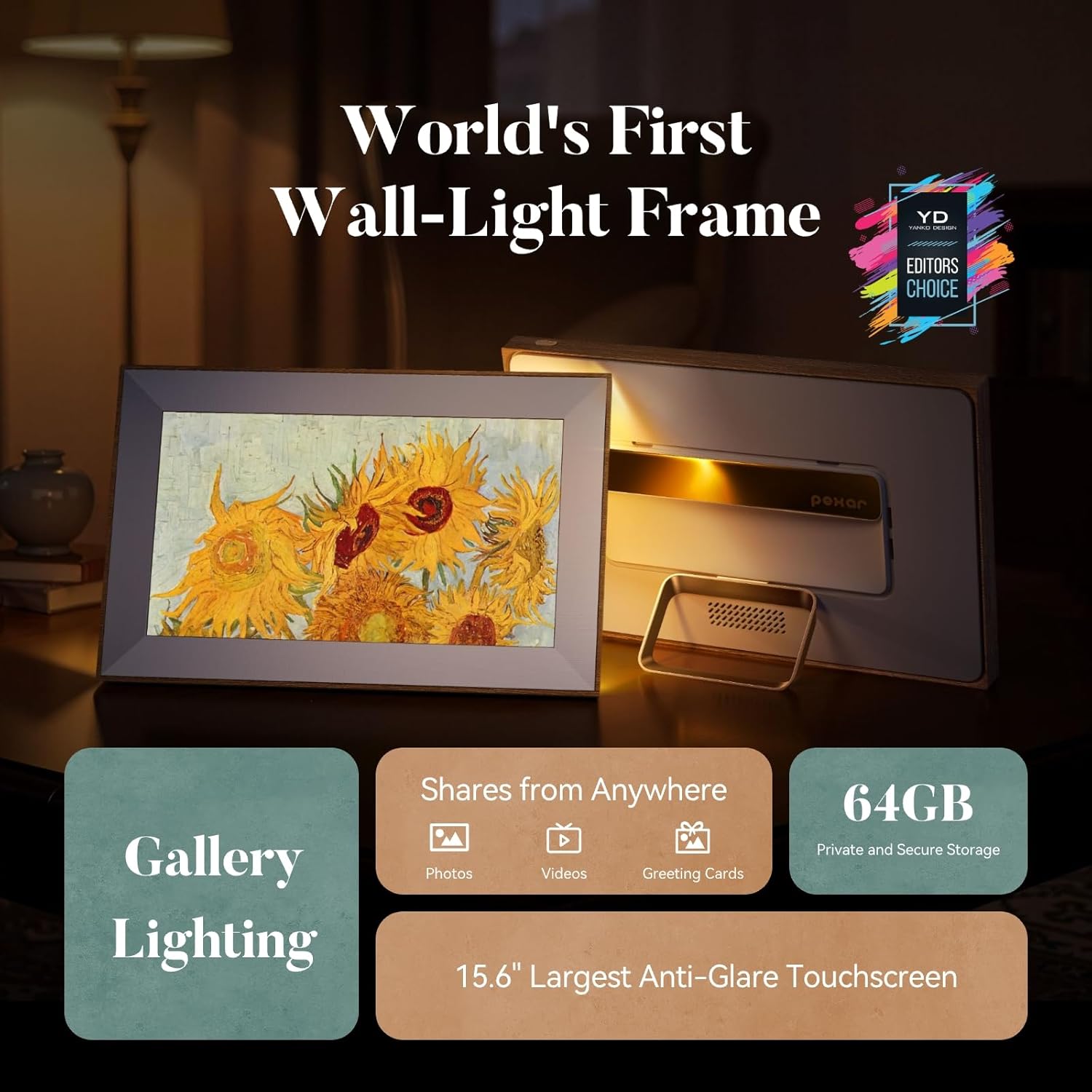




Pexar Starlight 15.6" Digital Picture Frame (Powered by Lexar), A Stunning, Large Anti-Glare Touchscreen with Vibrant Visuals for Gifting, Wedding, 64GB Local Storage, Share Photos/Videos via APP
This is an affiliate link. Buyyyah may earn a commission if you buy through it, at no extra cost to you.
Description
• Backlit by Built-in Gallery Lighting: Starlight features gallery lighting that comes from the back of the frame to add warmth and dimension to your wall display or accent table, with a special focus on your prized photos • Every Photo, Better Than Ever: The 1920x1080 resolution touchscreen serves up vibrant visuals on a stunning 15.6-inch display, support auto brightness adjustment. 2 Additionally, the anti-glare screen reduces distracting reflections from any angle while a sleek thin-bezel design with a metal stand supports both portrait and landscape implementation • Share Moments Anytime, Anywhere: Easy one-minute setup lets you quickly transfer photos and videos from your phone to the frame or you can share photos and videos from an SD card or USB drive.3 You can also send photos to multiple frames, simultaneously • Private, Secure, Worry-Free Storage: With 64GB of built-in storage, the frame holds more than 80,000 600KB-photos and you can add an SD card or USB flash drive for even more storage.4 Also, our frame is GDPR-, CCPA- and PSTI-compliant • Keeps Family Close: Invite friends and family to share photos/videos and react with a smile—stay connected even when apart • Smart and Useful: The frame boasts dual-orientation to display to both portrait and landscape shots and includes weather updates, a clock, and sleep mode. It also features a function that lets users turn a photo into a digital greeting card for special occasions and an album function for photo management
Details
General
- Brand
- pexar
- Model Number
- PX-156SSLGL
- Manufacturer
- Lexar Co.,LTD
- Manufacturer Part Number
- PX-156SSLGL
- Warranty Description
- 1-year manufacturer warranty.
- Color
- 15.6 in Starlight
- Frame Material
- Plastic
Display
- Resolution
- 1080p
- Display Size
- 15.6 Inches
- Aspect Ratio
- 16:9
- Touchscreen
- Touchscreen
Connectivity
- Compatible Devices
- Works with iOS and Android
- Connectivity Technology
- Wi-Fi
Power and Controls
- Power Source
- Corded Electric
- Control Method
- App
- Smart Home Compatibility
- Smart Home Compatible
Storage
- Memory Storage Capacity
- 64 GB
Dimensions
- Item Weight
- 2.36 Kilograms
- Item Dimensions L x W
- 16.6"L x 10.7"W
Frequently asked questions
- Can this frame display both portrait and landscape photos?
- Yes. The frame supports both portrait and landscape implementation and has dual-orientation to display both portrait and landscape shots.
- How can photos and videos be transferred to the frame?
- You can quickly transfer photos and videos from your phone in one minute, or share photos and videos from an SD card or USB drive.
- How much storage does the frame have?
- It has 64GB of built-in storage and can also use an SD card or USB flash drive for more storage.
Customer reviews

I'm in Heaven! You ** CAN ** have your cake and eat it! BUY THIS THING!
THIS is the answer to "What am I going to do with all those photos and movies?" "Is my photo collection just a hoarding vanity project never to be seen?" THIS IS YOUR SOLUTION! PROs: Top quality 1080p (really "2K" or 1200p vertical pixel density - which is even better! IPS type display panel) TOUCHscreen (you can finger swipe back and forth at any time). Good color depth, color and grayscale fidelity Good viewing angles, anti-glare coating. Plays back still photos and/or MPEG (.MP4) movies (with audio on or muted if you want). No hiccups or flakiness. Shuffle or timeline play. Shows tile title date - IF you want it. Shows current time of day in upper right corner (12 or 24 hr) IF you want it. Shows current temperature and sunny/cloudy/rain symbols - IF you want that. You don't have to buy the upgraded Frameo app if you don't want to. It works just fine (and I'm pretty happy) with the standard app. It's not too big and not too small. Two or three people could stand next to each other and enjoy the picture from a few feet away, yet the frame doesn't "take over". You can find a spot for it. The frame "matte" built into the black frame outline does a decent job of mimicking a real photo frame matte. You can use BOTH the internal storage and any docked external storage (USB or SD card) at the same time. Picture quality is GREAT out of the box. No need to fuss but you can control cropping and brightness if you want to. CONS: Must be powered by AC wall adapter. The darn thing works so well, I want to use it like a tablet, makes me wish it had an internal battery that would function for an hour or two when frame unplugged. Oh well, it's still a heck of a unit. I loaded my files with a tiny Samsung USB drive. You have to use either FAT32 or XFAT file system (NTFS file system pen drives will not be recognized). ~~~~~~~~~~~~~~~~~~~~~~~~~~~~~~~~~~~~~~~~~~~~~~~~~~~~~~~~~~~~~~ BOTTOM LINE: HIGHLY RECOMMENDED! We are very pleased. UPDATE 10/05/2024 IF YOU ARE HAVING PROBLEMS GETTING YOUR MOVIES TRANSFERRED and "RECOGNIZED" by the PEXAR. Technical tip to owners of Sony and Panasonic digital cameras as far as movies are concerned, something that might help your movie files get "recognized" by this Pexar device: If you have any 1080p (i.e. High Definition pixel density) MOVIE files created by your camera that have an .MTS file format (file extension), YOU'LL WANT TO RENAME THAT FILE EXTENSION TO BE: .MP4 (stands for Motion Picture Expert Group 4) file extension. You'll want to do this before transfering the files if you are using external storage (like USB-pen flash drive, SD ("Secure Digtal") card, etc. Once you do what is mentioned above, the PEXAR can then recognize these renamed movie files and play them just fine For the geeks or curious, MTS (aka MPEG Transport Stream) is a container wrapper of sorts for an MP4 file. Internet search will tell you how / why these variances of video formats came about. It doesn't matter, once you rename the file extension to .MP4, the movie will play just fine in the PEXAR frame. You want to "swim with the biggest school of fish" in the technical world of video (if you want the least hassle) and the .MP4 format is exactly that in the world of High Definition (HD) video. P.P.S. I also owned some ANCIENT home movies from a 12 year old Fuji digital camera taken in .AVI format (Audio Video Interleave). I had to do a file conversion of them to .MP4 format so the PEXAR could successfully play them. . I used a simple movie editing software (Windows Movie Maker - no longer made, but there are other conversion software utilities running around that can do the job). Once I did that, the movies shot in this old format play just fine in the Pexar frame. ABOUT VIDEO LENGTH: Some users have stated a 15 second video length limit. That has not been my personal experience. I successfully have this frame playing videos of 2 minutes long of my kitty cat wallering in the driveway. This is 24 fps (frames per second) .MP4 files. HOWEVER, you ** will ** get a warning that importing that large video will eat into your 32GB of internal memory. Such is life. NOTE: I am ** not ** relying on the paid subscription Frameo app. I just use a USB pen drive. Even with importing probably quantity: 6 X 2 or 3 minute length HD .MP4 videos, I still have somewhere around 8 or 10 GB of internal memory left at this point. P.P.S. WHAT FOLLOWS IS BORING, IT MAY HELP A FEW OF YOU WHO ARE NEW: Those of you with mega fancy cameras (full frame or APS-C Canon, Nikon, Sony, etc cams) that produce 20MB+ files: There is no need to fill up the internal memory in this frame with 20MB per photo file sizes, that is overkill and ridiculous. (My opinion). JPEG (or .JPG) is what you want as a file format type/medium for still photos with this frame. An 850KB to 1MB per picture JPEG file at 200 Pixels per inch ("pixel density") will do fine for 1080p viewing resolution and, if you want it a bit nicer (i.e. 1200dpi vertical , roughly "2K" viewing resolution) then bump up your saved file size to say 1.2MB per photo size. There are a lot of photo editing programs out there that will do "interpolation" to reduce / downsize your monster sized pure-overkill source file size to work with this 11" frame size display. (i.e. Photo software that will keep aspect ratio/proportion while reducing pixel density). You will gain some file "compression" when you downsize the file. So what? Few people can tell a difference on a frame of this size. Your goal should be to get things done while delivering a decent quality experience...right? You could, in a pinch, use one of those screen snipping software tools that comes native with your operating system and just select, snip, and capture a full screen display of the original photo/file AND THEN save that screen capture output (which will likely be 72 dots per inch (dpi) from the "clipboard" into a paint program as a JPEG. Very crude but it would get you by till you purchase a true photo editing program. Most beginners will be fine (or probably better served maybe) by a "lite" version photo editor. Again it's just my opinion. YMMV.
THIS is the answer to "What am I going to do with all those photos and movies?" "Is my photo collection just a hoarding vanity project never to be seen?" THIS IS YOUR SOLUTION! PROs: Top quality 1080p (really "2K" or 1200p vertical pixel density - which is even better! IPS type display panel) TOUCHscreen (you can finger swipe back and forth at any time). Good color depth, color and grayscale fidelity Good viewing angles, anti-glare coating. Plays back still photos and/or MPEG (.MP4) movies (with audio on or muted if you want). No hiccups or flakiness. Shuffle or timeline play. Shows tile title date - IF you want it. Shows current time of day in upper right corner (12 or 24 hr) IF you want it. Shows current temperature and sunny/cloudy/rain symbols - IF you want that. You don't have to buy the upgraded Frameo app if you don't want to. It works just fine (and I'm pretty happy) with the standard app. It's not too big and not too small. Two or three people could stand next to each other and enjoy the picture from a few feet away, yet the frame doesn't "take over". You can find a spot for it. The frame "matte" built into the black frame outline does a decent job of mimicking a real photo frame matte. You can use BOTH the internal storage and any docked external storage (USB or SD card) at the same time. Picture quality is GREAT out of the box. No need to fuss but you can control cropping and brightness if you want to. CONS: Must be powered by AC wall adapter. The darn thing works so well, I want to use it like a tablet, makes me wish it had an internal battery that would function for an hour or two when frame unplugged. Oh well, it's still a heck of a unit. I loaded my files with a tiny Samsung USB drive. You have to use either FAT32 or XFAT file system (NTFS file system pen drives will not be recognized). ~~~~~~~~~~~~~~~~~~~~~~~~~~~~~~~~~~~~~~~~~~~~~~~~~~~~~~~~~~~~~~ BOTTOM LINE: HIGHLY RECOMMENDED! We are very pleased. UPDATE 10/05/2024 IF YOU ARE HAVING PROBLEMS GETTING YOUR MOVIES TRANSFERRED and "RECOGNIZED" by the PEXAR. Technical tip to owners of Sony and Panasonic digital cameras as far as movies are concerned, something that might help your movie files get "recognized" by this Pexar device: If you have any 1080p (i.e. High Definition pixel density) MOVIE files created by your camera that have an .MTS file format (file extension), YOU'LL WANT TO RENAME THAT FILE EXTENSION TO BE: .MP4 (stands for Motion Picture Expert Group 4) file extension. You'll want to do this before transfering the files if you are using external storage (like USB-pen flash drive, SD ("Secure Digtal") card, etc. Once you do what is mentioned above, the PEXAR can then recognize these renamed movie files and play them just fine For the geeks or curious, MTS (aka MPEG Transport Stream) is a container wrapper of sorts for an MP4 file. Internet search will tell you how / why these variances of video formats came about. It doesn't matter, once you rename the file extension to .MP4, the movie will play just fine in the PEXAR frame. You want to "swim with the biggest school of fish" in the technical world of video (if you want the least hassle) and the .MP4 format is exactly that in the world of High Definition (HD) video. P.P.S. I also owned some ANCIENT home movies from a 12 year old Fuji digital camera taken in .AVI format (Audio Video Interleave). I had to do a file conversion of them to .MP4 format so the PEXAR could successfully play them. . I used a simple movie editing software (Windows Movie Maker - no longer made, but there are other conversion software utilities running around that can do the job). Once I did that, the movies shot in this old format play just fine in the Pexar frame. ABOUT VIDEO LENGTH: Some users have stated a 15 second video length limit. That has not been my personal experience. I successfully have this frame playing videos of 2 minutes long of my kitty cat wallering in the driveway. This is 24 fps (frames per second) .MP4 files. HOWEVER, you ** will ** get a warning that importing that large video will eat into your 32GB of internal memory. Such is life. NOTE: I am ** not ** relying on the paid subscription Frameo app. I just use a USB pen drive. Even with importing probably quantity: 6 X 2 or 3 minute length HD .MP4 videos, I still have somewhere around 8 or 10 GB of internal memory left at this point. P.P.S. WHAT FOLLOWS IS BORING, IT MAY HELP A FEW OF YOU WHO ARE NEW: Those of you with mega fancy cameras (full frame or APS-C Canon, Nikon, Sony, etc cams) that produce 20MB+ files: There is no need to fill up the internal memory in this frame with 20MB per photo file sizes, that is overkill and ridiculous. (My opinion). JPEG (or .JPG) is what you want as a file format type/medium for still photos with this frame. An 850KB to 1MB per picture JPEG file at 200 Pixels per inch ("pixel density") will do fine for 1080p viewing resolution and, if you want it a bit nicer (i.e. 1200dpi vertical , roughly "2K" viewing resolution) then bump up your saved file size to say 1.2MB per photo size. There are a lot of photo editing programs out there that will do "interpolation" to reduce / downsize your monster sized pure-overkill source file size to work with this 11" frame size display. (i.e. Photo software that will keep aspect ratio/proportion while reducing pixel density). You will gain some file "compression" when you downsize the file. So what? Few people can tell a difference on a frame of this size. Your goal should be to get things done while delivering a decent quality experience...right? You could, in a pinch, use one of those screen snipping software tools that comes native with your operating system and just select, snip, and capture a full screen display of the original photo/file AND THEN save that screen capture output (which will likely be 72 dots per inch (dpi) from the "clipboard" into a paint program as a JPEG. Very crude but it would get you by till you purchase a true photo editing program. Most beginners will be fine (or probably better served maybe) by a "lite" version photo editor. Again it's just my opinion. YMMV.

Great high res-display, wifi or subscription not required
This is what a high quality digital photo frame should be. It has a simple design, great matte display, high resolution and great color accuracy and viewing angles. I have tested the frame with some of my B&W photos, and they have a nice neutral color... not overly blue. I may still add some warmth to my B&W photos, but again that is a personal preference. Set up was simple without using wifi and I was able to easily add photos from a usb drive. I did connect to wifi to check the firmware, and an update was available and easily installed without any issues. The touch screen is very responsive, and the ability to remember each photos settings is a nice addition. The ability to set a schedule to turn off the display was easy to configure. The brightness out of the box was very high for my tastes, but was easily turned down to a much more appropriate level. I would have preferred a 4x3 ratio display over the frames 5x3 due to the cropping that needs to happen on most of my photos, but it is slightly better than the overly narrow 16x9 ratio of many other frames. I was actually going to pick up the larger 15.6 inch display, but that is 16x9 and lower resolution than this 11" model. I would love to see a larger, higher-res version of this frame in a 4x3 aspect ratio.
This is what a high quality digital photo frame should be. It has a simple design, great matte display, high resolution and great color accuracy and viewing angles. I have tested the frame with some of my B&W photos, and they have a nice neutral color... not overly blue. I may still add some warmth to my B&W photos, but again that is a personal preference. Set up was simple without using wifi and I was able to easily add photos from a usb drive. I did connect to wifi to check the firmware, and an update was available and easily installed without any issues. The touch screen is very responsive, and the ability to remember each photos settings is a nice addition. The ability to set a schedule to turn off the display was easy to configure. The brightness out of the box was very high for my tastes, but was easily turned down to a much more appropriate level. I would have preferred a 4x3 ratio display over the frames 5x3 due to the cropping that needs to happen on most of my photos, but it is slightly better than the overly narrow 16x9 ratio of many other frames. I was actually going to pick up the larger 15.6 inch display, but that is 16x9 and lower resolution than this 11" model. I would love to see a larger, higher-res version of this frame in a 4x3 aspect ratio.

Love this frame!
This review is for the Pexar Starlight 15.5” digital frame. Shipping was fast and the product packaging is excellent. It came with two different types of plugs so those who are not in the USA can still use it. A stand is provided if needed and holes to hang in landscape or portrait mode. The matting is textured and is a mat finish. The frame is faux wood grain in a pretty goldish tan (see pic). The frame is clear and bright with vivid colors. You can have the backlight on or off and adjust the brightness. The size is perfect for me. Large enough to be able to tell what the picture is from across the room, yet small enough you don’t feel silly having a goofy picture of your husband up on the wall that is life size! Lol. I LOVE that you can adjust the photo as it is being displayed if needed. My old frame I would have to go the the library and search thousands of photos for it then delete it and correct the issue on my phone and then resend it (such as how it fills the screen up). I have had no issue with the app and am just using the free level. The photos send quickly and the app is easy to use. I have had this frame since November 3 2025 with no issues and I would definitely buy again.
This review is for the Pexar Starlight 15.5” digital frame. Shipping was fast and the product packaging is excellent. It came with two different types of plugs so those who are not in the USA can still use it. A stand is provided if needed and holes to hang in landscape or portrait mode. The matting is textured and is a mat finish. The frame is faux wood grain in a pretty goldish tan (see pic). The frame is clear and bright with vivid colors. You can have the backlight on or off and adjust the brightness. The size is perfect for me. Large enough to be able to tell what the picture is from across the room, yet small enough you don’t feel silly having a goofy picture of your husband up on the wall that is life size! Lol. I LOVE that you can adjust the photo as it is being displayed if needed. My old frame I would have to go the the library and search thousands of photos for it then delete it and correct the issue on my phone and then resend it (such as how it fills the screen up). I have had no issue with the app and am just using the free level. The photos send quickly and the app is easy to use. I have had this frame since November 3 2025 with no issues and I would definitely buy again.


Beautiful Digital Frame That Everyone Compliments
I really enjoy this digital picture frame. Every time someone visits, they comment on how nice it looks and how the pictures almost seem like real printed photos. The screen is sharp, the colors are vibrant, and the anti-glare finish makes it look premium in any lighting. It feels like a high-end piece of decor, not just another tech gadget. One thing I recommend is taking a little extra time to prepare your photos before adding them. Use software to crop them to the right aspect ratio and get them as high resolution as possible. With AI photo editing tools available now, it is easy to upscale and adjust your pictures so they look perfect on the frame. Doing that really makes a huge difference in making the digital pictures look like "real" photos. It was simple to set up, sharing photos through the app is seamless, and the build quality is excellent. It looks and feels premium, and I would buy another one without hesitation. If you are thinking about getting a digital picture frame, this one is a fantastic choice.
I really enjoy this digital picture frame. Every time someone visits, they comment on how nice it looks and how the pictures almost seem like real printed photos. The screen is sharp, the colors are vibrant, and the anti-glare finish makes it look premium in any lighting. It feels like a high-end piece of decor, not just another tech gadget. One thing I recommend is taking a little extra time to prepare your photos before adding them. Use software to crop them to the right aspect ratio and get them as high resolution as possible. With AI photo editing tools available now, it is easy to upscale and adjust your pictures so they look perfect on the frame. Doing that really makes a huge difference in making the digital pictures look like "real" photos. It was simple to set up, sharing photos through the app is seamless, and the build quality is excellent. It looks and feels premium, and I would buy another one without hesitation. If you are thinking about getting a digital picture frame, this one is a fantastic choice.


