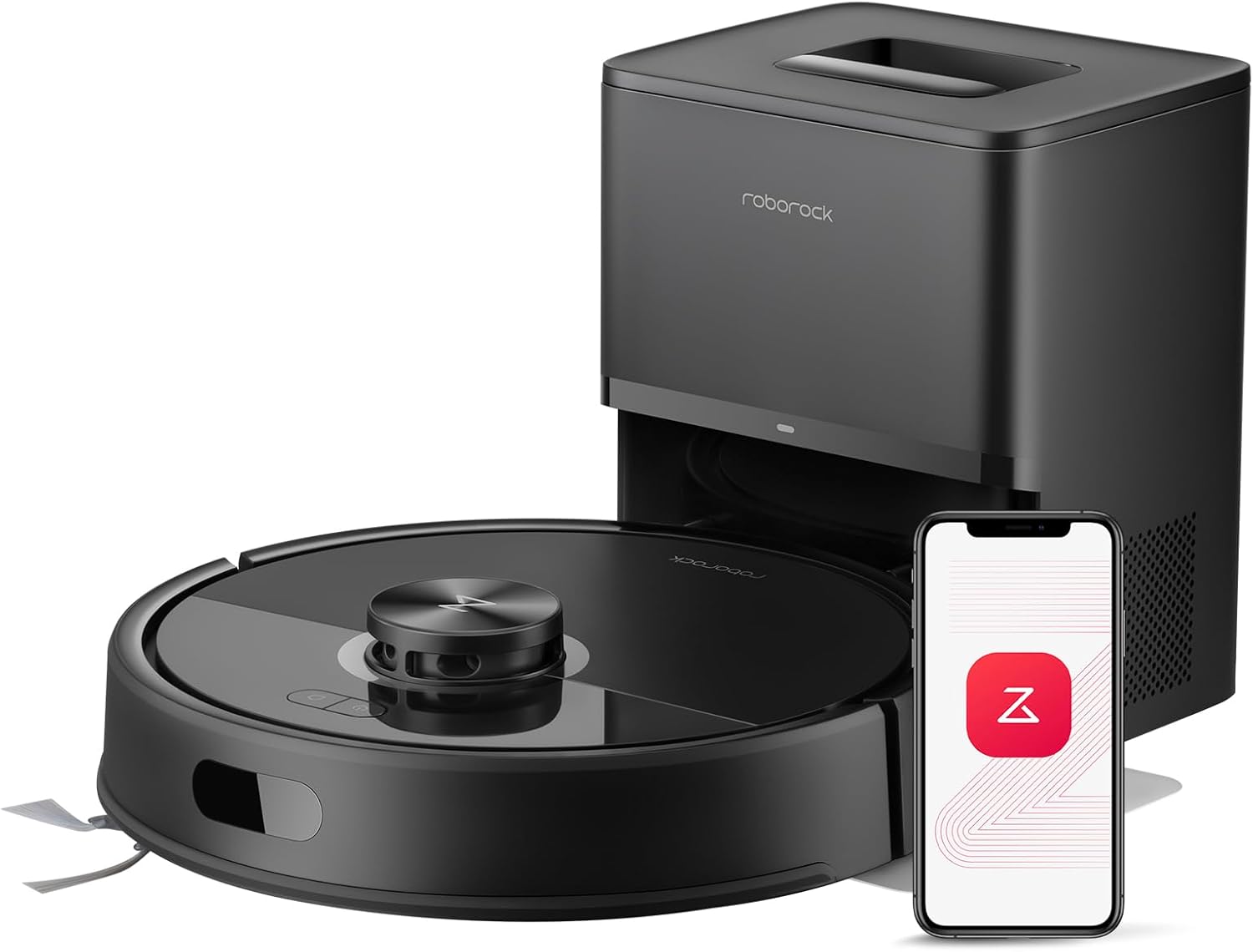


roborock Q7 M5+ Robot Vacuum and Mop, Upgraded from Q5 Max+, Up to 7-9 Weeks Self-Empty, 10000Pa Suction, Dual Anti-Tangle System for Pet Hair & Carpet, PreciSense LiDAR Navigation, App Control, Black
This is an affiliate link. Buyyyah may earn a commission if you buy through it, at no extra cost to you.
Description
- 7-Weeks Hands Free Cleaning: With a 2.7L sealed dust bag, the RockDock Plus efficiently collects pet hair, dirt, and debris without the need for constant emptying. This means longer cleaning cycles and more time between maintenance, ensuring your home stays consistently clean. - 10000Pa HyperForce Suction Power: High-performance suction lifts pet hair and debris from every surface, reaching deep into carpets and along edges for a thorough clean in every pass. - Dual Anti-Tangle Design: Spend less time detangling and more time enjoying your day. The JawScrapers main brush and 0% hair-tangling side brush resist pet hair wrap, even from long-haired breeds. With fewer cleaning interruptions, your robot stays ready with minimal effort. - Removes Dust You Hardly See: This advanced system combines vacuuming and mopping in one go, effectively capturing even the finest dust that traditional vacuuming may leave behind. With three adjustable water flow settings, you can tailor the cleaning power to meet your specific needs. - PreciSense LiDAR Navigation System: PreciSense LiDAR maps your home with precision, ensuring efficient and thorough cleaning. Its real-time mapping technology enables optimized cleaning paths, perfect for homes with pets and multiple rooms. - Multiple Ways to Control: Take charge of your Roborock through the Roborock App and enjoy hands-free control. Whether you're relaxing at home or on the go, experience personalized and effortless cleaning without lifting a finger. - Easy and Effortless Control with the Roborock App: Automate your cleaning routine with scheduled cleanings, start a quick spot clean when needed, set no-go zones around pet areas, and monitor progress and battery life in real time. All of these features are easily accessible from your smartphone, offering you greater convenience and control. Please note that the app supports 2.4GHz Wi-Fi only.
Details
Features & Specs
- Surface Recommendation
- Wood, Tile, Marble, Carpet
- Other Special Features of the Product
- 7-Weeks Hands Free Self Emptying, 10000Pa HyperForce Suction Power, App Control, Dual Anti-Tangle Design, VibraRise 2.0, PreciSense LiDAR Navigation
- Controller Type
- App Control
- Filter Type
- Cartridge
- Battery Life
- 150 minutes
- Cleaning Path Width
- 12.8 Inches
- Battery Type
- Lithium Ion
- Voltage
- 120 Volts
- Power Source
- Battery Powered
- Batteries are Included
- Yes
- Control Method
- Push Button
- Compatible Devices
- Smartphones
- Form Factor
- rectangular
- Color
- Black01
- Recommended Uses For Product
- Pet hair management, general household cleaning
- Number of Power Levels
- 4
- Noise Level
- 65 Decibels
- Portable
- No
- Indoor Outdoor Usage
- Indoor
- Number of Wheels
- 2
Measurements
- Item Dimensions L x W x H
- 19.57"L x 12.8"W x 10.24"H
- Item Weight
- 10.58 Pounds
Item Details
- Brand Name
- roborock
- Model Name
- RRA0TCP, RRA0TAC
- Included Components
- Quick Start Guide(1) Moisture-Proof Mat(1) User Manual(1) Robot(1) Mop Module(1) Auto-Empty Dock(1) Power Cord(1) Mop(1)
- Model Number
- RRA0TCP, RRA0TAC
- Number of Items
- 1
- Item Type Name
- Robotic Vacuum Cleaner
- Manufacturer
- roborock
- Unit Count
- 1.0 Count
Frequently asked questions
- How long does the battery last on a single charge?
- The battery life is 150 minutes.
- What floor types can this robot vacuum and mop handle?
- It is recommended for wood, tile, marble, and carpet surfaces.
- Does the robot have a self-emptying feature?
- Yes, it features 7-Weeks Hands Free Self Emptying with a 2.7L sealed dust bag that collects pet hair, dirt, and debris.
Customer reviews

what an amazing little robot
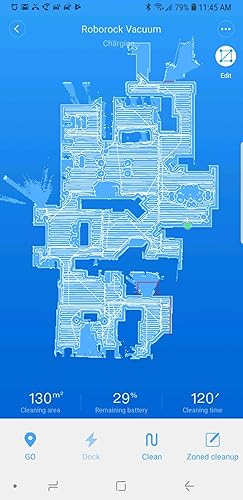
1 month Update: So, I've owned this little robot (we named him "Rocky") for 1 month now. A few observations: - The app is awesome. It gives you a notification when he starts up every day and you can watch him as he cleans the house. I've only noticed a couple bugs. First, when I was trying to show him off to some relatives over dinner one evening, I realized we had had the bedroom door closed that day so he didn't clean our bedroom. So, I set up a zone cleanup for our bedroom. He started up, backed away from the dock, did a few circles for a few minutes and finally just went back to the dock. I tried several times all with the same result. I tried a different zone in the house and he cleaned that just fine but he absolutely refused to go to the bedroom. I think perhaps since he couldn't get into the bedroom during the normal cleaning that day that area was technically "off the map?". I don't know, but that's the only time I've seen that happen. 2nd, we moved our couches (actually just laid 2 of them on their backs and moved the 3rd one to a different part of the room) and again I started him up for a zone cleanup in that area so he'd clean under the couches. Boy did he get confused. He actually strayed completely out of the zone and started trying to clean a whole other area. I think moving most of the large furniture in the room really confused him. I sent him back to the base and tried it again and he did better the 2nd time. -Maintenance: So I still wish they'd come out with a main roller brush that had removable caps. The hardest part of cleaning it, as others have mentioned is getting the hair that's wound around the inside of the caps off. Strangely enough, the very first time I cleaned the brush, it had many long hairs wound around the entire brush, making it quite difficult to clean, just like my first generation Roomba. Unlike the Roomba though, it was just that first time. I just cleaned him up after neglecting him for a couple weeks and while there was plenty of hair wound around the end caps, there was almost none wound around the rest of the brush. Other than that, maintenance is very easy. The app reminds you when it's time to perform various maintenance tasks, which is very helpful. Once again, cleaning out the dust bin is far easier than any other vacuum I've seen. So while the dust bin is smaller than some other robots, it's easier to get to and easier to clean. -Most spectacularly, since I have the map all set up now and I now have the red barrier tape lines (the little red lines you can draw on the map using the app) exactly where I want them, can you believe that in a month's worth of cleaning he's never gotten stuck even once? I knew the few places where roomba would always get stuck and predicted where Rocky would also likely get stuck, just drew in barrier tape to prevent him from getting to those problematic locations and poof, no more getting stuck. This part of the app appears to work flawlessly. So, overall, I am still extremely satisfied with this little Robot and I'm still happy to give it 5 stars. Someone said something about fake reviews on this product. This is not a fake review. I'm a former Roomba owner (several generations of Roombas, actually) and got tired of various Roomba problems (described below) and so went searching for a different option. I'll leave my first impressions here, since this amazing little robot has completed a couple cleanings now, and will update this review in a couple months if any problems crop up. 1. The foreign thing. Yep, it's definitely a Chinese robot. The manual has some awkward typos, typical of Chinese products, although not as bad as others that I've seen. I was a little concerned about quality, and customer service, since it's an overseas company, and still am, and will update in future months if this becomes a problem. On the flip side, you can change the language the robot speaks in the app. It's silly, but fun, because there are about a dozen different chinese voices you can choose from, one of which sounds an aweful lot like one of those giant transformer robots. I can't understand a dang thing it's saying, but it's fun. Changing it back to English is super easy as well. Just one click inside the app. 2. The setup was a little odd. Connecting to my home's wifi network wasn't explained very well. I downloaded the Mi Home app and expected it to tell me to connect to a wifi provided by the Roborock (like the Roomba 960 does) and then use that connection to configure the robot, but it didn't. I have no idea how it works, but after I downloaded the Mi Home app, it just asked me to move closer to the robot and then asked me for the network and password and next thing I know, Roborock is announcing that it was connected to the wifi. Somehow, the Mi Home app on my phone was able to communicate with the robot without me ever having to establish a connection between the two. Scary? A little? Oh well. Moving on. 3. Updating the firmware: Ok, don't get impatient with this. Since this was the first thing I did after getting the robot connected, I got a little impatient at how long it was taking to update the firmware and exited the app. I went back into it and restarted the update. Thankfully, that didn't screw anything up and the 2nd time I just waited it out. It took, no kidding, like, 10 minutes. Long enough to make me sure it wasn't going to work, but eventually, it did. I'd advise being patient here, because interrupting a firmware update in the middle can cause serious and unfixable errors. 4. That's another odd thing about the app. Several times now, when I've tried to do something in the app (like setting up the "Timer" (you know it as "The Schedule", they call it "Timer", in another example of the somewhat awkward Chinese syntax in some places) I got an error from the app that I didn't have a network connection. I did, of course. I tried it a little later and it worked fine. As I said, that has happened a couple different times in a couple different places in the app. Not sure why, but trying again a little later has always worked. 5. Finally, performance. Ok, so problems and quirks out of the way, here's the good parts. Man I love this little Robot. First off, it maps out your home using it's magical little laser. This way, it knows where everything's at. Then, as its approaching, say, your expensive dining room table leg, instead of ramming into it at full speed like Roomba loves to do, a few inches from the leg, it will slow to a crawl and very gingerly, bump the leg. Can't even really call it a "bump". It more just touches it. Very, very gentle. I LOVE that. I hated the way Roomba treated my furniture like a bull in a china shop (Roomba has literally knocked TV trays over rampaging around the house the way it does..) and I'm pretty sure that's one of the reasons I was constantly having to repair it. Also, it moves at a more stately pace than Roomba does. I see this as a very good thing. We have tile floors in the kitchen and Roomba rumbling across those tiles sounded like a truck unloading a ton of bricks. You can still hear Roborock click clacking across the tiles, but it's much, much quieter about it, either because the wheels are softer or because it's moving more slowly. Not sure, but I'm just happy it's so much quieter and I imagine that will result in less wear and tear on the machine as well. Speaking of quiet, it is. It does sound like a vacuum cleaner, just far quieter. Someone else mentioned it's about as loud as a microwave. I dunno if it's that quiet, but it's certainly tolerable. You can have a conversation in the room with it while it's cleaning, although you'd probably have to turn up the TV a tad to hear it. I guess it's about as loud as my wife using her blow dryer in the next room. You can hear it, but can still function completely normally. You don't feel like you have to leave the room, or the house.. Not bad at all. Finally, that app. Ok, so I am in love with the map and the ability to edit it. Someone in one of the many, many reviews I looked at before I bought this little guy said that this is the wave of the future when it comes to robo vacuums and I totally agree. Screw magnetic tape, and invisible wall towers and all that other junk. After this little guy maps out your house you can edit the map and just draw little lines on the map where you don't want it to go. For instance, referencing the pic I've attached to this review, see the longish red line in the bottom right hand corner of the map? That's our bathroom. We have tile floors in there too so my wife has a big throw rug in front of the bathroom cabinets because her feet get cold. Unfortunately, Roomba, in the rare moments it actually made it into our bathroom, would get stuck on top of that rug and under the cabinets. Like, not occasionally. Like, every. Damn. Time. They make these robots just the right height to fit under cabinets and that rug meant it was just tall enough to get wedged under the cabinet and hopelessly stuck. Same thing with RoboRock. It got in the bathroom and while it didn't get stuck, it struggled to free itself in the same spot that Roomba would always get stuck. So, I just drew a line across the front of the cabinets and voila, now it will stay a few inches away from the cabinets. Also, see the "U" shaped red lines in that same bathroom? That's our closet. Roomba would go in there and get hung up on my wife's long dresses. So, for Roborock, I drew that little U so that it will go into the closet, clean a little in the middle of the closet where there's nothing it can get hung up on, but stay out from under the clothing. Just brilliant. Finally, the cleaning pattern is also brilliant. It will box out a little section, outlining it and determining where everything is, then clean inside that section, then move onto the next. It's extremely efficient and works amazingly well. That solved yet another frustration with Roomba. So, while I'm sitting at my desk, working from home, Roomba would come along and butt into my chair. I'd move and it would clean under the desk. 5 minutes later it'd be back, butting into my chair ... again. And again. And yet again... Roomba very nearly got tossed across the room a few times when it interrupted me, multiple times, in the middle of doing something important. More often, I'd just turn the damn thing off and our floors wouldn't get cleaned. Roborock, however, will venture into my office and when it does, I get out of the way. I can do so because I have the app pulled up on my phone and can see where it will be heading to next. I get of the way, it cleans under my desk, efficiently, going over everything exactly once, and the away it goes, not to be seen again. Puuuuuurrrrrfect. So, long review, I know, and I don't usually post such long reviews, but after years of frustration with Roomba, this little guy has solved so many of them. I couldn't be happier. If that changes, I'll be sure to post an update. Oh, one other thing. Others have mentioned the dust bin is small. It is. And that is a bit unfortunate. It fills up pretty darned fast. Fortunately, it's far easier to access and clean out than even the Roomba 960s was. Emptying Roombas was a whole process. It was narrow and the door barely hinges open. Then, there's no way to really "tap" the filter clean, so you have to remove that and bang it against the inside of the garbage can. It just kinda takes a little while to do it and it's annoying. Roborocks is far, far easier. Open the little door, tap a few times on the filter with the palm of your hand and bam, clean. Much, much faster. Anyhow, the first cleaning, I cleaned the bin out 4 times and it was full every time. Hopefully, since it covers 100% of the house every time, it'll accumulate less stuff in there and I can go back to just cleaning it out once a day. Also, we have relatives visiting, and they brought their 2 huskys with them, so the amount of dog hair Roborock has to clean up should go down significantly after they leave. I'll post an update in a couple weeks letting you know how that's going.
1 month Update: So, I've owned this little robot (we named him "Rocky") for 1 month now. A few observations: - The app is awesome. It gives you a notification when he starts up every day and you can watch him as he cleans the house. I've only noticed a couple bugs. First, when I was trying to show him off to some relatives over dinner one evening, I realized we had had the bedroom door closed that day so he didn't clean our bedroom. So, I set up a zone cleanup for our bedroom. He started up, backed away from the dock, did a few circles for a few minutes and finally just went back to the dock. I tried several times all with the same result. I tried a different zone in the house and he cleaned that just fine but he absolutely refused to go to the bedroom. I think perhaps since he couldn't get into the bedroom during the normal cleaning that day that area was technically "off the map?". I don't know, but that's the only time I've seen that happen. 2nd, we moved our couches (actually just laid 2 of them on their backs and moved the 3rd one to a different part of the room) and again I started him up for a zone cleanup in that area so he'd clean under the couches. Boy did he get confused. He actually strayed completely out of the zone and started trying to clean a whole other area. I think moving most of the large furniture in the room really confused him. I sent him back to the base and tried it again and he did better the 2nd time. -Maintenance: So I still wish they'd come out with a main roller brush that had removable caps. The hardest part of cleaning it, as others have mentioned is getting the hair that's wound around the inside of the caps off. Strangely enough, the very first time I cleaned the brush, it had many long hairs wound around the entire brush, making it quite difficult to clean, just like my first generation Roomba. Unlike the Roomba though, it was just that first time. I just cleaned him up after neglecting him for a couple weeks and while there was plenty of hair wound around the end caps, there was almost none wound around the rest of the brush. Other than that, maintenance is very easy. The app reminds you when it's time to perform various maintenance tasks, which is very helpful. Once again, cleaning out the dust bin is far easier than any other vacuum I've seen. So while the dust bin is smaller than some other robots, it's easier to get to and easier to clean. -Most spectacularly, since I have the map all set up now and I now have the red barrier tape lines (the little red lines you can draw on the map using the app) exactly where I want them, can you believe that in a month's worth of cleaning he's never gotten stuck even once? I knew the few places where roomba would always get stuck and predicted where Rocky would also likely get stuck, just drew in barrier tape to prevent him from getting to those problematic locations and poof, no more getting stuck. This part of the app appears to work flawlessly. So, overall, I am still extremely satisfied with this little Robot and I'm still happy to give it 5 stars. Someone said something about fake reviews on this product. This is not a fake review. I'm a former Roomba owner (several generations of Roombas, actually) and got tired of various Roomba problems (described below) and so went searching for a different option. I'll leave my first impressions here, since this amazing little robot has completed a couple cleanings now, and will update this review in a couple months if any problems crop up. 1. The foreign thing. Yep, it's definitely a Chinese robot. The manual has some awkward typos, typical of Chinese products, although not as bad as others that I've seen. I was a little concerned about quality, and customer service, since it's an overseas company, and still am, and will update in future months if this becomes a problem. On the flip side, you can change the language the robot speaks in the app. It's silly, but fun, because there are about a dozen different chinese voices you can choose from, one of which sounds an aweful lot like one of those giant transformer robots. I can't understand a dang thing it's saying, but it's fun. Changing it back to English is super easy as well. Just one click inside the app. 2. The setup was a little odd. Connecting to my home's wifi network wasn't explained very well. I downloaded the Mi Home app and expected it to tell me to connect to a wifi provided by the Roborock (like the Roomba 960 does) and then use that connection to configure the robot, but it didn't. I have no idea how it works, but after I downloaded the Mi Home app, it just asked me to move closer to the robot and then asked me for the network and password and next thing I know, Roborock is announcing that it was connected to the wifi. Somehow, the Mi Home app on my phone was able to communicate with the robot without me ever having to establish a connection between the two. Scary? A little? Oh well. Moving on. 3. Updating the firmware: Ok, don't get impatient with this. Since this was the first thing I did after getting the robot connected, I got a little impatient at how long it was taking to update the firmware and exited the app. I went back into it and restarted the update. Thankfully, that didn't screw anything up and the 2nd time I just waited it out. It took, no kidding, like, 10 minutes. Long enough to make me sure it wasn't going to work, but eventually, it did. I'd advise being patient here, because interrupting a firmware update in the middle can cause serious and unfixable errors. 4. That's another odd thing about the app. Several times now, when I've tried to do something in the app (like setting up the "Timer" (you know it as "The Schedule", they call it "Timer", in another example of the somewhat awkward Chinese syntax in some places) I got an error from the app that I didn't have a network connection. I did, of course. I tried it a little later and it worked fine. As I said, that has happened a couple different times in a couple different places in the app. Not sure why, but trying again a little later has always worked. 5. Finally, performance. Ok, so problems and quirks out of the way, here's the good parts. Man I love this little Robot. First off, it maps out your home using it's magical little laser. This way, it knows where everything's at. Then, as its approaching, say, your expensive dining room table leg, instead of ramming into it at full speed like Roomba loves to do, a few inches from the leg, it will slow to a crawl and very gingerly, bump the leg. Can't even really call it a "bump". It more just touches it. Very, very gentle. I LOVE that. I hated the way Roomba treated my furniture like a bull in a china shop (Roomba has literally knocked TV trays over rampaging around the house the way it does..) and I'm pretty sure that's one of the reasons I was constantly having to repair it. Also, it moves at a more stately pace than Roomba does. I see this as a very good thing. We have tile floors in the kitchen and Roomba rumbling across those tiles sounded like a truck unloading a ton of bricks. You can still hear Roborock click clacking across the tiles, but it's much, much quieter about it, either because the wheels are softer or because it's moving more slowly. Not sure, but I'm just happy it's so much quieter and I imagine that will result in less wear and tear on the machine as well. Speaking of quiet, it is. It does sound like a vacuum cleaner, just far quieter. Someone else mentioned it's about as loud as a microwave. I dunno if it's that quiet, but it's certainly tolerable. You can have a conversation in the room with it while it's cleaning, although you'd probably have to turn up the TV a tad to hear it. I guess it's about as loud as my wife using her blow dryer in the next room. You can hear it, but can still function completely normally. You don't feel like you have to leave the room, or the house.. Not bad at all. Finally, that app. Ok, so I am in love with the map and the ability to edit it. Someone in one of the many, many reviews I looked at before I bought this little guy said that this is the wave of the future when it comes to robo vacuums and I totally agree. Screw magnetic tape, and invisible wall towers and all that other junk. After this little guy maps out your house you can edit the map and just draw little lines on the map where you don't want it to go. For instance, referencing the pic I've attached to this review, see the longish red line in the bottom right hand corner of the map? That's our bathroom. We have tile floors in there too so my wife has a big throw rug in front of the bathroom cabinets because her feet get cold. Unfortunately, Roomba, in the rare moments it actually made it into our bathroom, would get stuck on top of that rug and under the cabinets. Like, not occasionally. Like, every. Damn. Time. They make these robots just the right height to fit under cabinets and that rug meant it was just tall enough to get wedged under the cabinet and hopelessly stuck. Same thing with RoboRock. It got in the bathroom and while it didn't get stuck, it struggled to free itself in the same spot that Roomba would always get stuck. So, I just drew a line across the front of the cabinets and voila, now it will stay a few inches away from the cabinets. Also, see the "U" shaped red lines in that same bathroom? That's our closet. Roomba would go in there and get hung up on my wife's long dresses. So, for Roborock, I drew that little U so that it will go into the closet, clean a little in the middle of the closet where there's nothing it can get hung up on, but stay out from under the clothing. Just brilliant. Finally, the cleaning pattern is also brilliant. It will box out a little section, outlining it and determining where everything is, then clean inside that section, then move onto the next. It's extremely efficient and works amazingly well. That solved yet another frustration with Roomba. So, while I'm sitting at my desk, working from home, Roomba would come along and butt into my chair. I'd move and it would clean under the desk. 5 minutes later it'd be back, butting into my chair ... again. And again. And yet again... Roomba very nearly got tossed across the room a few times when it interrupted me, multiple times, in the middle of doing something important. More often, I'd just turn the damn thing off and our floors wouldn't get cleaned. Roborock, however, will venture into my office and when it does, I get out of the way. I can do so because I have the app pulled up on my phone and can see where it will be heading to next. I get of the way, it cleans under my desk, efficiently, going over everything exactly once, and the away it goes, not to be seen again. Puuuuuurrrrrfect. So, long review, I know, and I don't usually post such long reviews, but after years of frustration with Roomba, this little guy has solved so many of them. I couldn't be happier. If that changes, I'll be sure to post an update. Oh, one other thing. Others have mentioned the dust bin is small. It is. And that is a bit unfortunate. It fills up pretty darned fast. Fortunately, it's far easier to access and clean out than even the Roomba 960s was. Emptying Roombas was a whole process. It was narrow and the door barely hinges open. Then, there's no way to really "tap" the filter clean, so you have to remove that and bang it against the inside of the garbage can. It just kinda takes a little while to do it and it's annoying. Roborocks is far, far easier. Open the little door, tap a few times on the filter with the palm of your hand and bam, clean. Much, much faster. Anyhow, the first cleaning, I cleaned the bin out 4 times and it was full every time. Hopefully, since it covers 100% of the house every time, it'll accumulate less stuff in there and I can go back to just cleaning it out once a day. Also, we have relatives visiting, and they brought their 2 huskys with them, so the amount of dog hair Roborock has to clean up should go down significantly after they leave. I'll post an update in a couple weeks letting you know how that's going.
Excellent Robotic Vaccuum with Lots of Features
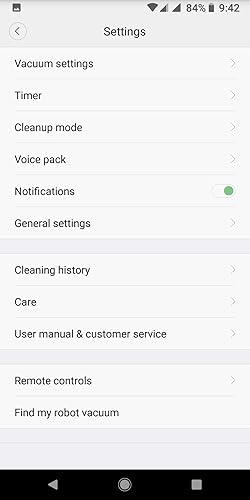
A Little Background: This review is coming from someone who works in the IT industry, so I'm very comfortable with technology. Features and settings that I say work great and are easy to setup may not come so easily to some. That said, I don't have extensive experience with robotic vacuums. I have used the same ole Roomba 670 for the past few years and haven't "upgraded" because, quite frankly, I was never really impressed with the technology. Don't get me wrong, the 670 picks up great, but the pinball cleaning pattern just isn't conducive with whole-home use and made it, at least in my estimation, "good enough for the high spots". Coming from that, what I'm impressed with may not be so impressive to some. There's your context, so apply it to my product review and dissect accordingly. Suggestions: 1) Make sure it's fully charged before doing anything. Download the app while you wait so you'll have that handy once it's time to begin setup. 2) RTFM. It's a pathetic little guide almost devoid of meaningful information but read it anyway. You may extract tidbits of info that you find useful. 3) Once ready for setup, open the app and begin the wireless connection to the robot. Some access points will recognize that the client doesn't support 5 GHz connections and isolate that band automatically, but if yours doesn't choose the 2.4 GHz connection NOT the 5 GHz. Recommendations: 1) Update the firmware immediately after setup is complete. This will ensure the latest fixes and features are available, potentially making for a much smoother experience. Access your robot in the app and open its settings. Click on "Firmware Updates" and apply if an update is available. Make sure the robot is fully charged before you start this process and don't touch anything until it is completed. The robot will announce that the update is complete, and the app will indicate that the firmware is up to date. FINALLY! TIME TO CLEAN! *** Not so fast! IF you want to save the map generated by the robot, you'll need to enable that option in settings FIRST! I really debated on whether to share this information or let folks experience the same joy I experienced when the first cleaning was completed, and I went to edit the map. Only then did I learn this setting needed enabling. Once again, access the robot in the app and open its settings. Open "Manage Maps" > Enable "Map Saving (Beta)" > Set the number of levels in your home you'll use the robot in. There, now that I've robbed you of that wonderful experience start the robot and let it clean. Only pick it up or assist it if requested. Now, the Good, the Bad, and the Ugly: Good: 1) Cleaning (Grade: A+): Suction is powerful on bare floors and the automatic carpet boost works great on runners and throw rugs. My floors are bare throughout the home with low-cut level loop style rugs scattered abroad. I cannot speak to the vacuum's performance on carpet, but I'd guess it would perform great on low and medium level loop carpets. I'm not so sure about shag or cut pile style carpeting. Thinking about how these robotic vacuums work, I'm not too sure any of them would do much more than tug at the long, thick fibers. You can manually adjust the power of this vacuum in its settings, so a little experimentation might make all the difference between great or poor performance on carpeting. 2) Pattern/Navigation (Grade: A+): The sensors on this robot are awesome and that means the software and engineering driving the robot is awesome. The robot cleans in a methodical back-and-forth pattern that overlaps just enough to ensure thorough cleaning, but not enough to amount to wasted energy. It calculates the cleaning area as it maps the surroundings, cleaning in small grids along its path. It does an excellent job of identifying objects and navigating around (or over) them. The cliff sensor works well, and the robot spends less time bumping into and getting stuck under objects, and more time cleaning the floor. It does a tremendous job at edge cleaning as well. This robot has true "smarts". Goodbye pinball wizard robot vacuum. 3) Mapping (Grade: A+): It's mind blowing to watch how quickly this thing maps the room and its surroundings. Once you have the damned setting enabled to save the maps, features such as spot cleaning, room/zone editing, and no-go zones seem to work great. I've seen several complaints about mapping, but I'd point out an important caveat to that feature and that would be the word (BETA) beside the setting. When software (or in this case a feature) is in beta, bugs are to be expected as it is rolled out. Because the mapping feature is disabled by default, enabling it means you are agreeing to the UAT (User Acceptance Testing). Sending a detailed email to support about the bugs you are experiencing will help advance the development and push the software stable more quickly. Much more quickly than leaving a product review like "mapping sucks", "mapping is garbage", etc. Until it is stable, issues with mapping are on YOU as soon as you toggle that setting. They seem to be very actively updating and improving the software, so I expect this feature to be stabilized sooner than later. Unfortunately, testing takes the one thing we all hate to sacrifice...time. 4) Features (Grade: A+): To highlight a few: Manually adjust the vacuum power, Pin n Go (tap a spot on the map and deploy for spot cleaning), In-app Remote Control, Scheduling, Mapping, No-Go Zones, Room and Zone Editing, Cleaning History, Guided Maintenance Scheduling and Monitoring, Firmware Updates. This thing is packed! 5) Durability (Grade: A+): Of course, the true measure of durability is time, but you know how it is when you can tell you're holding and looking at a well-made product. This vacuum has that look and feel that is reassuring that it will last for a long time to come. I've also witnessed it climb in and out of a table stand with legs made of square metal tubing on multiple occasions, and had I not seen it, I'd have placed money against it being able to do so. The legs are black, so I guess it doesn't "see" them? I don't know, but it's tripping. If it were cheaply made there's no way the drive train would be stout enough to traverse that obstacle. Bad: 1) Dust Bin (Grade: C+): The dust bin is tiny. I mean really tiny. I mean it's really, really tiny. Roborock has announced an automatic dumping dock is forthcoming, and I hope they have the good sense to make it compatible with a wide variety of their robots, because they'll make a fortune selling the things if the other models have capacities like this one. I'd buy one right now if it were available for the S4 Max. If they rush it or allow marketing to dictate the development and make it only compatible with the latest and greatest robot in a bid to push consumers to upgrade, they're going to miss out on a lot of revenue. They'll be severely underestimating my ability and willingness to push pause, dump the bin, and resume cleaning if they decide to go that route. 2) Documentation (Grade: C-): It's thin. It's so thin it's almost transparent. It is the weakest link in Roborock's chain. You can read the manual, in-app help, and every FAQ on the website and hardly glean a single thing of note. Sure, it mentions most every feature but elaborates on almost none of them. It's as if robotic vacuuming with Roborock is a delicacy that you must cook yourself, but they want you to prepare it without giving away the recipe or any of the ingredients. I have no idea why I'm bitching about it though. I've really had no need for it, but it's still true for those who do. Ugly: Absolutely None! Buy it. You'll love it if you're coming from an outdated model with a fraction of the features. I'm sure you'll appreciate all that it has to offer if you're coming from a slighly older model looking to upgrade, or crossing over from a rival brand in search of something better.
A Little Background: This review is coming from someone who works in the IT industry, so I'm very comfortable with technology. Features and settings that I say work great and are easy to setup may not come so easily to some. That said, I don't have extensive experience with robotic vacuums. I have used the same ole Roomba 670 for the past few years and haven't "upgraded" because, quite frankly, I was never really impressed with the technology. Don't get me wrong, the 670 picks up great, but the pinball cleaning pattern just isn't conducive with whole-home use and made it, at least in my estimation, "good enough for the high spots". Coming from that, what I'm impressed with may not be so impressive to some. There's your context, so apply it to my product review and dissect accordingly. Suggestions: 1) Make sure it's fully charged before doing anything. Download the app while you wait so you'll have that handy once it's time to begin setup. 2) RTFM. It's a pathetic little guide almost devoid of meaningful information but read it anyway. You may extract tidbits of info that you find useful. 3) Once ready for setup, open the app and begin the wireless connection to the robot. Some access points will recognize that the client doesn't support 5 GHz connections and isolate that band automatically, but if yours doesn't choose the 2.4 GHz connection NOT the 5 GHz. Recommendations: 1) Update the firmware immediately after setup is complete. This will ensure the latest fixes and features are available, potentially making for a much smoother experience. Access your robot in the app and open its settings. Click on "Firmware Updates" and apply if an update is available. Make sure the robot is fully charged before you start this process and don't touch anything until it is completed. The robot will announce that the update is complete, and the app will indicate that the firmware is up to date. FINALLY! TIME TO CLEAN! *** Not so fast! IF you want to save the map generated by the robot, you'll need to enable that option in settings FIRST! I really debated on whether to share this information or let folks experience the same joy I experienced when the first cleaning was completed, and I went to edit the map. Only then did I learn this setting needed enabling. Once again, access the robot in the app and open its settings. Open "Manage Maps" > Enable "Map Saving (Beta)" > Set the number of levels in your home you'll use the robot in. There, now that I've robbed you of that wonderful experience start the robot and let it clean. Only pick it up or assist it if requested. Now, the Good, the Bad, and the Ugly: Good: 1) Cleaning (Grade: A+): Suction is powerful on bare floors and the automatic carpet boost works great on runners and throw rugs. My floors are bare throughout the home with low-cut level loop style rugs scattered abroad. I cannot speak to the vacuum's performance on carpet, but I'd guess it would perform great on low and medium level loop carpets. I'm not so sure about shag or cut pile style carpeting. Thinking about how these robotic vacuums work, I'm not too sure any of them would do much more than tug at the long, thick fibers. You can manually adjust the power of this vacuum in its settings, so a little experimentation might make all the difference between great or poor performance on carpeting. 2) Pattern/Navigation (Grade: A+): The sensors on this robot are awesome and that means the software and engineering driving the robot is awesome. The robot cleans in a methodical back-and-forth pattern that overlaps just enough to ensure thorough cleaning, but not enough to amount to wasted energy. It calculates the cleaning area as it maps the surroundings, cleaning in small grids along its path. It does an excellent job of identifying objects and navigating around (or over) them. The cliff sensor works well, and the robot spends less time bumping into and getting stuck under objects, and more time cleaning the floor. It does a tremendous job at edge cleaning as well. This robot has true "smarts". Goodbye pinball wizard robot vacuum. 3) Mapping (Grade: A+): It's mind blowing to watch how quickly this thing maps the room and its surroundings. Once you have the damned setting enabled to save the maps, features such as spot cleaning, room/zone editing, and no-go zones seem to work great. I've seen several complaints about mapping, but I'd point out an important caveat to that feature and that would be the word (BETA) beside the setting. When software (or in this case a feature) is in beta, bugs are to be expected as it is rolled out. Because the mapping feature is disabled by default, enabling it means you are agreeing to the UAT (User Acceptance Testing). Sending a detailed email to support about the bugs you are experiencing will help advance the development and push the software stable more quickly. Much more quickly than leaving a product review like "mapping sucks", "mapping is garbage", etc. Until it is stable, issues with mapping are on YOU as soon as you toggle that setting. They seem to be very actively updating and improving the software, so I expect this feature to be stabilized sooner than later. Unfortunately, testing takes the one thing we all hate to sacrifice...time. 4) Features (Grade: A+): To highlight a few: Manually adjust the vacuum power, Pin n Go (tap a spot on the map and deploy for spot cleaning), In-app Remote Control, Scheduling, Mapping, No-Go Zones, Room and Zone Editing, Cleaning History, Guided Maintenance Scheduling and Monitoring, Firmware Updates. This thing is packed! 5) Durability (Grade: A+): Of course, the true measure of durability is time, but you know how it is when you can tell you're holding and looking at a well-made product. This vacuum has that look and feel that is reassuring that it will last for a long time to come. I've also witnessed it climb in and out of a table stand with legs made of square metal tubing on multiple occasions, and had I not seen it, I'd have placed money against it being able to do so. The legs are black, so I guess it doesn't "see" them? I don't know, but it's tripping. If it were cheaply made there's no way the drive train would be stout enough to traverse that obstacle. Bad: 1) Dust Bin (Grade: C+): The dust bin is tiny. I mean really tiny. I mean it's really, really tiny. Roborock has announced an automatic dumping dock is forthcoming, and I hope they have the good sense to make it compatible with a wide variety of their robots, because they'll make a fortune selling the things if the other models have capacities like this one. I'd buy one right now if it were available for the S4 Max. If they rush it or allow marketing to dictate the development and make it only compatible with the latest and greatest robot in a bid to push consumers to upgrade, they're going to miss out on a lot of revenue. They'll be severely underestimating my ability and willingness to push pause, dump the bin, and resume cleaning if they decide to go that route. 2) Documentation (Grade: C-): It's thin. It's so thin it's almost transparent. It is the weakest link in Roborock's chain. You can read the manual, in-app help, and every FAQ on the website and hardly glean a single thing of note. Sure, it mentions most every feature but elaborates on almost none of them. It's as if robotic vacuuming with Roborock is a delicacy that you must cook yourself, but they want you to prepare it without giving away the recipe or any of the ingredients. I have no idea why I'm bitching about it though. I've really had no need for it, but it's still true for those who do. Ugly: Absolutely None! Buy it. You'll love it if you're coming from an outdated model with a fraction of the features. I'm sure you'll appreciate all that it has to offer if you're coming from a slighly older model looking to upgrade, or crossing over from a rival brand in search of something better.

Impressive Robotic Vacuum
Nice robotic vacuum. I had initially tried the base model shark vacuum and was amused. That particular vacuum used the bump to bump method of cleaning and overall did a good job. Moving into the future was nice since I now didn't need to sweep the floor myself. I wondered how nice it would be to have a robotic mop as well. I found this Roborock with the added mop function and was impressed by the reviews so I decided to give it a try. I have now had the vacuum in operation for the past three weeks and I now feel qualified to provide a review. The vacuum function has five modes: Mop, Quiet, Balanced, Turbo, and MAX. So far I've tried three of the modes, the Balanced, MAX, and the MOP. The Balanced mode allows the Roborock to automatically increase and decrease the suction power depending on the terrain that it goes over such as bare floor vs carpeting, works fine and is not too loud. I could still watch TV while it's doing its thing without too much distraction. The MAX mode is loud and sounds like a quieter version of a full vacuum. I noticed that with MAX mode, the Roborock seems more aggressive when bumping into things. This makes sense as I suspect the primary use for MAX mode would be carpeting. I mostly used the Roborock for hardwood flooring so the Balanced mode has worked fine even though we have four small dogs in the house. The Mop mode drops the vacuum to a bare minimum and is a one time use that needs to be activated in the settings before beginning a cleaning cycle. This should only be used if the floor had already been cleaned. However, I normally use the mopping container on the balanced mode which using higher suction and does the mopping at the same time. I do this about two times per week and it does well in keeping my floors clean. Also, the cleaning pattern of the Mop mode doesn't look any different than the balanced mode so it's almost unnecessary but I can see how it could be handy if used while at home so you can monitor the cleaning. I often fill the water container in the morning before going to work and let it vacuum/mop while I'm away and it does fine just on its own. I think the manual states to be home when using the mopping container but my floors are smooth and I remove anything on the floor that can be so I've yet to have any issues. Obviously, the mopping won't be as good as manually mopping or a steam mop but I have found that with regular use, it does a pretty good job that I can live with. On one occasion, I added vinegar to the water in an attempt to provide a bit of cleaning power to the water and it worked ok but I noticed that the moisture on the floor wasn't as evenly distributed so I don't think that is a winner. On another occasion, I added a little bit of chlorinated surface cleaner to the container and I think it worked a little better since I could smell a little chlorine clean in the air. I think I will be trying this again. Also, the instructions do say not to add cleaners to the water because it could cause the small filtered water distribution ports on the bottom of the container to clog. Well, I just purchased a 12 pack of the filters here on Amazon for less than five bucks so I will be experimenting with adding different types of cleaners that won't leave a residue on the floor https://www.amazon.com/gp/product/B07JZZ3RF3/ref=ppx_yo_dt_b_asin_title_o02__o00_s00?ie=UTF8&psc=1. I have also bought an additional 10 microfiber mopping pads for less than twenty bucks to allow me to replace the cloth after each mopping cycle https://www.amazon.com/gp/product/B07GJNR3TN/ref=ppx_yo_dt_b_asin_title_o03__o00_s00?ie=UTF8&psc=1. In this manner, once I have a few dirty cloths, I can wash a bunch of them using my washing machine at the same time. The cleaning pattern that the Roborock uses is impressive. Since it literally can see using the laser on its little cupula, it creates a map of the area and does a great job a covering just about every inch of the floor. I have noticed a couple glitches though when I set the software to store the map. On at least two times, I left a loose rug on the floor that caused the robot to get stuck. Someone walking by picked up the robot and set it off of where it stopped and restarted the cleaning. The Roborock appear to "ghost" the room map as seen on my phone app. Basically, the original room map was still there but there was a second offset map as well. This caused the Roborock to extend the cleaning cycle since it wasn't able to know that the issue occurred. However, it still cleaned the entire floor just in some places it did so more than once. At the end of the cycle it struggled to find its home since the dock on the map was offset because of the "ghosted" image. The software provides an option to not save the map which I activated. In this manner it resets the map each time and works well. I didn't set any exclusion zones so have no need to save the map. If I did need to add zones, I would toggle the map saving function and once it completes a new cycle the map would be saved where zones could be added. The voice on the Roborock is adequately loud and clear. It announces when a cleaning cycle is about to start and end, when the dirt container needs to be emptied, and if an error occurs such as when it has gotten stuck on the rug. There may be more things that it announce but the above are the ones I've heard so far. Also, there are several languages and voices that can be set. For english, there is only one option at the moment and it's a female voice - it is nice though. Another interesting thing is that the first few times that the robot mapped the rooms, it would vacuum at an angle to the direction of the square rooms. This bothered my touch of OCD but it did do a good job of cleaning. The last time I reset the map, it now vacuums perpendicular to the walls which are north, south, east, and west - so basically it is now vacuuming in a north south pattern which makes me happy (lol). The timer works perfectly as well. I set the Roborock to clean in balanced mode every day during the week and to MAX mode on the weekends when I'm home. On at least a couple of days during the week, I install the mopping container. On the weekend, I allow the MAX vacuum cycle to complete then perform a second cleaning using the Mop mode for extra cleaning. This cycle is working very well for me. Overall, I am very happy with the Roborock and would definitely buy it again if I had to do it all over again. It cleans well, has a mop feature that I can now not live without, and it is smart! It's currently snowing outside and I sure wish there was a robotic snow cleaner for my driveway!
Nice robotic vacuum. I had initially tried the base model shark vacuum and was amused. That particular vacuum used the bump to bump method of cleaning and overall did a good job. Moving into the future was nice since I now didn't need to sweep the floor myself. I wondered how nice it would be to have a robotic mop as well. I found this Roborock with the added mop function and was impressed by the reviews so I decided to give it a try. I have now had the vacuum in operation for the past three weeks and I now feel qualified to provide a review. The vacuum function has five modes: Mop, Quiet, Balanced, Turbo, and MAX. So far I've tried three of the modes, the Balanced, MAX, and the MOP. The Balanced mode allows the Roborock to automatically increase and decrease the suction power depending on the terrain that it goes over such as bare floor vs carpeting, works fine and is not too loud. I could still watch TV while it's doing its thing without too much distraction. The MAX mode is loud and sounds like a quieter version of a full vacuum. I noticed that with MAX mode, the Roborock seems more aggressive when bumping into things. This makes sense as I suspect the primary use for MAX mode would be carpeting. I mostly used the Roborock for hardwood flooring so the Balanced mode has worked fine even though we have four small dogs in the house. The Mop mode drops the vacuum to a bare minimum and is a one time use that needs to be activated in the settings before beginning a cleaning cycle. This should only be used if the floor had already been cleaned. However, I normally use the mopping container on the balanced mode which using higher suction and does the mopping at the same time. I do this about two times per week and it does well in keeping my floors clean. Also, the cleaning pattern of the Mop mode doesn't look any different than the balanced mode so it's almost unnecessary but I can see how it could be handy if used while at home so you can monitor the cleaning. I often fill the water container in the morning before going to work and let it vacuum/mop while I'm away and it does fine just on its own. I think the manual states to be home when using the mopping container but my floors are smooth and I remove anything on the floor that can be so I've yet to have any issues. Obviously, the mopping won't be as good as manually mopping or a steam mop but I have found that with regular use, it does a pretty good job that I can live with. On one occasion, I added vinegar to the water in an attempt to provide a bit of cleaning power to the water and it worked ok but I noticed that the moisture on the floor wasn't as evenly distributed so I don't think that is a winner. On another occasion, I added a little bit of chlorinated surface cleaner to the container and I think it worked a little better since I could smell a little chlorine clean in the air. I think I will be trying this again. Also, the instructions do say not to add cleaners to the water because it could cause the small filtered water distribution ports on the bottom of the container to clog. Well, I just purchased a 12 pack of the filters here on Amazon for less than five bucks so I will be experimenting with adding different types of cleaners that won't leave a residue on the floor https://www.amazon.com/gp/product/B07JZZ3RF3/ref=ppx_yo_dt_b_asin_title_o02__o00_s00?ie=UTF8&psc=1. I have also bought an additional 10 microfiber mopping pads for less than twenty bucks to allow me to replace the cloth after each mopping cycle https://www.amazon.com/gp/product/B07GJNR3TN/ref=ppx_yo_dt_b_asin_title_o03__o00_s00?ie=UTF8&psc=1. In this manner, once I have a few dirty cloths, I can wash a bunch of them using my washing machine at the same time. The cleaning pattern that the Roborock uses is impressive. Since it literally can see using the laser on its little cupula, it creates a map of the area and does a great job a covering just about every inch of the floor. I have noticed a couple glitches though when I set the software to store the map. On at least two times, I left a loose rug on the floor that caused the robot to get stuck. Someone walking by picked up the robot and set it off of where it stopped and restarted the cleaning. The Roborock appear to "ghost" the room map as seen on my phone app. Basically, the original room map was still there but there was a second offset map as well. This caused the Roborock to extend the cleaning cycle since it wasn't able to know that the issue occurred. However, it still cleaned the entire floor just in some places it did so more than once. At the end of the cycle it struggled to find its home since the dock on the map was offset because of the "ghosted" image. The software provides an option to not save the map which I activated. In this manner it resets the map each time and works well. I didn't set any exclusion zones so have no need to save the map. If I did need to add zones, I would toggle the map saving function and once it completes a new cycle the map would be saved where zones could be added. The voice on the Roborock is adequately loud and clear. It announces when a cleaning cycle is about to start and end, when the dirt container needs to be emptied, and if an error occurs such as when it has gotten stuck on the rug. There may be more things that it announce but the above are the ones I've heard so far. Also, there are several languages and voices that can be set. For english, there is only one option at the moment and it's a female voice - it is nice though. Another interesting thing is that the first few times that the robot mapped the rooms, it would vacuum at an angle to the direction of the square rooms. This bothered my touch of OCD but it did do a good job of cleaning. The last time I reset the map, it now vacuums perpendicular to the walls which are north, south, east, and west - so basically it is now vacuuming in a north south pattern which makes me happy (lol). The timer works perfectly as well. I set the Roborock to clean in balanced mode every day during the week and to MAX mode on the weekends when I'm home. On at least a couple of days during the week, I install the mopping container. On the weekend, I allow the MAX vacuum cycle to complete then perform a second cleaning using the Mop mode for extra cleaning. This cycle is working very well for me. Overall, I am very happy with the Roborock and would definitely buy it again if I had to do it all over again. It cleans well, has a mop feature that I can now not live without, and it is smart! It's currently snowing outside and I sure wish there was a robotic snow cleaner for my driveway!


The smartest vacuum ever!
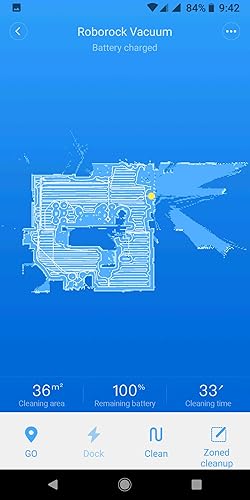
My wife and I are in the process of 'smart-tizing' our new home; so, of course, we needed to invest in a robot vacuum. After 'some' research, we initially bought the Shark IQ (more like low-IQ) - disastrous...didn't function as a vacuum or a robot; didn't vacuum anything (lint, hair, dust), and couldn't map the room or find its station...it was like a lost dog roaming around in circles, bumping into walls. Needless to say, we returned it. Subsequently, my wife and I did A LOT more research - Reddit posts, endless YouTube videos, tech reviews, etc...stumbling upon this lesser-known robot - Roborock S6. In that it was only offered for sale via Amazon or eBay, we were a bit skeptical, but the reviews were unanimous...excellent performance. Enter the S6. Due to our previous experience, I was leery out of the box, nervously syncing the bot to app and network. I have to say, despite a recurring error (5) within the first few days (resolved, see below) and a less-polished app, the robot is amazing. It mapped our entire upstairs (600 sq ft) in 1 run, and vacuumed the carpet (all carpeted floors) impressively. It runs in complete darkness due to its laser optics which is one of the lesser-known perks; should be one of the more marketed features, as a robot is supposed to function unattended - often times when home is vacant and dark! Absolutely love it! For the price and the performance, this is a must-buy for robot vacuum shoppers! Now, I need to mention several of out-fo-the-box cons; one of which has been resolved, the other, from what I hear, will be resolved, the last of which may be resolved with help of Amazon (Alexa) and app dev: 1. Error 5...error 5...error 5. This was a recurring theme within the first few days. The robot would stop completely, notify via audible voice from robot itself and app. Error 5 occurs when the main brush becomes jammed, prompting the user to 'un-jam'...which is actually quite easy; but, this required constant attention. Now, you could override this by simply resuming remotely, but the user wouldn't know if the brush was truly jammed. Most of the times, the brush was indeed jammed with hair that had gotten tangled mostly in the space between the axle and rotor fittings. It occurred so regularly that my heart began to sink because I feared I'd need to return a robot that I loved for all other reasons. I did try to rectify initially with vinyl electrical tape to better seal said gap to prevent entanglement; but, that only delayed the inevitable error 5. But, wait! After researching online, I learned there is a 'Carpet Mode' in the app’s peripheral vacuum settings that, when activated, supposedly enables maximum suction and main brush roller agitation upon sensing carpeting. After activating, I was a bit nervous; but, lo and behold, the darned function worked...and resolved the issue...no more error 5...and no more tangles! Amazing! I understand why this carpet mode is a selection and not a default mode…higher suction and more vigorous brush action requires more battery which is less economical; however, in that the robot has an automatic recharge and resume function that resumes right where it left off after charging in addition to the battery life being one of the largest of the robots we’d researched (5200mAh), I’d suggest having this carpet mode engaged by default. 2. The less-refined Roborock app. Now, I know there is an alternative Mi-home app that's a universal smart app for multiple devices from a third party that has more features; but, I wanted to stick with the manufacturer-sponsored app. This is a Chinese product; so, there are a few English-based grammatical errors you'd expect from non-native speakers...those are trivial. My biggest gripes are the layout itself, the clunkiness of the mapping, and lack of storing multiple floor maps. First, the layout, some menu items (like the schedule /timer or the aforementioned carpet mode) that are buried in places that should be more prominent as they're features that are more routinely used. Second, the mapping system. Again, part of this is the function that actually enables map memory is a toggle that actively needs to be selected by the user, and is located in a peripheral menu. Why is this not just natively enabled by default? It does, in its current state, save multiple back-up versions of the map in case the user accidentally deletes or needs to redo an edit. Speaking of the edit, the editing needs to be refined. Currently, the edit modes are partitioned into ‘room’, ‘no-go’ and ‘entire map’ - this could easily be integrated into one edit menu. Also, even though the map can be partitioned into sections, there is no way to label/name each section which may be nice with things like Alexa. Speaking of partitions...when the original run that maps is complete, the robot’s algorithm tries its hardest to define sections; but, we needed to refine it. The split function to manually separate sections is a bit wonky…it ultimately worked; but, took several edit retries. Now, all these things re. app being said, I’ve read from 2020 CES reports, Roborock is working to polish and improve their app, specifically enabling the ability to map and memorize multiple floors. This would be great, as we would love to be able to have our robot vacuum and mop (yes, there is a mop function) both floors. 3. This is the least important; even though Alexa is a big part of the routines governing other sections of the house. Alexa seems to have limited functionality with the Roborock app skill enabled…allowing simple vocal commands like clean (entire house), stop, return to station. I have yet to be able to have Alexa recognize the device so that routines can be enabled. I’ve had no trouble finding my other 20+ devices. This has been reported to be an app issue. It would also be nice, as stated earlier, to be able to label the rooms by name, and then be able to vocally request Alexa to have the robot to clean certain rooms / sections. Anyway, overall, this is an exceptional robot that does everything it advertises. We love it, and highly recommend it!
My wife and I are in the process of 'smart-tizing' our new home; so, of course, we needed to invest in a robot vacuum. After 'some' research, we initially bought the Shark IQ (more like low-IQ) - disastrous...didn't function as a vacuum or a robot; didn't vacuum anything (lint, hair, dust), and couldn't map the room or find its station...it was like a lost dog roaming around in circles, bumping into walls. Needless to say, we returned it. Subsequently, my wife and I did A LOT more research - Reddit posts, endless YouTube videos, tech reviews, etc...stumbling upon this lesser-known robot - Roborock S6. In that it was only offered for sale via Amazon or eBay, we were a bit skeptical, but the reviews were unanimous...excellent performance. Enter the S6. Due to our previous experience, I was leery out of the box, nervously syncing the bot to app and network. I have to say, despite a recurring error (5) within the first few days (resolved, see below) and a less-polished app, the robot is amazing. It mapped our entire upstairs (600 sq ft) in 1 run, and vacuumed the carpet (all carpeted floors) impressively. It runs in complete darkness due to its laser optics which is one of the lesser-known perks; should be one of the more marketed features, as a robot is supposed to function unattended - often times when home is vacant and dark! Absolutely love it! For the price and the performance, this is a must-buy for robot vacuum shoppers! Now, I need to mention several of out-fo-the-box cons; one of which has been resolved, the other, from what I hear, will be resolved, the last of which may be resolved with help of Amazon (Alexa) and app dev: 1. Error 5...error 5...error 5. This was a recurring theme within the first few days. The robot would stop completely, notify via audible voice from robot itself and app. Error 5 occurs when the main brush becomes jammed, prompting the user to 'un-jam'...which is actually quite easy; but, this required constant attention. Now, you could override this by simply resuming remotely, but the user wouldn't know if the brush was truly jammed. Most of the times, the brush was indeed jammed with hair that had gotten tangled mostly in the space between the axle and rotor fittings. It occurred so regularly that my heart began to sink because I feared I'd need to return a robot that I loved for all other reasons. I did try to rectify initially with vinyl electrical tape to better seal said gap to prevent entanglement; but, that only delayed the inevitable error 5. But, wait! After researching online, I learned there is a 'Carpet Mode' in the app’s peripheral vacuum settings that, when activated, supposedly enables maximum suction and main brush roller agitation upon sensing carpeting. After activating, I was a bit nervous; but, lo and behold, the darned function worked...and resolved the issue...no more error 5...and no more tangles! Amazing! I understand why this carpet mode is a selection and not a default mode…higher suction and more vigorous brush action requires more battery which is less economical; however, in that the robot has an automatic recharge and resume function that resumes right where it left off after charging in addition to the battery life being one of the largest of the robots we’d researched (5200mAh), I’d suggest having this carpet mode engaged by default. 2. The less-refined Roborock app. Now, I know there is an alternative Mi-home app that's a universal smart app for multiple devices from a third party that has more features; but, I wanted to stick with the manufacturer-sponsored app. This is a Chinese product; so, there are a few English-based grammatical errors you'd expect from non-native speakers...those are trivial. My biggest gripes are the layout itself, the clunkiness of the mapping, and lack of storing multiple floor maps. First, the layout, some menu items (like the schedule /timer or the aforementioned carpet mode) that are buried in places that should be more prominent as they're features that are more routinely used. Second, the mapping system. Again, part of this is the function that actually enables map memory is a toggle that actively needs to be selected by the user, and is located in a peripheral menu. Why is this not just natively enabled by default? It does, in its current state, save multiple back-up versions of the map in case the user accidentally deletes or needs to redo an edit. Speaking of the edit, the editing needs to be refined. Currently, the edit modes are partitioned into ‘room’, ‘no-go’ and ‘entire map’ - this could easily be integrated into one edit menu. Also, even though the map can be partitioned into sections, there is no way to label/name each section which may be nice with things like Alexa. Speaking of partitions...when the original run that maps is complete, the robot’s algorithm tries its hardest to define sections; but, we needed to refine it. The split function to manually separate sections is a bit wonky…it ultimately worked; but, took several edit retries. Now, all these things re. app being said, I’ve read from 2020 CES reports, Roborock is working to polish and improve their app, specifically enabling the ability to map and memorize multiple floors. This would be great, as we would love to be able to have our robot vacuum and mop (yes, there is a mop function) both floors. 3. This is the least important; even though Alexa is a big part of the routines governing other sections of the house. Alexa seems to have limited functionality with the Roborock app skill enabled…allowing simple vocal commands like clean (entire house), stop, return to station. I have yet to be able to have Alexa recognize the device so that routines can be enabled. I’ve had no trouble finding my other 20+ devices. This has been reported to be an app issue. It would also be nice, as stated earlier, to be able to label the rooms by name, and then be able to vocally request Alexa to have the robot to clean certain rooms / sections. Anyway, overall, this is an exceptional robot that does everything it advertises. We love it, and highly recommend it!