

SABLUTE MAM1 Pro Ergonomic Wireless Trackball Mouse, Adjustable 0°/18° Angle, Thumb Control, Quiet Clicks, 3 Multi-Device Bluetooth & USB Receiver, Rechargeable Mouse for Office, Windows Mac
This is an affiliate link. Buyyyah may earn a commission if you buy through it, at no extra cost to you.
Description
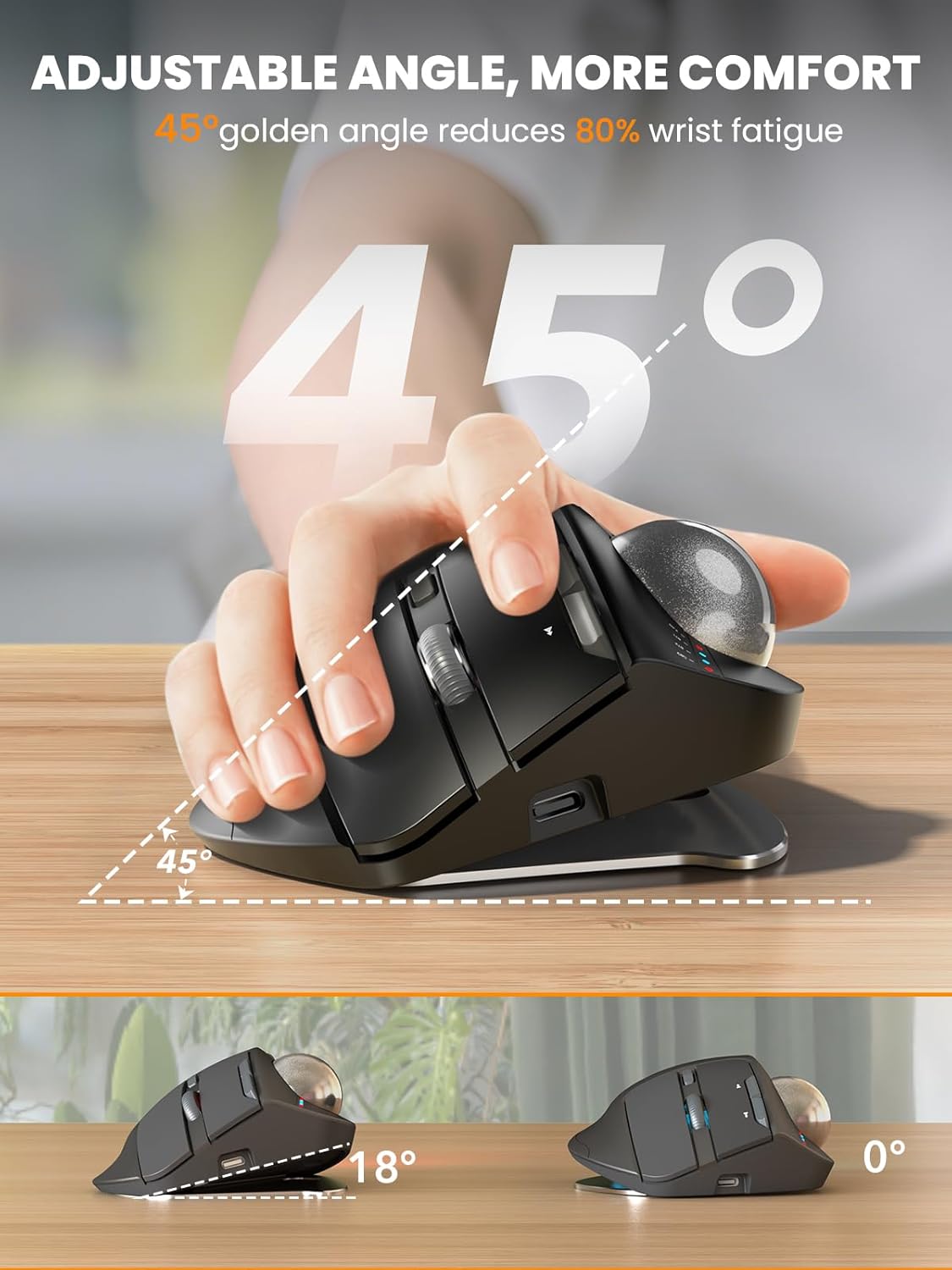
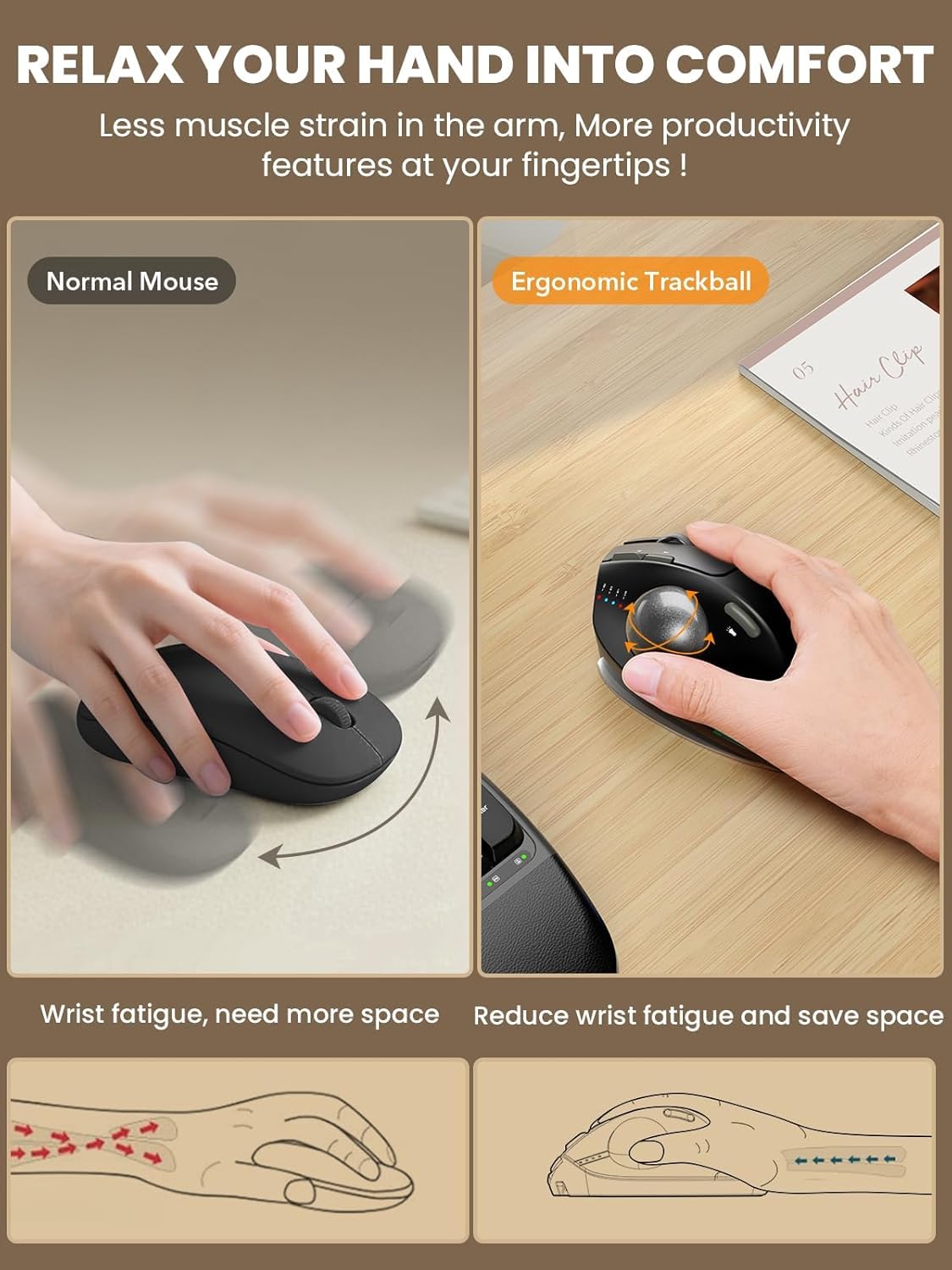
- Ergonomic Adjustable Angle: 0° or 18° adjustable ergonomic tilt lets you choose a natural handshake position. The 18° angle follows the wrist’s natural resting posture, helping reduce wrist and forearm strain during long hours of work, study, or computer use - Thumb Trackball Control: Smooth thumb-operated trackball allows precise cursor control without moving your arm across the desk. Reduces repetitive wrist and shoulder movement, making it ideal for small desks, limited spaces, and long daily use - 3-Device Wireless Switching: Connect up to three devices via dual Bluetooth modes and a 2.4G USB receiver. Switch instantly between your PC, laptop, or tablet with one button. Stable, lag-free wireless connection up to 33 ft (10 m) - Quiet Clicks & Adjustable DPI: Five adjustable DPI levels from 800 to 4800 let you match cursor speed to different tasks and screens. Ultra-quiet buttons with up to 95% reduced click noise keep you focused in offices or shared workspaces - Rechargeable with Backlight: Built-in rechargeable battery with USB-C charging eliminates disposable batteries. Soft ambient backlight can be turned on or off as needed. Compatible with Windows, macOS, Android, and ChromeOS. USB receiver stores neatly in the base - Warm Tips: If you are using a trackball mouse for the first time, it may take some time to get used to its operation. We recommend that you spend 1-2 weeks to adapt, as many users find that this helps reduce the pressure and pain on the wrist caused by long-term use of the mouse and improves comfort - You can download the driver by following the steps in the instruction manual to customize the mouse settings and fine-tune them to better suit your personal mouse preferences. (Note: This driver is not compatible with Mac OS.)
Details
Features & Specs
- Connectivity Technology
- Bluetooth, USB
- Additional Features
- Ergonomic Design, LED Lights, Portable, Rechargeable, Wireless
- Movement Detection
- Trackball
- Button Quantity
- 8
- Hand Orientation
- Right
- Compatible Devices
- Bluetooth low energy technology: Windows11 orlater/Windows 10/Windows 8, macOS 10.10 or later,Chrome OS, Android 5.0 or later, Personal Computer, Tablet, With Receiver: Windows 11 or later/Windows 10/Windows 8,Windows 7, macOS 10.10 orlater,ChromeOS,linux Kernel 2.6
- Operating System
- Chrome OS, Linux, Windows, macOS
- Hardware Platform
- Mac, PC, laptop
- Power Source
- Battery Powered
- Mouse Maximum Sensitivity
- 4800 Dots per Inch
- Minimum Required Operating System Version
- Windows 7
- Range
- 33 feet
Style
- Color
- Gray ball
- Style Name
- Modern
Materials & Care
- Enclosure Material
- Metal, Plastic
Item details
- Brand
- SABLUTE
- Model Name
- MAM1 Pro
- Antenna Location
- Gaming, Office, Student
- Model Number
- F-35
- Built-In Media
- Charging cable, Manual, Trackball Mouse, USB
- Manufacturer
- SABLUTE
- Warranty Description
- 1 Year warranty
Measurements
- Item Weight
- 12.64 ounces
- Item Dimensions L x W
- 5.36"L x 3.94"W
- Unit Count
- 1.0 Count
Frequently asked questions
- Is this mouse rechargeable?
- Yes, it has a built-in rechargeable battery with USB-C charging, eliminating disposable batteries.
- How many devices can it connect to simultaneously?
- It can connect up to three devices via dual Bluetooth modes and a 2.4G USB receiver, and you can switch instantly between them.
- What is the hand orientation of this mouse?
- The mouse is designed for right-handed use, as indicated in the product details.
Customer reviews

This mouse holds it’s own against the big name trackball mice
I’ve always preferred trackball mice over the standard “move your hand all around” mice. Back in the mid-nineties, I got my first trackball mouse that was wired, and I knew this was a better style of mouse for me. I then upgraded to a wireless trackball mouse in the naughts, which was huge: no more cord! Since the early tens, I been exclusively using Logitech’s mice, starting with the M570, upgrading to the M575, then upgrading again in 2024 to the M575S. I currently have a combination of six M575/S mice in total, that I use to control my PCs & Stream Boxes throughout my house and apartment. After 30 years, I’m a pretty avid and experienced user of trackball mice. Even though I’ve been loyal to Logitech for many years, after reading the description for this Sablute wireless trackball mouse, I knew I had to try it. Comparing the two head-to-head, one might not notice the subtle differences, as they both offer most of the same features. They both have left and right buttons; they both have forward and back buttons; they both have scroll wheels that you can click; and they both have trackballs. However, the Sablute does have a couple more offerings than the M575S. Firstly, they both come with 2.4GHz dongles, to plug into a USB-A port, as well as a Bluetooth connection, to connect to a second device. However, the Sablute offers a second Bluetooth connection, allowing you to connect to a third device. You can easily switch between all three connections via the push button on the bottom of the mouse. As well, there’s a small row of four LED lights, to the front of the trackball, with three different LEDs, one for each connection, that light up temporarily, to let you know which device you’ve selected. Plus, the fourth light illuminates when you’re charging your built-in 800mAh rechargeable battery, with the included USB-C cable. You can recharge this mouse in 3-4 hours and get over 300 days of standby time. I’ve been using this mouse daily for about a month now and the battery is still almost full. This is the second difference compared to the competition, as my other mice all need a single AA battery to operate. The third difference is the two extra buttons on the top of the Sablute. The one, just below the scroll wheel, allows you to change your DPI on the go, offering you five different speeds. The other extra button, is located just above the trackball, that lets you turn on and switch colours of the mouse’s tail atmosphere light, at the bottom rear. A fourth feature is the bottom metal plate, that adds a bit of weight to the mouse, but also makes it more stable and stationary. This plate is also how you adjust the tilt that the mouse sits at. You get two positions: with either the mouse flat at 0°, or you get an 18° tilt to the right, letting your hand sit at a more comfortable 45° angle. Unfortunately, both brands of trackball mice are for right hands only. You will need to search for a left hand mouse, otherwise you’ll be operating the trackball with your pinky finger. As previously mentioned, both mice are almost identical in features and buttons. They are also of similar size and they both have a smooth, quality feel to them. The trackballs and scroll wheels also glide nice and precise. The only noticeable difference is the Sablute weighs a bit more, thanks to it’s metal plate. Unfortunately, if you remove this plate, the mouse won’t sit flat. But since the mouse stays stationary to operate, the extra weight is not a hindrance. If anything, it ensures the Sablute is less likely to move around, if you accidentally knock it. After using the M575 for so many years, you’d think I’d notice a difference while operating the mouse, but I don’t. Whether the Sablute is sitting on my stand-up table or lying on my bed next to me (when controlling my stream box, or watching YouTube videos on TV, via my PC), it sits comfortably in my hand and has performed flawlessly. If you are somewhat familiar with the Logitech trackball mouse, the Sablute will feel right at home. Both are great mice, but these extra features make it a little more useful. And, if you’ve never had a trackball mouse before, this is the one to get. Not only are they easier on your hand, but they need less space on your desk to operate. Plus, a mouse pad isn’t necessary. After being a market leader for decades, someone needs to add some improvements on their next update, just to keep up with this Sablute wireless trackball mouse! It’s probably the best mouse I’ve ever had.
I’ve always preferred trackball mice over the standard “move your hand all around” mice. Back in the mid-nineties, I got my first trackball mouse that was wired, and I knew this was a better style of mouse for me. I then upgraded to a wireless trackball mouse in the naughts, which was huge: no more cord! Since the early tens, I been exclusively using Logitech’s mice, starting with the M570, upgrading to the M575, then upgrading again in 2024 to the M575S. I currently have a combination of six M575/S mice in total, that I use to control my PCs & Stream Boxes throughout my house and apartment. After 30 years, I’m a pretty avid and experienced user of trackball mice. Even though I’ve been loyal to Logitech for many years, after reading the description for this Sablute wireless trackball mouse, I knew I had to try it. Comparing the two head-to-head, one might not notice the subtle differences, as they both offer most of the same features. They both have left and right buttons; they both have forward and back buttons; they both have scroll wheels that you can click; and they both have trackballs. However, the Sablute does have a couple more offerings than the M575S. Firstly, they both come with 2.4GHz dongles, to plug into a USB-A port, as well as a Bluetooth connection, to connect to a second device. However, the Sablute offers a second Bluetooth connection, allowing you to connect to a third device. You can easily switch between all three connections via the push button on the bottom of the mouse. As well, there’s a small row of four LED lights, to the front of the trackball, with three different LEDs, one for each connection, that light up temporarily, to let you know which device you’ve selected. Plus, the fourth light illuminates when you’re charging your built-in 800mAh rechargeable battery, with the included USB-C cable. You can recharge this mouse in 3-4 hours and get over 300 days of standby time. I’ve been using this mouse daily for about a month now and the battery is still almost full. This is the second difference compared to the competition, as my other mice all need a single AA battery to operate. The third difference is the two extra buttons on the top of the Sablute. The one, just below the scroll wheel, allows you to change your DPI on the go, offering you five different speeds. The other extra button, is located just above the trackball, that lets you turn on and switch colours of the mouse’s tail atmosphere light, at the bottom rear. A fourth feature is the bottom metal plate, that adds a bit of weight to the mouse, but also makes it more stable and stationary. This plate is also how you adjust the tilt that the mouse sits at. You get two positions: with either the mouse flat at 0°, or you get an 18° tilt to the right, letting your hand sit at a more comfortable 45° angle. Unfortunately, both brands of trackball mice are for right hands only. You will need to search for a left hand mouse, otherwise you’ll be operating the trackball with your pinky finger. As previously mentioned, both mice are almost identical in features and buttons. They are also of similar size and they both have a smooth, quality feel to them. The trackballs and scroll wheels also glide nice and precise. The only noticeable difference is the Sablute weighs a bit more, thanks to it’s metal plate. Unfortunately, if you remove this plate, the mouse won’t sit flat. But since the mouse stays stationary to operate, the extra weight is not a hindrance. If anything, it ensures the Sablute is less likely to move around, if you accidentally knock it. After using the M575 for so many years, you’d think I’d notice a difference while operating the mouse, but I don’t. Whether the Sablute is sitting on my stand-up table or lying on my bed next to me (when controlling my stream box, or watching YouTube videos on TV, via my PC), it sits comfortably in my hand and has performed flawlessly. If you are somewhat familiar with the Logitech trackball mouse, the Sablute will feel right at home. Both are great mice, but these extra features make it a little more useful. And, if you’ve never had a trackball mouse before, this is the one to get. Not only are they easier on your hand, but they need less space on your desk to operate. Plus, a mouse pad isn’t necessary. After being a market leader for decades, someone needs to add some improvements on their next update, just to keep up with this Sablute wireless trackball mouse! It’s probably the best mouse I’ve ever had.

Ergonomic. Excellent battery life. Lighting effect can be improved upon.
5 out of 5 Stars (5) ⭐⭐⭐⭐⭐ [REVIEW UPDATES] [TL;DR] [QUALITY] (5/5) [VALUE] (5/5) [EASE OF USE] (5/5) [MET EXPECTATIONS] (5/5) [PACKAGING] (5/5) [REVIEW REMARKS] This is a decent trackball mouse that rivals the more known brands. With all the features of many other trackballs, this one has all the features that you need and some that are a pleasant surprise. The adjustable DPI is very handy, especially when you are just acclimatizing to using a trackball. The DPI is a control that makes the movement of the trackball more precise. This also is great if you are working on something that requires a little more precision. The connectivity is great when using the included USB dongle. The Bluetooth connection was not stable on Windows 11, but worked well on my Android devices. Thankfully, it comes with a dongle, relying on USB would be a nightmare. Ergonomics is the forefront of this trackball. The adjustable baseplate allows for two (2) angles for your comfort. I do like the slight tilt. The weight of this mouse is also to be recognized. It has a good heft to it and it stays in place on my desk. I appreciate this, I am going to say the weight comes from the metal baseplate. Battery life is excellent and there are lights to warn you when the battery is low. Charging the unit is as simple as connecting a USB-C cable to mouse and charge for a few hours. The battery lasts weeks with heavy daily use. One feature that is really cool, but needs to be updated, is the RGB lighting. This really does add to the cool factor. You can turn it off or on, which is great. The lighting effects are minimal and you cannot change the light colour to a solid colour of your choice. I do wish it had this built into it. I am not big on the 'breathing effect' and the solid colour is red...red...or...red. The breathing cycles through many colours, but none are addressable to be set as solid. As a trackball user since they came out a few decades ago, I find this to be an excellent product. I like the features and connectivity options. The trackball is easy to use and for beginners, it should be easier to adjust to than other options. The value is great and the quality is excellent. The time using this mouse has been delightful. Recommended based on ease of use, quality, value and features. In the event that experiences change or evolve, updates may be made to this review to address such developments.
5 out of 5 Stars (5) ⭐⭐⭐⭐⭐ [REVIEW UPDATES] [TL;DR] [QUALITY] (5/5) [VALUE] (5/5) [EASE OF USE] (5/5) [MET EXPECTATIONS] (5/5) [PACKAGING] (5/5) [REVIEW REMARKS] This is a decent trackball mouse that rivals the more known brands. With all the features of many other trackballs, this one has all the features that you need and some that are a pleasant surprise. The adjustable DPI is very handy, especially when you are just acclimatizing to using a trackball. The DPI is a control that makes the movement of the trackball more precise. This also is great if you are working on something that requires a little more precision. The connectivity is great when using the included USB dongle. The Bluetooth connection was not stable on Windows 11, but worked well on my Android devices. Thankfully, it comes with a dongle, relying on USB would be a nightmare. Ergonomics is the forefront of this trackball. The adjustable baseplate allows for two (2) angles for your comfort. I do like the slight tilt. The weight of this mouse is also to be recognized. It has a good heft to it and it stays in place on my desk. I appreciate this, I am going to say the weight comes from the metal baseplate. Battery life is excellent and there are lights to warn you when the battery is low. Charging the unit is as simple as connecting a USB-C cable to mouse and charge for a few hours. The battery lasts weeks with heavy daily use. One feature that is really cool, but needs to be updated, is the RGB lighting. This really does add to the cool factor. You can turn it off or on, which is great. The lighting effects are minimal and you cannot change the light colour to a solid colour of your choice. I do wish it had this built into it. I am not big on the 'breathing effect' and the solid colour is red...red...or...red. The breathing cycles through many colours, but none are addressable to be set as solid. As a trackball user since they came out a few decades ago, I find this to be an excellent product. I like the features and connectivity options. The trackball is easy to use and for beginners, it should be easier to adjust to than other options. The value is great and the quality is excellent. The time using this mouse has been delightful. Recommended based on ease of use, quality, value and features. In the event that experiences change or evolve, updates may be made to this review to address such developments.

This is going to be a weird review because I'm returning but I'm still giving 5 stars
As a kensington Orbit user I have always wondered how the other half lived. I've researched and been enamored by thumb trackball for years and finally pulled the trigger on this one bc I needed a second mouse when using two computers at once. I was in love the second I pulled it out of the box. The build quality, the weight and solidity of the thing was stunning and very satisfying. I can not emphasize how much I just like touching and holding this thing. unfortunately for my big dumb oft broken hands... thumb controls make my brain-and wrist-hurt. I just couldn't get he hang of this type of trackball. I missed my finger controls. the ball was precise but my thumb was not. As a test to see if it was just something I needed to get used to I used it side by side with my orbit and I couldn't believe how much cheaper and crappy the twice as expensive Kensington felt and how much better it was for how I use a mouse. I've never been so heartbroken to return a product. I want this to work for me but it just doesn't. and from what I've read that's just how trackballs are. Some people like thumbs some like fingers. there is no in between I guess. If you're a thumb ball girl though, let me tell you that you have to give this thing a try.
As a kensington Orbit user I have always wondered how the other half lived. I've researched and been enamored by thumb trackball for years and finally pulled the trigger on this one bc I needed a second mouse when using two computers at once. I was in love the second I pulled it out of the box. The build quality, the weight and solidity of the thing was stunning and very satisfying. I can not emphasize how much I just like touching and holding this thing. unfortunately for my big dumb oft broken hands... thumb controls make my brain-and wrist-hurt. I just couldn't get he hang of this type of trackball. I missed my finger controls. the ball was precise but my thumb was not. As a test to see if it was just something I needed to get used to I used it side by side with my orbit and I couldn't believe how much cheaper and crappy the twice as expensive Kensington felt and how much better it was for how I use a mouse. I've never been so heartbroken to return a product. I want this to work for me but it just doesn't. and from what I've read that's just how trackballs are. Some people like thumbs some like fingers. there is no in between I guess. If you're a thumb ball girl though, let me tell you that you have to give this thing a try.
Solid feel, comfortable for all day use.
I am on the verge of carpal tunnel sensitivity. Moving to this track ball design appears to have reduced my wrist fatigue. The first thing I noticed was the solid feel of this unit. It's solid response to button and track wheel movement is a nice improvement over lighter plastic devices I have used in the past. The device has a couple of different tilt positions, find the one that works best for you. The software interface for setting this track ball is easy to use and makes adjustments to the device quick and easy. This model provides for several types of connectivity i.e. "blue tooth", dongle, and a second "blue tooth" , making it easy to use this same mouse for both my desktop and laptop computers.
I am on the verge of carpal tunnel sensitivity. Moving to this track ball design appears to have reduced my wrist fatigue. The first thing I noticed was the solid feel of this unit. It's solid response to button and track wheel movement is a nice improvement over lighter plastic devices I have used in the past. The device has a couple of different tilt positions, find the one that works best for you. The software interface for setting this track ball is easy to use and makes adjustments to the device quick and easy. This model provides for several types of connectivity i.e. "blue tooth", dongle, and a second "blue tooth" , making it easy to use this same mouse for both my desktop and laptop computers.