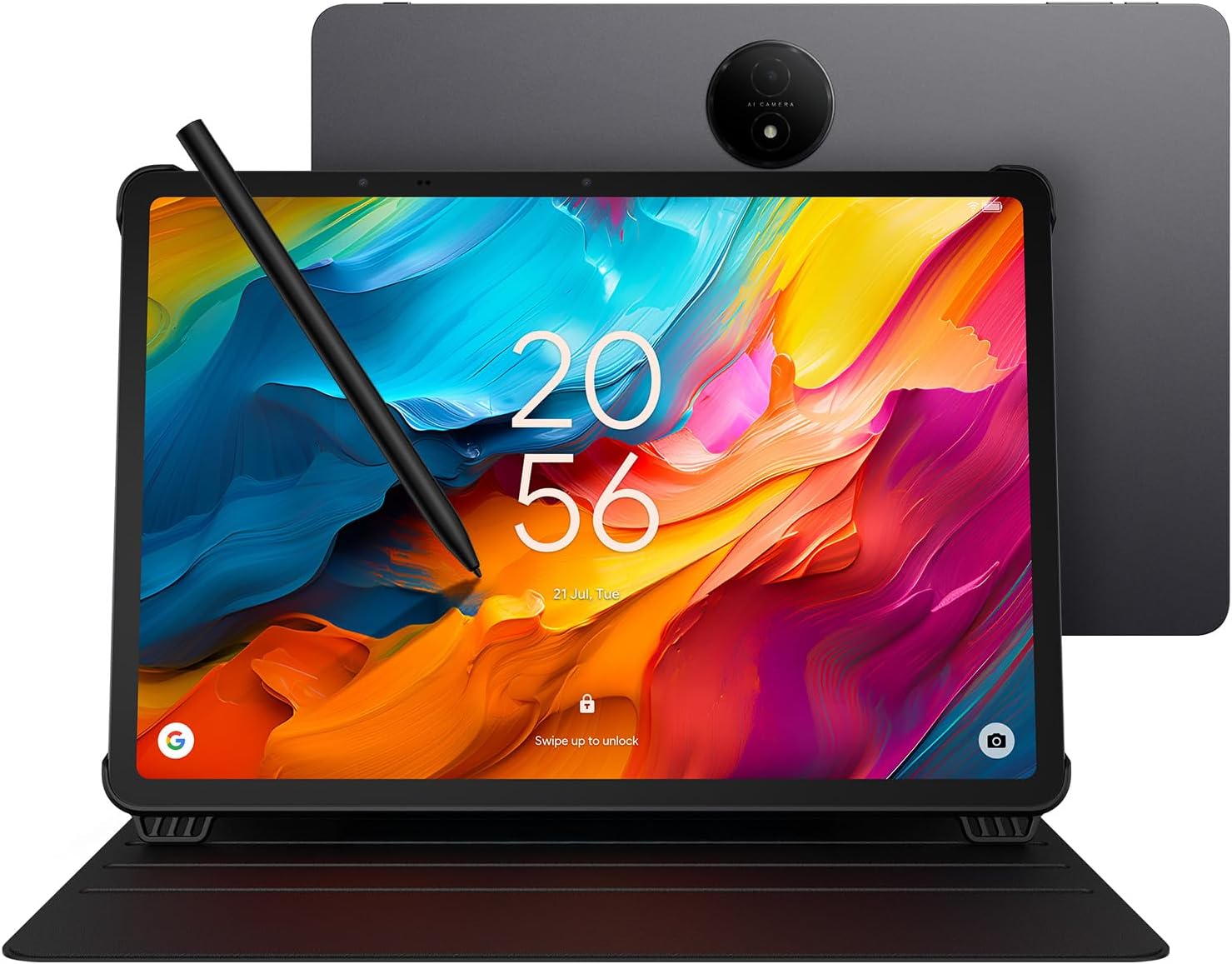


TCL NXTPAPER 14 Android Tablet, 14.3" Paper-Like Display Drawing Pad, Digital Notebook & Musician Tablet with 4096-Level Stylus & Flip Case, 8+8GB RAM, 256GB Storage, 10000mAh, Multi-Window, Gray
This is an affiliate link. Buyyyah may earn a commission if you buy through it, at no extra cost to you.
Description
- Tablet, Drawing Pad, Digital Notebook & Musician Tablet – All in One: From creative minds to busy professionals, musicians, and avid streamers, the TCL NXTPAPER 14 fits seamlessly into any lifestyle. Equipped with a 14.3-inch 2.4K display that delivers rich, lifelike colors and a 4096-pressure-level T-PEN stylus for fluid, accurate input, it’s perfectly suited for drawing, note-taking, reading, viewing digital sheet music, and multimedia entertainment - Effortless Eye Comfort on a Paper-Like Screen: Powered by NXTPAPER 3.0 display technology, the TCL NXTPAPER 14 delivers a paper-like viewing experience with an anti-glare coating, blue light reduction, and DC dimming—engineered to reduce eye strain during long hours of use. The Eye Care Assistant automatically adjusts screen brightness and color temperature to match your surroundings and prompts you to take regular breaks - Seamless 3-in-1 Display Modes with NXTPAPER Key: Instantly switch between modes with the dedicated NXTPAPER Key on the TCL NXTPAPER 14 tablet. Regular Mode offers vibrant visuals for movies and video calls. Ink Paper Mode recreates the texture of e-paper for long reading, note-taking, and sheet music display. Color Paper Mode delivers soft, low-saturation tones that are perfect for digital art, comics, and creative projects - Strong Performance for Multitasking & Multi-Window Productivity: Driven by the MediaTek Helio G99 processor and running Android 14, TCL electronics tablets combine 256GB of storage with 8GB RAM, plus an additional 8GB of expandable memory, handling study, work, and creative apps with ease. TCL’s smart UI boosts productivity by supporting screen mirroring, extended displays, floating windows, and split screen. Note: Built-in storage only; microSD cards not supported - 10,000mAh Powerhouse with Fast & Reverse Charging: Power through your day with the TCL NXTPAPER 14 Android tablet’s massive 10,000mAh battery—fully recharged in about two hours with 33W fast charging. Whether you’re working, studying, or creating on the go, it keeps up effortlessly. Additionally, reverse charging lets you power your phone or earbuds anytime, anywhere. Note: Charger not included - Immersive Multimedia with Sharp Video & Rich Audio: The TCL NXTPAPER 14 tablets feature dual front cameras (13MP + 5MP) and an 8MP rear autofocus camera, all supporting 1080p video for clear, detailed visuals in video calls, online teaching, or vlogging. The quad stereo speaker system with Smart PA delivers rich, room-filling sound — up to 200% volume — for an experience you’ll feel as much as hear - Slim Yet Strong – Elegant Design with Everyday Durability: Crafted at just 0.27 inches thin and weighing 1.67 lbs, the TCL NXTPAPER 14 drawing tablet combines a generous display with refined portability, offering the perfect harmony of style, size, and usability. The durable metal build handles everyday bumps with ease, while the included adjustable flip case keeps it protected and instantly becomes a stand for hands-free use anywhere
Details
General Information
- Brand
- TCL
- Model Name
- TCL NXTPAPER 14
- Generation
- 1st Generation
- Model Number
- Helio G99
- Set Name
- TCL NXTPAPER
- Style Name
- elegant
- Size
- 256GB
- Unit Count
- 1.0 Count
- Specific Uses For Product
- Creative, Professional, Entertainment
- Manufacturer
- TCL Communication Ltd.
- Operating System
- Android 14
- Operating System Family
- Android
- Color
- Gray
Display
- Screen Size
- 14.3 Inches
- Display Resolution Maximum
- 2400 x 1600 Pixels
- Display Type
- LCD
- Native Resolution
- 2400x1600
- Aspect Ratio
- 16:10
- Display Refresh Rate in Hertz
- 60
Processor
- Processor Speed
- 2.2 GHz
- Processor Description
- MediaTek Helio G99
- Processor Brand
- MediaTek
- CPU Model Number
- Helio G99
Memory & Storage
- Memory Storage Capacity
- 256 GB
- RAM Memory Installed
- 8 GB
- RAM Size
- 8 GB
- Hard-Drive Size
- 256 GB
Battery
- Battery Average Life
- 10 Hours
- Battery Capacity
- 10000 Milliamp Hours
- Battery Cell Type
- Lithium Polymer
- Battery Power
- 10000 Milliamp Hours
- Lithium-Battery Energy Content
- 39.86 Watt Hours
Camera
- Video Capture Resolution
- QHD 1440p
- Camera Description
- Dual front cameras (13MP + 5MP), 8MP rear autofocus camera, 2K video support
- Rear Facing Camera Photo Sensor Resolution
- 8 MP
Connectivity
- Hardware Interface
- Bluetooth, USB Type C
- Wireless Technology
- Bluetooth, Wi-Fi
- Connectivity Technology
- Bluetooth, Wi-Fi
- Wireless Compability
- 802.11ac
Dimensions & Weight
- Item Weight
- 1.83 Kilograms
- Item Dimensions L x W x Thickness
- 8.74"L x 12.69"W x 0.27"Th
Input & Compatibility
- Human-Interface Input
- OCR, Touchscreen with Stylus Support
- Graphics Description
- Integrated
- Compatible Devices
- Stylus, Laptop
Warranty
- Warranty Description
- 1 Year Manufacturer
- Warranty Type
- Limited
Features
- Other Special Features of the Product
- All-Day Power with Extra Utility, Paper-Like Viewing Experience, Powerful Performance & Productivity, Stylus Support, Versatile Screen Modes
Included Items
- Built-In Media
- Flip Case, T-PEN Stylus, TCL NXTPAPER 14 Tablet, USB-C Cable
Frequently asked questions
- Is this tablet suitable for drawing and note-taking?
- Yes, it features a 14.3-inch 2.4K display and a 4096-pressure-level T-PEN stylus, making it ideal for drawing, note-taking, and digital art, as stated in the product description.
- How long does the battery last and does it support fast charging?
- The 10,000mAh battery provides up to 10 hours of average battery life and supports 33W fast charging, fully recharging in about two hours (source: Battery Average Life and product description).
- What accessories are included with the tablet?
- The tablet comes with a 4096-level T-PEN stylus, a flip case, and a USB-C cable, as listed under Built-In Media in the product details.
Customer reviews

This is a surprisingly good large Android tablet at a good price
Happy with the purchase, and a bit surprised at how well it works so far. The large size makes it easy to read documents, the "paper" modes are a nice addition, and the battery lasts for hours of use. I was able to install an email program (not Google) and it worked right away. Other Playstore apps work on it too (I have a few favorites to install). The cover is also nice, although I don't know why the included a felt-loop stylus holder - the magnetic attachment is great; maybe the loop is for those who don't want to use the case. A couple of things to note: 1) the description says the device works only with the stylus. This is not exactly correct. Finger touches work, and I was able to quickly connect a small Bluetooth keyboard (which makes emailing much easier). 2) However, attempting to use a small plastic pointer and an old PDA stylus did not work for me, so perhaps that is what TCL means about working only with their stylus. 3) The device works with stylus, fingers, or BT keyboard with or without a screen protector. The pointing accuracy is best with the stylus, of course. 4) Although a spare stylus tip is included it seems likely that replacements will be needed over time. I hope TCL makes them available at a reasonable price. 5) Due to the inability to use an alternate stylus, I hope TCL also makes spare stylus pens available a reasonable price too. 6) I purchased a screen protector (I use them on all my touch devices) and noticed that the camera "bump" and two other sensors along the edge of the screen made it impossible to get a perfect fit. This is not TCL's fault, it is more likely due to the rather rigid screen protector. And it does not affect functionality - the slight detachment is outside of the actual screen area. However, it seems possible that the slight separation could get snagged and detach over time. A Zag protector (if available) would undoubtedly do better. I'll leave a comment about that on the screen protector review (not a TCL product) 7) Related to the previous point: the screen protector attached well to the screen (I use rubber gloves and a small rubber squeegee to apply them smoothly), but when the power is off there is a "ripple" effect that appears to be inconsistencies in the screen protector plastic itself. I tested with all three paper modes of the TCL, and with power on the ripple is not noticeable. Note: these are definitely *not* air pockets between the glass and the protector, but rather, appear to be inconsistencies in the protector film itself. Annoying but not a serious problem for the TCL. 8) It would be nice if the TCL had a smart card or microSD slot. For simply viewing PDFs and such, 128 GB may be fine, but with a few apps installed, another 128-256 GB, on microSD, would be a very welcome addition (and Android already handles SD devices, so this amounts to a small case change, a small PCB change, and a $0.50 connector. I hope TCL will consider adding an SD slot on future releases. After a few days use I'd buy this again. Nice design, really easy on the eyes, surprising screen mode "paper" options, good battery life, and it was delivered fast and *very* well packaged. Five stars.
Happy with the purchase, and a bit surprised at how well it works so far. The large size makes it easy to read documents, the "paper" modes are a nice addition, and the battery lasts for hours of use. I was able to install an email program (not Google) and it worked right away. Other Playstore apps work on it too (I have a few favorites to install). The cover is also nice, although I don't know why the included a felt-loop stylus holder - the magnetic attachment is great; maybe the loop is for those who don't want to use the case. A couple of things to note: 1) the description says the device works only with the stylus. This is not exactly correct. Finger touches work, and I was able to quickly connect a small Bluetooth keyboard (which makes emailing much easier). 2) However, attempting to use a small plastic pointer and an old PDA stylus did not work for me, so perhaps that is what TCL means about working only with their stylus. 3) The device works with stylus, fingers, or BT keyboard with or without a screen protector. The pointing accuracy is best with the stylus, of course. 4) Although a spare stylus tip is included it seems likely that replacements will be needed over time. I hope TCL makes them available at a reasonable price. 5) Due to the inability to use an alternate stylus, I hope TCL also makes spare stylus pens available a reasonable price too. 6) I purchased a screen protector (I use them on all my touch devices) and noticed that the camera "bump" and two other sensors along the edge of the screen made it impossible to get a perfect fit. This is not TCL's fault, it is more likely due to the rather rigid screen protector. And it does not affect functionality - the slight detachment is outside of the actual screen area. However, it seems possible that the slight separation could get snagged and detach over time. A Zag protector (if available) would undoubtedly do better. I'll leave a comment about that on the screen protector review (not a TCL product) 7) Related to the previous point: the screen protector attached well to the screen (I use rubber gloves and a small rubber squeegee to apply them smoothly), but when the power is off there is a "ripple" effect that appears to be inconsistencies in the screen protector plastic itself. I tested with all three paper modes of the TCL, and with power on the ripple is not noticeable. Note: these are definitely *not* air pockets between the glass and the protector, but rather, appear to be inconsistencies in the protector film itself. Annoying but not a serious problem for the TCL. 8) It would be nice if the TCL had a smart card or microSD slot. For simply viewing PDFs and such, 128 GB may be fine, but with a few apps installed, another 128-256 GB, on microSD, would be a very welcome addition (and Android already handles SD devices, so this amounts to a small case change, a small PCB change, and a $0.50 connector. I hope TCL will consider adding an SD slot on future releases. After a few days use I'd buy this again. Nice design, really easy on the eyes, surprising screen mode "paper" options, good battery life, and it was delivered fast and *very* well packaged. Five stars.

Samsung needs to take notes
First off, YOU SHOULD HAVE A TOP QUALITY CHARGER AND USB CABLES IN YOUR LIFE. I will tell you why later. If Samsung copied this Screen Finish on their entire lineup, they would own all of the market. I'm not kidding when I say this matte finish really makes this screen look better when consuming media around the house. Almost a surreal effect. HUGE and useful real estate btw, and not as heavy as other Mid grade XXL tablets. The pixel density is great, do not get yourself fooled a 1080p on a 14inch or greater Tablet matters. You will see the pixels. The extra resolution is needed. That said I think the fact it is a LCD helps soften the most harsh pixelation as it looks amazing and really gives Movies that Pleasant viewing experience. The Pen Lag is there, not the worst but you're just taking notes with this response time, and the pen is not intuitive, there is a reddit post of people just trying to figure out how to use it. Ask me how I know... The builtin storage Capacity is kind of a non question for me as I stream my data through Media Streaming services and Plex home server. So all the apps to do so barely take a lick of space. Also what this is advertising for (books) those don't take any space. The charging and battery run time is gonna be a thing for those who are use to Apple and Samsung battery magic. Now not bad by any means, but watching a 2 hour movie will run your battery 30% using the Speakers. Granted it's pushing a larger screen and quad speakers. Speakers.... they match the vibe. They will be enough for media. There is no glowing review on them. They will be beat by every Bluetooth speaker because you simply can not get a great sound stage on these form factors. There is a Volume Plus mode if it's not loud enough but you will try it once and never again dear god that was horrible. TCL remove that feature because you're asking for warranty claims. My testing shows PEAK 24watt charging speed at 2.5a/9.6v which is confusing given its supposed to be a battery Economy mindful chipset with the Hellio G99 that's found in other mid grades like the Samsung S9 Tab FE. Cameras are unremarkable and to be honest I would of taken a downgrade on the rear for a flush camera. Just enough to make sure a once and awhile QR code that's needed to be scanned is clear enough. Selfie cam is..... there. UI is vanilla Android, I immediately ditched it for my Launcher of choice so No opinions past that. In all. A great Deal. Tablet is great. Case is useful. Pen is a dud.
First off, YOU SHOULD HAVE A TOP QUALITY CHARGER AND USB CABLES IN YOUR LIFE. I will tell you why later. If Samsung copied this Screen Finish on their entire lineup, they would own all of the market. I'm not kidding when I say this matte finish really makes this screen look better when consuming media around the house. Almost a surreal effect. HUGE and useful real estate btw, and not as heavy as other Mid grade XXL tablets. The pixel density is great, do not get yourself fooled a 1080p on a 14inch or greater Tablet matters. You will see the pixels. The extra resolution is needed. That said I think the fact it is a LCD helps soften the most harsh pixelation as it looks amazing and really gives Movies that Pleasant viewing experience. The Pen Lag is there, not the worst but you're just taking notes with this response time, and the pen is not intuitive, there is a reddit post of people just trying to figure out how to use it. Ask me how I know... The builtin storage Capacity is kind of a non question for me as I stream my data through Media Streaming services and Plex home server. So all the apps to do so barely take a lick of space. Also what this is advertising for (books) those don't take any space. The charging and battery run time is gonna be a thing for those who are use to Apple and Samsung battery magic. Now not bad by any means, but watching a 2 hour movie will run your battery 30% using the Speakers. Granted it's pushing a larger screen and quad speakers. Speakers.... they match the vibe. They will be enough for media. There is no glowing review on them. They will be beat by every Bluetooth speaker because you simply can not get a great sound stage on these form factors. There is a Volume Plus mode if it's not loud enough but you will try it once and never again dear god that was horrible. TCL remove that feature because you're asking for warranty claims. My testing shows PEAK 24watt charging speed at 2.5a/9.6v which is confusing given its supposed to be a battery Economy mindful chipset with the Hellio G99 that's found in other mid grades like the Samsung S9 Tab FE. Cameras are unremarkable and to be honest I would of taken a downgrade on the rear for a flush camera. Just enough to make sure a once and awhile QR code that's needed to be scanned is clear enough. Selfie cam is..... there. UI is vanilla Android, I immediately ditched it for my Launcher of choice so No opinions past that. In all. A great Deal. Tablet is great. Case is useful. Pen is a dud.

Awesome Music reader
I bought this as a backup/secondary music reader for my Samsung Galaxy tablet (not sure of its model offhand, just that it big and was pretty expensive, over $1000). I became aware of this after watching a YT video comparing different e-readers/tablets as music readers (great video by @MadMusicBand). At the cost of this, I couldn't turn it down. I find it ridiculous to spend over $1000 just to basically have a glorified e-reader, which is all you really need for music, to have it at normal A4 size. The screen size is more than adequate. You can easily get music to display at least as large as on paper and in most cases even bigger and is not super shiny, which the Samsung and iPad are. I had to buy a matte screen protector for the Samsung to cut down on glare as it gets really hard to see due to ambient lighting, stage lighting, etc. (BTW, iPads have this issue as well). It comes with a pen (on the iPad, that's an additional $80-plus bucks, at least for the Apple ones), which is really my only complaint in that you have to make sure it is turned on and charged. You have to plug it in to a USB-C to for charging. The Samsung S-pen easily charges on the back of the tablet, but it only really needs to be charged for the air gestures (or whatever they call it), which I find annoying to use. It (the Samsing S-Pen) functions as a pen on the tablet without any charging required. The only other drawback, which is the same complaint I have about the Samsung and iPads large enough that I'd use for music is the weight. If using for choir music, it can be a little heavy to hold up for a while, but not overly so, I have about the same amount of fatigue from holding a folder up for paper music for more than a song or 2. I would suggest putting it in one of the music folder that will hold open at an angle and one of the folder companies does make a "adapter" to hold tablets in them. This will work in that adapter, but definitely stretches it to its limit. If using on a stand, this shouldn't be an issue. I highly recommend MobileSheets as a reader (and it's multi-platform). It not only will turn pages with gestures (winks, moving head a certain way), or foot pedal, in addition to the usual screen taps, and also has the ability to link 2 tablets together so you can have multiple pages displayed at once and turn pages on both with 1 gesture/trigger (sometimes takes a little fiddling with but works well and is pretty cool when you get them linked).
I bought this as a backup/secondary music reader for my Samsung Galaxy tablet (not sure of its model offhand, just that it big and was pretty expensive, over $1000). I became aware of this after watching a YT video comparing different e-readers/tablets as music readers (great video by @MadMusicBand). At the cost of this, I couldn't turn it down. I find it ridiculous to spend over $1000 just to basically have a glorified e-reader, which is all you really need for music, to have it at normal A4 size. The screen size is more than adequate. You can easily get music to display at least as large as on paper and in most cases even bigger and is not super shiny, which the Samsung and iPad are. I had to buy a matte screen protector for the Samsung to cut down on glare as it gets really hard to see due to ambient lighting, stage lighting, etc. (BTW, iPads have this issue as well). It comes with a pen (on the iPad, that's an additional $80-plus bucks, at least for the Apple ones), which is really my only complaint in that you have to make sure it is turned on and charged. You have to plug it in to a USB-C to for charging. The Samsung S-pen easily charges on the back of the tablet, but it only really needs to be charged for the air gestures (or whatever they call it), which I find annoying to use. It (the Samsing S-Pen) functions as a pen on the tablet without any charging required. The only other drawback, which is the same complaint I have about the Samsung and iPads large enough that I'd use for music is the weight. If using for choir music, it can be a little heavy to hold up for a while, but not overly so, I have about the same amount of fatigue from holding a folder up for paper music for more than a song or 2. I would suggest putting it in one of the music folder that will hold open at an angle and one of the folder companies does make a "adapter" to hold tablets in them. This will work in that adapter, but definitely stretches it to its limit. If using on a stand, this shouldn't be an issue. I highly recommend MobileSheets as a reader (and it's multi-platform). It not only will turn pages with gestures (winks, moving head a certain way), or foot pedal, in addition to the usual screen taps, and also has the ability to link 2 tablets together so you can have multiple pages displayed at once and turn pages on both with 1 gesture/trigger (sometimes takes a little fiddling with but works well and is pretty cool when you get them linked).
Fabulous tablet for sheet music!
I am using this tablet for my sheet music, particulary the mobile sheets software. So it is a limited use case, no watching videos or playing games. For sheet music this tablet is absolutely fabulous: - the battery life is good enough to go through many hours, probably 8 or 10. My longest session so far was 4 hours which only got it down to like 75% of charge. - The screen is quite nice, the anti reflective surface is nice, little to no glare - It is quite snappy. Swiping, roating the screen, zooming in and out are instant. - For my use case it has ample storage capacity although I have a real large collection of sheet music. - The size is quite pleasant, I can even put two pages on the screen side by side and still see them both sufficiently. Although for such a case it would be even nice to have that tablet as a 16 inch or more. - It charges really fast And yes, like many mentioned - it does not come with a wall plug, only a USB-C cable. Not a big problem, since I have a wall plug for all the other USB-C devices. It is actually nice to not yet get another thing I don't need. - The stylus works great. And others mentioned - there is no good place to attach it, really. The back of the cover perhaps. So I pass on that and carry the stylus in my purse. The stylus charges quickly. - The protective cover is nice and will help it to withstand drops. - Someone mentioned that this tablet does not update Android. Mine updated the Android version, system, security when I started it the first time, it had a mesage saying that it wsa not updated for 32 months. So it updated but it only to Android 15 which is not the latest and the security updates are outdated too. For my limited use case this is probably not too big a deal. I will add a Norton 360 though, just to pad it a bit extra. -Someone metnioned that it would run in loops and not start. I once had the situation where I had shut down the tablet entirely and had it on the charger. In this case it was not possible to start it up and it ran into this loop. Once I disconnected the charger, it started up right away. It has a deep sleep setting to save battery which I am using now instead. The price for such a device is fabulous. Now I just hope that it will last. If not I'll update this post but so far I am very happy and quite impressed - for my specific use case.
I am using this tablet for my sheet music, particulary the mobile sheets software. So it is a limited use case, no watching videos or playing games. For sheet music this tablet is absolutely fabulous: - the battery life is good enough to go through many hours, probably 8 or 10. My longest session so far was 4 hours which only got it down to like 75% of charge. - The screen is quite nice, the anti reflective surface is nice, little to no glare - It is quite snappy. Swiping, roating the screen, zooming in and out are instant. - For my use case it has ample storage capacity although I have a real large collection of sheet music. - The size is quite pleasant, I can even put two pages on the screen side by side and still see them both sufficiently. Although for such a case it would be even nice to have that tablet as a 16 inch or more. - It charges really fast And yes, like many mentioned - it does not come with a wall plug, only a USB-C cable. Not a big problem, since I have a wall plug for all the other USB-C devices. It is actually nice to not yet get another thing I don't need. - The stylus works great. And others mentioned - there is no good place to attach it, really. The back of the cover perhaps. So I pass on that and carry the stylus in my purse. The stylus charges quickly. - The protective cover is nice and will help it to withstand drops. - Someone mentioned that this tablet does not update Android. Mine updated the Android version, system, security when I started it the first time, it had a mesage saying that it wsa not updated for 32 months. So it updated but it only to Android 15 which is not the latest and the security updates are outdated too. For my limited use case this is probably not too big a deal. I will add a Norton 360 though, just to pad it a bit extra. -Someone metnioned that it would run in loops and not start. I once had the situation where I had shut down the tablet entirely and had it on the charger. In this case it was not possible to start it up and it ran into this loop. Once I disconnected the charger, it started up right away. It has a deep sleep setting to save battery which I am using now instead. The price for such a device is fabulous. Now I just hope that it will last. If not I'll update this post but so far I am very happy and quite impressed - for my specific use case.



![Ailun 3 Pack Screen Protector for iPhone 16 [6.1 inch] + 3 Pack Camera Lens Protector with Installation Frame,Case Friendly Tempered Glass Film,[9H Hardness][Not for iPhone 16e/16 Pro/Plus/Pro Max]](https://m.media-amazon.com/images/I/71z4XevAN2L._AC_SY300_SX300_QL70_FMwebp_.jpg)


