




TECKNET Wireless Mouse, Bluetooth Mouse (BT5.3/5.0 & 2.4G) Rechargeable Ergonomic Optical Mouse with 6 Adjustable DPI, Side Scroll, Quiet Clicks, USB A Receiver, 7 Buttons, Wide Compatibility - Black
This is an affiliate link. Buyyyah may earn a commission if you buy through it, at no extra cost to you.
Description
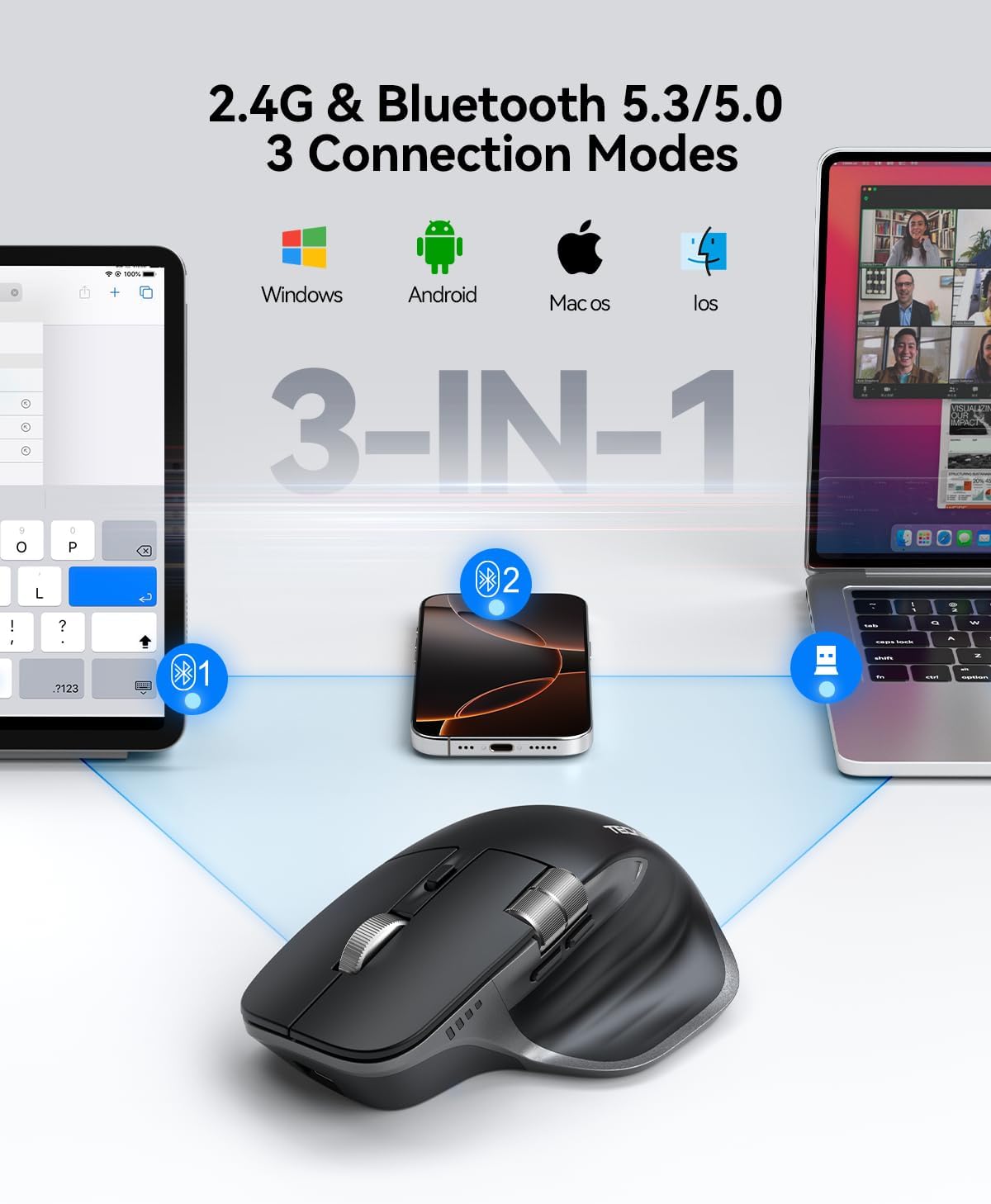
• Seamless 3-Device Switching: This wireless mouse supports two Bluetooth 5.3/5.0 connections and 2.4GHz USB-A connectivity, letting you connect up to 3 devices at once. In Bluetooth mode, the computer mouse pairs with two devices to free up USB-A ports—ideal for USB-less devices. For 2.4GHz mode, just plug in the bottom-mounted USB receiver for instant use (no software needed). With one button, switch freely between all 3 devices for smooth multitasking and maximum efficiency(Note: All buttons are non-programmable.) • Precision Metal Scroll Wheel: The wireless mouse features a precision-crafted metal scroll wheel that not only offers a more metallic luster and technological appeal visually but also delivers a uniquely cool and smooth tactile sensation. It significantly enhances the overall texture and durability of the mouse. • High-Precision 6-Level DPI Control: Equipped with a high-performance chip, this Bluetooth mouse offers 6 adjustable DPI settings (4800/3200/2400/1600/1200/800). The LED indicator shows the selected DPI by the number of blinks—for easy checking. Whether you need precise control for detailed work or fast movement for browsing, this Bluetooth mouse for laptop adapts to all your needs. • Side Scroll Wheel for Ease: This wireless Bluetooth mouse features a side-mounted scroll wheel for effortless horizontal scrolling. With a gentle flick of the finger, navigate spreadsheets, web pages, or design canvases horizontally—reducing wrist strain during long sessions and saving time on view adjustments to boost efficiency. • Rechargeable & Long-Lasting: Skip the hassle of frequent battery replacements! This wireless mouse for laptop is a rechargeable wireless mouse that fully charges in 1.5–2 hours and lasts up to about 3 months with 2 hours of daily use (charging cable included). Ideal for anyone seeking a convenient, long-lasting mouse. • Quiet Clicks, Focused Work: Silent clicks, no disturbance—perfect for offices, libraries, or focused work. This wireless silent mouse delivers precise, comfortable control, free from loud clicking noise. • Wide Compatibility: This wireless computer mouse works with Windows, macOS, Chrome, and Linux laptops (side scroll wheel not supported on macOS). The computer mouse wireless enters auto sleep after 10 minutes of inactivity to save power, and wakes with a click. LED blinks when battery is low. • 36 MONTHS WARRANTY: If you encounter any problems in using the product, please feel free to contact our professional customer service team, enjoying TECKNET 36 Months Warranty (Registered Only.)
Details
Connectivity & Compatibility
- Connectivity Technology
- Bluetooth, USB A, Wireless
- Operating System
- Chrome OS, Linux, Windows 10
- Compatible Devices
- Windows/Mac/Chromebook/Linux/Notebook/Laptop/Computer
- Range
- 33 feet
- Minimum Required Operating System Version
- Windows 11
- Antenna Location
- Indoor/Outdoor
Features & Performance
- Additional Features
- Bluetooth, Ergonomic Design, Rechargeable, Side Scroll Wheel, Wireless
- Movement Detection
- Optical
- Button Quantity
- 7
- Hand Orientation
- Right
- Mouse Maximum Sensitivity
- 4800 Dots per Inch
Battery & Power
- Battery Average Life
- 3 months
- Number of Batteries
- 1 Lithium Ion batteries required. (included)
- Power Source
- Rechargeable
- Are Batteries Included
- Yes
- Are Batteries Required
- Yes
Design & Build
- Color
- Black
- Style Name
- Modern
- Theme
- Office
- Enclosure Material
- Metal, Plastic
- Finish
- Matte
- Item Weight
- 173 Grams
- Unit Count
- 1.0 Count
Product Information
- Brand
- TECKNET
- Model Name
- TK-MS029
- Model Number
- TK-MS029
- Manufacturer
- TECKNET
- Mfr Part Number
- TK-MS029
- Warranty Description
- 3 years
- Built-In Media
- Rechargeable Mouse, USB A to C Charging Cable
- Hardware Platform
- PC
Frequently asked questions
- Can this mouse connect to multiple devices simultaneously?
- Yes, it supports seamless 3-device switching via two Bluetooth 5.3/5.0 connections and 2.4GHz USB-A connectivity, allowing you to connect up to 3 devices at once.
- Is the mouse rechargeable and how long does the battery last?
- Yes, it is rechargeable. It fully charges in 1.5–2 hours and lasts up to about 3 months with 2 hours of daily use.
- Does it have silent clicks?
- Yes, it features quiet clicks for no disturbance, perfect for offices or libraries.
Customer reviews

Great mouse overall, but just a tad slippery to hold.
I bought to avoid overpaying for another logictech MX. That is just robbery. I wanted one for work office and one for home office. I plan to leave my more expensive logictech at home. This mouse works great, with a few caveats: 1) Bluetooth receiver isn't the strongest... it seems to do better with line-of-sight. At least that was my experience in an office with MANY bluetooth and wifi signals flying around. (Everyone with a headset, keyboard, mouse, etc.) 2) Just behind the wheel is the DPI button, tap that until the cursor moves at same speed as other mice you use (if you use more than one on a particular computer, such as a work laptop, where you might have a home mouse, an office desk mouse, and a backpack mouse.) That way you don't have to go to windows settings every time you chance mice! [NOTE: Items 1 & 2 are critical to smooth operation without skips / whatnot.] 3) It is just a tad slippery to hold. I have a fancier older Logitech MX Master 3? 4? (i forget which) at home. I have a Logitech M330 in my laptop bag for meeting rooms. Both of these have rubber texture. This mouse does not. It is slick plastic (as of early April 2026) on all sides. This makes it a little more difficult to hold/control. Not impossible, but not ideal. I mentioned to seller/maker, and they said they'd work on that. They appreciated my feedback. :-)
I bought to avoid overpaying for another logictech MX. That is just robbery. I wanted one for work office and one for home office. I plan to leave my more expensive logictech at home. This mouse works great, with a few caveats: 1) Bluetooth receiver isn't the strongest... it seems to do better with line-of-sight. At least that was my experience in an office with MANY bluetooth and wifi signals flying around. (Everyone with a headset, keyboard, mouse, etc.) 2) Just behind the wheel is the DPI button, tap that until the cursor moves at same speed as other mice you use (if you use more than one on a particular computer, such as a work laptop, where you might have a home mouse, an office desk mouse, and a backpack mouse.) That way you don't have to go to windows settings every time you chance mice! [NOTE: Items 1 & 2 are critical to smooth operation without skips / whatnot.] 3) It is just a tad slippery to hold. I have a fancier older Logitech MX Master 3? 4? (i forget which) at home. I have a Logitech M330 in my laptop bag for meeting rooms. Both of these have rubber texture. This mouse does not. It is slick plastic (as of early April 2026) on all sides. This makes it a little more difficult to hold/control. Not impossible, but not ideal. I mentioned to seller/maker, and they said they'd work on that. They appreciated my feedback. :-)
Excellent!
This mouse is very ergonomic, very inexpensive, functional, and cool. I love the colors, weight, and size. This style of mouse should be the new standard for mice, giving a more open grip with your hand and less taxing to use. This model gives bluetooth OR dongle, and the bluetooth is simple and un-fussy (unlike logitech's mx series). Tecknet generally makes cool mice, and the dongle has a useful magnet to store inside. 2 critiques. First, the thumb divot goes in a little too far. It's just the teensiest bit curved farther in than the logi mx master mouse, sometimes making it a slight strain for me to hold. Why do mouse-makers think we want to have to use claw-hands to hold the mouse? But you can fix this with a little slab of putty or fun-tack covered with tissue, giving a wider grip for the thumb. 2nd, the mouse buttons. I wish they were programmable by default. Why would I want web forward-back navigation buttons right by my thumb? Who's constantly going forward and back? Fortunately, I'm on ubuntu, and input-remapper let me change the thumb wheel to volume, and the nav buttons to page up and down - so now they're very useful! Overall, this will be very comparable to the logitech mx master mouse series, for a fraction of the price. Very ergonomic, and as cool as it appears online.
This mouse is very ergonomic, very inexpensive, functional, and cool. I love the colors, weight, and size. This style of mouse should be the new standard for mice, giving a more open grip with your hand and less taxing to use. This model gives bluetooth OR dongle, and the bluetooth is simple and un-fussy (unlike logitech's mx series). Tecknet generally makes cool mice, and the dongle has a useful magnet to store inside. 2 critiques. First, the thumb divot goes in a little too far. It's just the teensiest bit curved farther in than the logi mx master mouse, sometimes making it a slight strain for me to hold. Why do mouse-makers think we want to have to use claw-hands to hold the mouse? But you can fix this with a little slab of putty or fun-tack covered with tissue, giving a wider grip for the thumb. 2nd, the mouse buttons. I wish they were programmable by default. Why would I want web forward-back navigation buttons right by my thumb? Who's constantly going forward and back? Fortunately, I'm on ubuntu, and input-remapper let me change the thumb wheel to volume, and the nav buttons to page up and down - so now they're very useful! Overall, this will be very comparable to the logitech mx master mouse series, for a fraction of the price. Very ergonomic, and as cool as it appears online.
Best mouse I ever owned
This is the best mouse I have ever owned. Period. I am comparing it against the Logitech MX Vertical, Apple Magic Mouse, and Logitech MX Master, among others. It is basically a copy of the Logitech MX Master at a fraction of the price. I use it daily across several Macs, including a MacBook Pro, an iMac, and a Mac Mini. Pros: - Extremely quiet: The clicking noise is almost nonexistent. - Lightweight: It feels much lighter than the MX Master or MX Vertical. - Flawless connectivity: Both the Bluetooth and USB dongle connections work perfectly. - Great battery life: A single charge lasts for several months. - Mac compatibility: The side buttons and scroll wheel work perfectly on macOS, despite the product images incorrectly claiming they do not. - Unbeatable price: The value for money is incredible. Cons: - No travel case: It does not come with a small pouch or bag to protect it while traveling. - Material quality: While the plastic quality is perfectly fine, Logitech MX mice do have a slightly better overall premium feel. However, this minor difference does not justify paying 4 to 5 times more for the Logitech.
This is the best mouse I have ever owned. Period. I am comparing it against the Logitech MX Vertical, Apple Magic Mouse, and Logitech MX Master, among others. It is basically a copy of the Logitech MX Master at a fraction of the price. I use it daily across several Macs, including a MacBook Pro, an iMac, and a Mac Mini. Pros: - Extremely quiet: The clicking noise is almost nonexistent. - Lightweight: It feels much lighter than the MX Master or MX Vertical. - Flawless connectivity: Both the Bluetooth and USB dongle connections work perfectly. - Great battery life: A single charge lasts for several months. - Mac compatibility: The side buttons and scroll wheel work perfectly on macOS, despite the product images incorrectly claiming they do not. - Unbeatable price: The value for money is incredible. Cons: - No travel case: It does not come with a small pouch or bag to protect it while traveling. - Material quality: While the plastic quality is perfectly fine, Logitech MX mice do have a slightly better overall premium feel. However, this minor difference does not justify paying 4 to 5 times more for the Logitech.
Good alternative to MX
This mouse closely resembles my Logitech MX 3S mouse, which I purchased for office work at a lower cost. The ergonomic design is excellent, with only minor differences compared to the MX, primarily due to its glossy finish. It connected seamlessly and was easy to set up, offering a stable connection. The scroll wheel and buttons are responsive and function perfectly. The mouse feels durable and features the convenient ability to dynamically adjust its DPI settings, which I find very useful. It operates flawlessly with my HP and Dell laptops without any issues, and switching between devices is smooth. I wish the switch button were positioned on the top rather than the bottom, but otherwise, it performs well. Very good price for what it offers. Highly recommend this product.
This mouse closely resembles my Logitech MX 3S mouse, which I purchased for office work at a lower cost. The ergonomic design is excellent, with only minor differences compared to the MX, primarily due to its glossy finish. It connected seamlessly and was easy to set up, offering a stable connection. The scroll wheel and buttons are responsive and function perfectly. The mouse feels durable and features the convenient ability to dynamically adjust its DPI settings, which I find very useful. It operates flawlessly with my HP and Dell laptops without any issues, and switching between devices is smooth. I wish the switch button were positioned on the top rather than the bottom, but otherwise, it performs well. Very good price for what it offers. Highly recommend this product.


