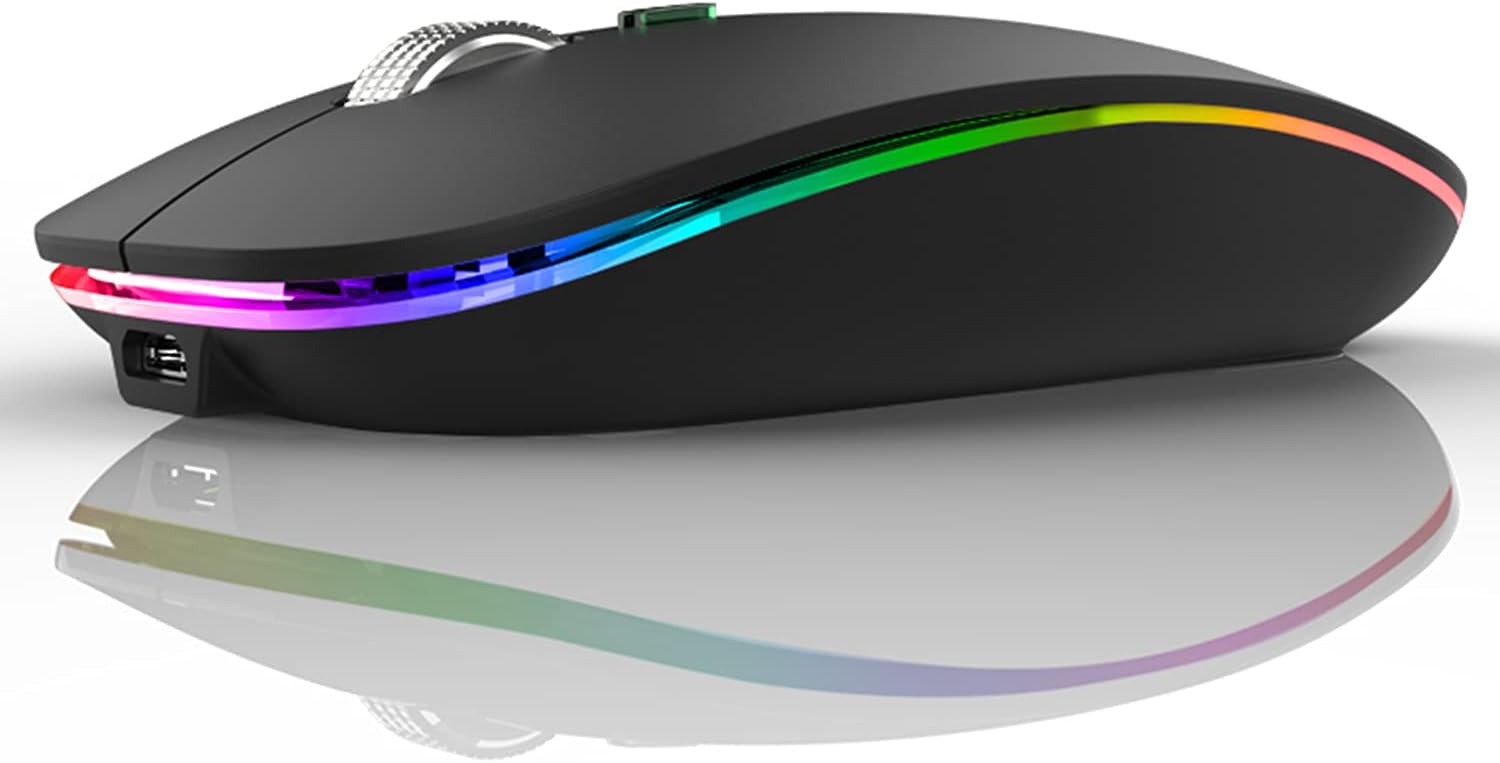


Uiosmuph LED Wireless Mouse, G12 Slim Rechargeable Silent Mouse, 2.4G Portable USB Optical Computer Mice with USB Receiver and Type C Adapter (Matte Black)
This is an affiliate link. Buyyyah may earn a commission if you buy through it, at no extra cost to you.
Description
- Rechargeable: Built-in rechargeable battery, no need change battery. Special soundless design for the right and left buttons, won’t disturb others. - Colorful Light: 7 different color changes randomly while in use, offering soothing lighting, creating cool and fancy atmosphere for work and play. - Energy Saving: The mouse will be in sleep mode in 8 mins of inactivity. And the LED light can be turned off by the bottom light switch. - Slim & Portable: About 4.4 x 2.2 x 0.79 inches, Suitable for travelling carry and it can be easily put into your laptop bag and ultra-space saving. - USB A and USB C Connection: This wireless mouse is packed with USB receiver (stored at the mouse bottom) and USB C adapter, works for computer with USB A or USB C port. For USB C connection, simply plug the USB receiver into the adapter, then plug adapter into your device. - Widely Compatibility: This rechargeable mouse works for Windows 7/8/10/XP, Vista, Linux, Mac OS, Chrome OS etc. It's compatible with most of the computers with USB C port, like MacBook Pro after 2016, MacBook Air after 2018, Chromebook and more.
Details
Features & Specs
- Connectivity Technology
- USB
- Additional Features
- LED Lights, Portable, Rechargeable, Soundless, Wireless
- Movement Detection
- Optical
- Button Quantity
- 4
- Hand Orientation
- Ambidextrous
- Compatible Devices
- Personal Computer
- Operating System
- Windows 2000
- Number of Batteries
- 1 Product Specific batteries required. (included)
- Hardware Platform
- Laptop, PC
- Power Source
- Battery Powered
- Mouse Maximum Sensitivity
- 800 Dots per Inch
- Minimum Required Operating System Version
- Windows 10
- Range
- 10.0 meters
- Embellishment Feature
- LED
Measurements
- Item Weight
- 2.4 Ounces
- Item Dimensions L x W
- 4.4"L x 2.22"W
- Unit Count
- 1.0 Count
Item details
- Brand
- Uiosmuph
- Model Name
- LED Wireless Mouse
- Antenna Location
- Office
- Model Number
- G12
- Built-In Media
- 1 x LED Wireless Mouse, 1 x Type C Adapter, 1 x USB C Charging Cable, 1 x USB Receiver (stored at the mouse bottom), 1 x User Manual
- Are Batteries Included
- Yes
- Are Batteries Required
- Yes
- Manufacturer
- Lootech
- Mfr Part Number
- DEDK-JS-1219-1965
Style
- Color
- Matte Black
- Style Name
- Modern
- Theme
- Rainbow
Materials & Care
- Enclosure Material
- Plastic
- Finish
- Matte
Frequently asked questions
- Is this mouse rechargeable?
- Yes, it has a built-in rechargeable battery, so no need to change batteries.
- Does it work with USB-C devices?
- Yes, it comes with a USB receiver and a USB-C adapter, and works for computers with USB-A or USB-C port.
- Is it silent?
- Yes, it has a special soundless design for the right and left buttons, so it won't disturb others.
Customer reviews

Best mouse I ever purchased for a computer!
DISLIKES: NONE! LIKES: Has an off and on button with 2 ON modes, the middle position is just the mouse, the other on position turns on a beautiful slow fading rainbow light show along the sides of the mouse as well as a small view port on top that changes colors as the sides fade into each color. It's nice to be able to turn off the color changing mode, as that does eat a bit more power to have that function on. I use that function when I feel like I need a change, then turn it off when I'm getting down to serious work. The mouse is wireless, came with everything needed to have it up and running once fully charged, this can take anywhere from 1 to 2 hours depending on how much use is put on the rechargeable battery within it. Comes with it's own charging cable, and yes, it can be used while charging, it may take a little longer to get to a full charge if in use while charging, but at least you CAN still use it while charging, although I'd recommend buying a longer USB cable if you need to use it while in charge mode. But it seems to hold up for a very long time before needing a recharge, again, this depends on how much usage it gets. You'll know when it's time to recharge it, as it will become erratic and slow to respond when the battery has gotten too weak to keep the pointer moving smoothly across your screen and button presses slow or not responding. It self-installs, and that only took less than a minute on my old antiquated desktop system I'm using for creating my Christmas and Halloween Animated Lights to Music displays, as well as games I play on it and other things I use the system for. The mouse is comfortable in the hand, the soft touch buttons and scroll wheel are fantastic, no annoying clicking of the buttons when pressed or buzzing type sounds when using the scroll wheel, unlike other mouse types I've used in the past. This mouse is a joy to use and am very happy with it and how it functions. Well worth the small investment I paid for it. Yes, I'd highly recommend this mouse for anyone, especially for late night computerists where the clicking and scroll wheel buzzing type sounds of other mice could annoy someone watching TV or sleeping, if the computer happens to be in your bedroom. The silence of this mouse is definitely golden! I'd double the Star rating on this one to 10-Stars if that were possible. Best mouse I've ever purchased!
DISLIKES: NONE! LIKES: Has an off and on button with 2 ON modes, the middle position is just the mouse, the other on position turns on a beautiful slow fading rainbow light show along the sides of the mouse as well as a small view port on top that changes colors as the sides fade into each color. It's nice to be able to turn off the color changing mode, as that does eat a bit more power to have that function on. I use that function when I feel like I need a change, then turn it off when I'm getting down to serious work. The mouse is wireless, came with everything needed to have it up and running once fully charged, this can take anywhere from 1 to 2 hours depending on how much use is put on the rechargeable battery within it. Comes with it's own charging cable, and yes, it can be used while charging, it may take a little longer to get to a full charge if in use while charging, but at least you CAN still use it while charging, although I'd recommend buying a longer USB cable if you need to use it while in charge mode. But it seems to hold up for a very long time before needing a recharge, again, this depends on how much usage it gets. You'll know when it's time to recharge it, as it will become erratic and slow to respond when the battery has gotten too weak to keep the pointer moving smoothly across your screen and button presses slow or not responding. It self-installs, and that only took less than a minute on my old antiquated desktop system I'm using for creating my Christmas and Halloween Animated Lights to Music displays, as well as games I play on it and other things I use the system for. The mouse is comfortable in the hand, the soft touch buttons and scroll wheel are fantastic, no annoying clicking of the buttons when pressed or buzzing type sounds when using the scroll wheel, unlike other mouse types I've used in the past. This mouse is a joy to use and am very happy with it and how it functions. Well worth the small investment I paid for it. Yes, I'd highly recommend this mouse for anyone, especially for late night computerists where the clicking and scroll wheel buzzing type sounds of other mice could annoy someone watching TV or sleeping, if the computer happens to be in your bedroom. The silence of this mouse is definitely golden! I'd double the Star rating on this one to 10-Stars if that were possible. Best mouse I've ever purchased!

STILL Love this Mouse
FINAL: I dropped this on hard floors one too many times, and the scroll wheel stopped working. So I bought another one exactly like it. It's that great. New mouse is the black one. ANOTHER UPDATE: It's April 1, 2024, and this mouse is still great. I read a review about the lack of USB ports for charging, but all one has to do is buy a USB extender. They are inexpensive, and great for adding a whole lot more things to the computer. Just plug the extender into one of the USBs, and in my case, I now have four more that I can use. I use 3 max, with an extra, just in case. Also, if you think your mouse is not working, charge it or use it while charging. Even if it acts like it doesn't want to work, detach the dongle (or whatever you may call it) from the USB port, turn the port off, reattach the dongle, turn the port back on, then turn the mouse off, then back on. It works every time for me. You are simply resetting the connection. I STILL love this mouse! I have no complaints, whatsoever. UPDATE - AGAIN: 7-7-22 I STILL love this mouse. The fact that it can be recharged is, well, saving me money on batteries. I can even leave it plugged in and use it. For those who say it quits working, if you make any change, unplug the dongle and plug it back in after a couple seconds, then turn the mouse on/off. Works perfectly. Never have a problem with it. UPDATE: 12-16-21: I love this mouse! I know. I said that already. Great product. One thing to be aware of. If I let my laptop sit for a while, logged in, when I come back, the mouse won't register. I found that all I have to do is turn it off, unplug the receiver from the USB port, re-plug the receiver, then turn the mouse back on. Same thing, If the mouse runs out of power and you recharge it when it's off. Mouse won't register. It's not broken, as some said on here. Just reset the same way. It's never failed me yet. Also, I use an old mouse pad for laser mouse because some surfaces make the pointer bounce all over the place. I bought Finger Pads from Amazon, multi-sized pack, and since my fingers are very dry they won't turn that wheel much. Those old-style filing finger pads work perfectly.
FINAL: I dropped this on hard floors one too many times, and the scroll wheel stopped working. So I bought another one exactly like it. It's that great. New mouse is the black one. ANOTHER UPDATE: It's April 1, 2024, and this mouse is still great. I read a review about the lack of USB ports for charging, but all one has to do is buy a USB extender. They are inexpensive, and great for adding a whole lot more things to the computer. Just plug the extender into one of the USBs, and in my case, I now have four more that I can use. I use 3 max, with an extra, just in case. Also, if you think your mouse is not working, charge it or use it while charging. Even if it acts like it doesn't want to work, detach the dongle (or whatever you may call it) from the USB port, turn the port off, reattach the dongle, turn the port back on, then turn the mouse off, then back on. It works every time for me. You are simply resetting the connection. I STILL love this mouse! I have no complaints, whatsoever. UPDATE - AGAIN: 7-7-22 I STILL love this mouse. The fact that it can be recharged is, well, saving me money on batteries. I can even leave it plugged in and use it. For those who say it quits working, if you make any change, unplug the dongle and plug it back in after a couple seconds, then turn the mouse on/off. Works perfectly. Never have a problem with it. UPDATE: 12-16-21: I love this mouse! I know. I said that already. Great product. One thing to be aware of. If I let my laptop sit for a while, logged in, when I come back, the mouse won't register. I found that all I have to do is turn it off, unplug the receiver from the USB port, re-plug the receiver, then turn the mouse back on. Same thing, If the mouse runs out of power and you recharge it when it's off. Mouse won't register. It's not broken, as some said on here. Just reset the same way. It's never failed me yet. Also, I use an old mouse pad for laser mouse because some surfaces make the pointer bounce all over the place. I bought Finger Pads from Amazon, multi-sized pack, and since my fingers are very dry they won't turn that wheel much. Those old-style filing finger pads work perfectly.


I love this quiet mouse!
I was skeptical at first to get the quiet mouse because I tend to like the click noise of the mouse (when I'm the one gaming lol) but the sound and feel of the click on this mouse is SO satisfying! I definitely won't be switching back to my normal loud mouse. It moves really smoothly and feels nice in my hand. The only downside is that I wish the scroll wheel was just the tiniest bit easier to scroll as I find myself accidentally clicking down on it just trying to scroll which then wildly scrolls the page. Not the biggest deal, maybe I'm just heavy-handed. The LED feature is really cool though I don't find myself ever using it. I have no clue what the button under the scroll wheel does, it doesn't seem to do anything but maybe it's just programmable. I didn't need anything super fancy so this is perfect, I'm really happy with my purchase. Edit: after using this mouse for a few weeks, I do have just one small complaint. On the bottom of the mouse is the power switch and there are three positions that it can be in: On with LED on, On without LED, and Off, in that order. My only complaint is that the On without LED option is in the middle. I rarely use the LED because I'm afraid it will drain the battery and I just don't need it, so it would be much more convenient if the On with LED was in the middle position instead so you could just switch it easily On/Off. I bring my mouse to work every day and the other day I accidentally switched it to On with LED instead of off and put it in my bag. When I got home a few hours later it was completely dead and I had to recharge it.
I was skeptical at first to get the quiet mouse because I tend to like the click noise of the mouse (when I'm the one gaming lol) but the sound and feel of the click on this mouse is SO satisfying! I definitely won't be switching back to my normal loud mouse. It moves really smoothly and feels nice in my hand. The only downside is that I wish the scroll wheel was just the tiniest bit easier to scroll as I find myself accidentally clicking down on it just trying to scroll which then wildly scrolls the page. Not the biggest deal, maybe I'm just heavy-handed. The LED feature is really cool though I don't find myself ever using it. I have no clue what the button under the scroll wheel does, it doesn't seem to do anything but maybe it's just programmable. I didn't need anything super fancy so this is perfect, I'm really happy with my purchase. Edit: after using this mouse for a few weeks, I do have just one small complaint. On the bottom of the mouse is the power switch and there are three positions that it can be in: On with LED on, On without LED, and Off, in that order. My only complaint is that the On without LED option is in the middle. I rarely use the LED because I'm afraid it will drain the battery and I just don't need it, so it would be much more convenient if the On with LED was in the middle position instead so you could just switch it easily On/Off. I bring my mouse to work every day and the other day I accidentally switched it to On with LED instead of off and put it in my bag. When I got home a few hours later it was completely dead and I had to recharge it.

How are they making money?
THIS MOUSE IS INSANE. Perks: * Compatible with nearly everything, even a phone. * Easy to use and charge * Fits well, ESPECIALLY if you have small hands like me * Buttons and scroll wheel are especially reactive and high-quality. * After two years of using it, I still have yet to have it break, extremely stable. * Four separate sensitivity options. * LEDs are beautiful, and also useful in some scenarios. * Silent, making it good for office and school use. However... I wish it had side buttons. That way, you can reprogram them to do basically anything. But you know what? This mouse is TEN DOLLARS. They are giving you ALL OF THIS, for just ten measly dollars. Please never go bankrupt, Uiosmuph.
THIS MOUSE IS INSANE. Perks: * Compatible with nearly everything, even a phone. * Easy to use and charge * Fits well, ESPECIALLY if you have small hands like me * Buttons and scroll wheel are especially reactive and high-quality. * After two years of using it, I still have yet to have it break, extremely stable. * Four separate sensitivity options. * LEDs are beautiful, and also useful in some scenarios. * Silent, making it good for office and school use. However... I wish it had side buttons. That way, you can reprogram them to do basically anything. But you know what? This mouse is TEN DOLLARS. They are giving you ALL OF THIS, for just ten measly dollars. Please never go bankrupt, Uiosmuph.




![Ailun 3 Pack Screen Protector for iPhone 16 [6.1 inch] + 3 Pack Camera Lens Protector with Installation Frame,Case Friendly Tempered Glass Film,[9H Hardness][Not for iPhone 16e/16 Pro/Plus/Pro Max]](https://m.media-amazon.com/images/I/71z4XevAN2L._AC_SY300_SX300_QL70_FMwebp_.jpg)