VIWOODS 6.13'' Carta1300 AiPaper Reader with 4G Connectivity, Ultra-Thin & Light E Ink eReader Device, AI Integrated, 300PPI, Adjustable Front Light, 128GB Storage
This is an affiliate link. Buyyyah may earn a commission if you buy through it, at no extra cost to you.
Description
- Ultra-Thin & Lightweight Design: Weighing only 138g with a super-slim 6.7mm body, the VIWOODS e reader features a compact 6.13-inch screen that perfectly balances portability and usability. Its sleek design fits effortlessly in your pocket, making it ideal for commuting, traveling, or enjoying your favorite reads anytime, anywhere - Stunning Carta 1300 Display: Enjoy a premium reading experience with the advanced Carta 1300 E-Ink display. It delivers faster refresh rates, reduced glare, and a true paper-like feel for comfortable, long reading sessions - Adjustable Front Light: Read comfortably in any environment with 20 levels of adjustable cool light, designed without warm light. Whether in low light or bright sunlight, the VIWOODS e-reader adapts to your needs for strain-free reading - AI Button for Instant Assistance: Access AI-powered assistance with ease using the dedicated AI side button. Long-press for voice input or short-press for text-based queries, providing you with quick solutions, learning tools, or helpful summaries in seconds - AI Screenshot Q&A: Struggling with a complex topic? Simply take a screenshot, let the AI analyze it, and receive a detailed summary or explanation. Dive deeper into any subject with follow-up questions, making learning easier than ever - Personal Knowledge Library: Save AI interactions and Q&A sessions into your personal knowledge bank. Build a searchable repository of insights and information over time, perfect for lifelong learners and professionals alike - High-Resolution 300 PPI Display: Featuring a 300 PPI high-resolution display, the VIWOODS reading tablet ensures sharp, crystal-clear text and images, making every word and detail easy to read and visually stunning - What’s in the Box: The VIWOODS AiPaper Reader includes a protective case, A-to-C adapter, card tray eject tool, and quick start guide - Note: Does not support handwriting or built-in speaker. Compatible with Bluetooth headphones for audiobook playback
Details
Features & Specs
- Display Technology
- Electronic Ink
- Connectivity Technology
- 4G connectivity, Bluetooth, USB, Wi-Fi
- Screen Size
- 6.1 Inches
- Memory Storage Capacity
- 128 GB
- Native Resolution
- 824×1648
- Color
- AiPaper Reader
- File Format
- DOC, DOCX, EPUB, HTM, HTML, MOBI, PDF, TXT
- Other Special Features of the Product
- 128GB storage, 300 PPI, 4G connectivity, AI integrated, Adjustable Front Light
- Battery Description
- Lithium-Ion
- RAM Memory Installed
- 4 GB
- Human-Interface Input
- Buttons, Touchscreen
Measurements
- Item Dimensions L x W x Thickness
- 6.28"L x 3.16"W x 0.26"Th
Item Details
- Brand
- VIWOODS
- Model Name
- AiPaper Reader
- Built-In Media
- AiPaper Reader, Card tray eject tool, Protective Case, Quick guide, USB-C Cable
- Manufacturer
- VIWOODS
- Model Number
- AiPaper Reader
- Warranty Description
- 14 months
- Unit Count
- 1.0 Count
Frequently asked questions
- What is the weight and thickness of this e-reader?
- The VIWOODS AiPaper Reader weighs only 138g with a super-slim 6.7mm body.
- Does this e-reader support 4G connectivity?
- Yes, it has 4G connectivity as listed in the connectivity technology.
- What file formats are supported?
- Supported file formats include DOC, DOCX, EPUB, HTM, HTML, MOBI, PDF, TXT.
Customer reviews

Great for me but there are some improvements that would make it really shine!
My primary reason for getting this was the size, e-ink display for reading. Also the main reason I got this particular one was because it came with the kindle app built in, plus others such as B&N, Kobo etc ready to install. This alone makes it perfect for my needs. Others I researched didn’t have that and you also had to convert kindle into another format on your computer then transfer it to the device. Sorry but I’m old and don’t want to do that. The older I have become the more I don’t want to deal with extra steps/BS. This device is the exact same size as my iPhone pro max and about the same weight. Having a magnetic thing on the back like my phone would be really helpful to just attach it to my phone. Just saying! This makes it perfect for taking it with me to appointments. Yes I have several kindles and tablets however they are larger than I prefer for carrying them around. I use crutches and it and my phone fit perfectly in the cup holders on my crutches. And yes I don’t like carrying a purse or bag. So far it’s been problematic free which is always a good thing. While I have to leave the brightness at about 14 and use a mid sized font with the Amazon bold, it’s great for my old eyes to read with. I have tried to read on my iPhone but mybeyes don’t like it and they become blurry and give me a headache after just a few minutes of reading. Because of the e ink I was able to read for an hour the first night with no eye problems or headaches. That in itself justified getting it. I do have a couple of dislikes, the battery life isn’t great, it drains quicker than I care for. The 128 GB storage is fine for people like me to like to keep a ton of books loaded up. If you store photos etc then a larger storage space would be a nice option, 256, 512GBs. Like others have mentioned I agree that the placement of the AI button is poor however I have disabled it so that takes care of accidental issues. Maybe either it or the power button on top. It’s all about holding it and not accidentally pressing it. Although disabling it does defeat the AI purpose. My other main concern is the user unfriendliness, guess I just don’t know what the icons are for and the navigation and trying to figure out how to do things is poor. The user guide needs improvement. I’m old school and prefer to have a manual in front of me as I try to figure out how to do things. Reading an onboard manual and then to go out to try to do whatever it is is not conducive for me. I think that they need to work on making normal tasks easier to do in one or two screens not several. T mobile is not a good choice where I live so the phone option isn’t something I would use. As I have said my primary usage for this device is reading not for using it as a phone or anything else, that’s what my phone is for. Speed is fine for me. Prior to getting this one, trying to decide if I should get the this one or the color one was the biggest challenge for my usage. In the end I decided to go with this one because the color one supposedly is not as crisp and clear with the letters. All in all, while a little pricey, it’s a great product for me. Reliability remains to be seen since I haven’t had it long enough to make a determination, hopefully it will last with no problems.
My primary reason for getting this was the size, e-ink display for reading. Also the main reason I got this particular one was because it came with the kindle app built in, plus others such as B&N, Kobo etc ready to install. This alone makes it perfect for my needs. Others I researched didn’t have that and you also had to convert kindle into another format on your computer then transfer it to the device. Sorry but I’m old and don’t want to do that. The older I have become the more I don’t want to deal with extra steps/BS. This device is the exact same size as my iPhone pro max and about the same weight. Having a magnetic thing on the back like my phone would be really helpful to just attach it to my phone. Just saying! This makes it perfect for taking it with me to appointments. Yes I have several kindles and tablets however they are larger than I prefer for carrying them around. I use crutches and it and my phone fit perfectly in the cup holders on my crutches. And yes I don’t like carrying a purse or bag. So far it’s been problematic free which is always a good thing. While I have to leave the brightness at about 14 and use a mid sized font with the Amazon bold, it’s great for my old eyes to read with. I have tried to read on my iPhone but mybeyes don’t like it and they become blurry and give me a headache after just a few minutes of reading. Because of the e ink I was able to read for an hour the first night with no eye problems or headaches. That in itself justified getting it. I do have a couple of dislikes, the battery life isn’t great, it drains quicker than I care for. The 128 GB storage is fine for people like me to like to keep a ton of books loaded up. If you store photos etc then a larger storage space would be a nice option, 256, 512GBs. Like others have mentioned I agree that the placement of the AI button is poor however I have disabled it so that takes care of accidental issues. Maybe either it or the power button on top. It’s all about holding it and not accidentally pressing it. Although disabling it does defeat the AI purpose. My other main concern is the user unfriendliness, guess I just don’t know what the icons are for and the navigation and trying to figure out how to do things is poor. The user guide needs improvement. I’m old school and prefer to have a manual in front of me as I try to figure out how to do things. Reading an onboard manual and then to go out to try to do whatever it is is not conducive for me. I think that they need to work on making normal tasks easier to do in one or two screens not several. T mobile is not a good choice where I live so the phone option isn’t something I would use. As I have said my primary usage for this device is reading not for using it as a phone or anything else, that’s what my phone is for. Speed is fine for me. Prior to getting this one, trying to decide if I should get the this one or the color one was the biggest challenge for my usage. In the end I decided to go with this one because the color one supposedly is not as crisp and clear with the letters. All in all, while a little pricey, it’s a great product for me. Reliability remains to be seen since I haven’t had it long enough to make a determination, hopefully it will last with no problems.
Did exactly what I was hoping it would do
I got this because I wanted to offload my ebook reading and audiobook listening from my phone to a similar-sized device. This works perfectly for that purpose. Most of my books are already in Kindle format, and the mini makes a lovely pocket-sized Kindle reader. With access to Google Play, I was also able to download and set up Audible and Libro apps to bring in my audiobook collection. And finally, for a couple of audiobooks for which I had MP3 files on my Mac laptop, I was able to connect with a USB C cable and use an Android file transfer utility to bring the files into a generic audiobook player app. So all good there. I had some problems pressing buttons accidentally when I picked the device up or put it in my pocket. Using a the (separate and somewhat pricey) folio cover improved that situation significantly. I can now keep my phone and the ViWoods device together in the same trouser pocket without worrying about scratching either screen. (There IS a setting, by the way, to turn on the reader when you open the folio cover.) The AI access is occasionally useful for looking up answers to questions about something I’m reading or listening to, but I don’t have much experience with that yet. So far, I have quite a bit stored on it. The audiobooks obviously take up more space than the ebooks, but I have the complete Arkangel Shakespeare series in Audible’s high-quality download format, along with three different recordings of the complete Bible, and quite a few others, and am still only at about 50% in the storage department, so not many worries there. I wouldn’t mind an option to plug in a memory card, but I haven’t run up against a wall there yet. I’m actually thinking about getting a larger Viwoods device as well, having been impressed both with the quality of this one and the rapid answers I’ve gotten to a handful of tech support questions I had.
I got this because I wanted to offload my ebook reading and audiobook listening from my phone to a similar-sized device. This works perfectly for that purpose. Most of my books are already in Kindle format, and the mini makes a lovely pocket-sized Kindle reader. With access to Google Play, I was also able to download and set up Audible and Libro apps to bring in my audiobook collection. And finally, for a couple of audiobooks for which I had MP3 files on my Mac laptop, I was able to connect with a USB C cable and use an Android file transfer utility to bring the files into a generic audiobook player app. So all good there. I had some problems pressing buttons accidentally when I picked the device up or put it in my pocket. Using a the (separate and somewhat pricey) folio cover improved that situation significantly. I can now keep my phone and the ViWoods device together in the same trouser pocket without worrying about scratching either screen. (There IS a setting, by the way, to turn on the reader when you open the folio cover.) The AI access is occasionally useful for looking up answers to questions about something I’m reading or listening to, but I don’t have much experience with that yet. So far, I have quite a bit stored on it. The audiobooks obviously take up more space than the ebooks, but I have the complete Arkangel Shakespeare series in Audible’s high-quality download format, along with three different recordings of the complete Bible, and quite a few others, and am still only at about 50% in the storage department, so not many worries there. I wouldn’t mind an option to plug in a memory card, but I haven’t run up against a wall there yet. I’m actually thinking about getting a larger Viwoods device as well, having been impressed both with the quality of this one and the rapid answers I’ve gotten to a handful of tech support questions I had.
fast,accurate,and super easy to use
The AiPaper Reader turned out to be exactly what I needed! The more I used it, the more it became part of my daily routine. One of the most refreshing aspects is the lack of constant notifications, apart from calls and messages. Starting my day without being bombarded by alerts and only checking updates later on my computer has made mornings feel much calmer and more focused. The device itself is incredibly well-made. The e-ink screen is sharp and clear, making it perfect for reading eBooks, while being far gentler on the eyes than regular screens. So far, I’ve experienced no bugs, and the overall experience has been smooth. I also use the device to read French articles for study purposes, and the built-in AI feature has been surprisingly helpful. When using third-party apps to read, I often take screenshots of useful information to organize into my knowledge base. Annotating these screenshots allows me to quickly reference important points later, which has made studying much more efficient. This device strikes a great balance between functionality and simplicity, and it’s become an invaluable part of my daily life.
The AiPaper Reader turned out to be exactly what I needed! The more I used it, the more it became part of my daily routine. One of the most refreshing aspects is the lack of constant notifications, apart from calls and messages. Starting my day without being bombarded by alerts and only checking updates later on my computer has made mornings feel much calmer and more focused. The device itself is incredibly well-made. The e-ink screen is sharp and clear, making it perfect for reading eBooks, while being far gentler on the eyes than regular screens. So far, I’ve experienced no bugs, and the overall experience has been smooth. I also use the device to read French articles for study purposes, and the built-in AI feature has been surprisingly helpful. When using third-party apps to read, I often take screenshots of useful information to organize into my knowledge base. Annotating these screenshots allows me to quickly reference important points later, which has made studying much more efficient. This device strikes a great balance between functionality and simplicity, and it’s become an invaluable part of my daily life.



Love love love!
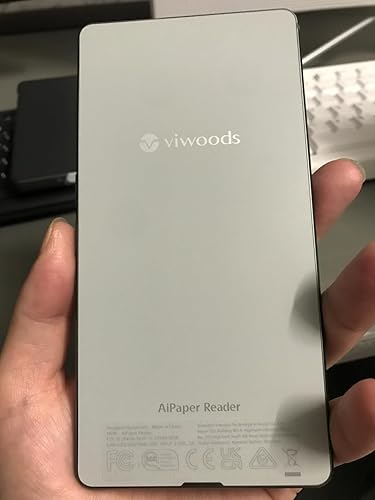
I love this ereader so much. It’s super light so it can go with you everywhere, fits perfectly in your hand, backlit so you can read in bed, easy to turn pages with a physical button or with a swipe. All the apps you use to read are preloaded so super easy to download books. I don’t really use the AI function but if that is important to you it’s there. Would highly recommend. I read so many more books now. Easy on your eyes and I carry it everywhere and read while I’m waiting in line, on the train wherever.
I love this ereader so much. It’s super light so it can go with you everywhere, fits perfectly in your hand, backlit so you can read in bed, easy to turn pages with a physical button or with a swipe. All the apps you use to read are preloaded so super easy to download books. I don’t really use the AI function but if that is important to you it’s there. Would highly recommend. I read so many more books now. Easy on your eyes and I carry it everywhere and read while I’m waiting in line, on the train wherever.