


WALI Single Arm Laptop and Monitor Desk Mount for 17" Notebook and Up to 32" Screen, 2-in-1 Adjustable Monitor Arm with Laptop Tray, VESA 75x75 100x100,Holds 22-26.4 lbs, Black (GSMP001NLP)
This is an affiliate link. Buyyyah may earn a commission if you buy through it, at no extra cost to you.
Description
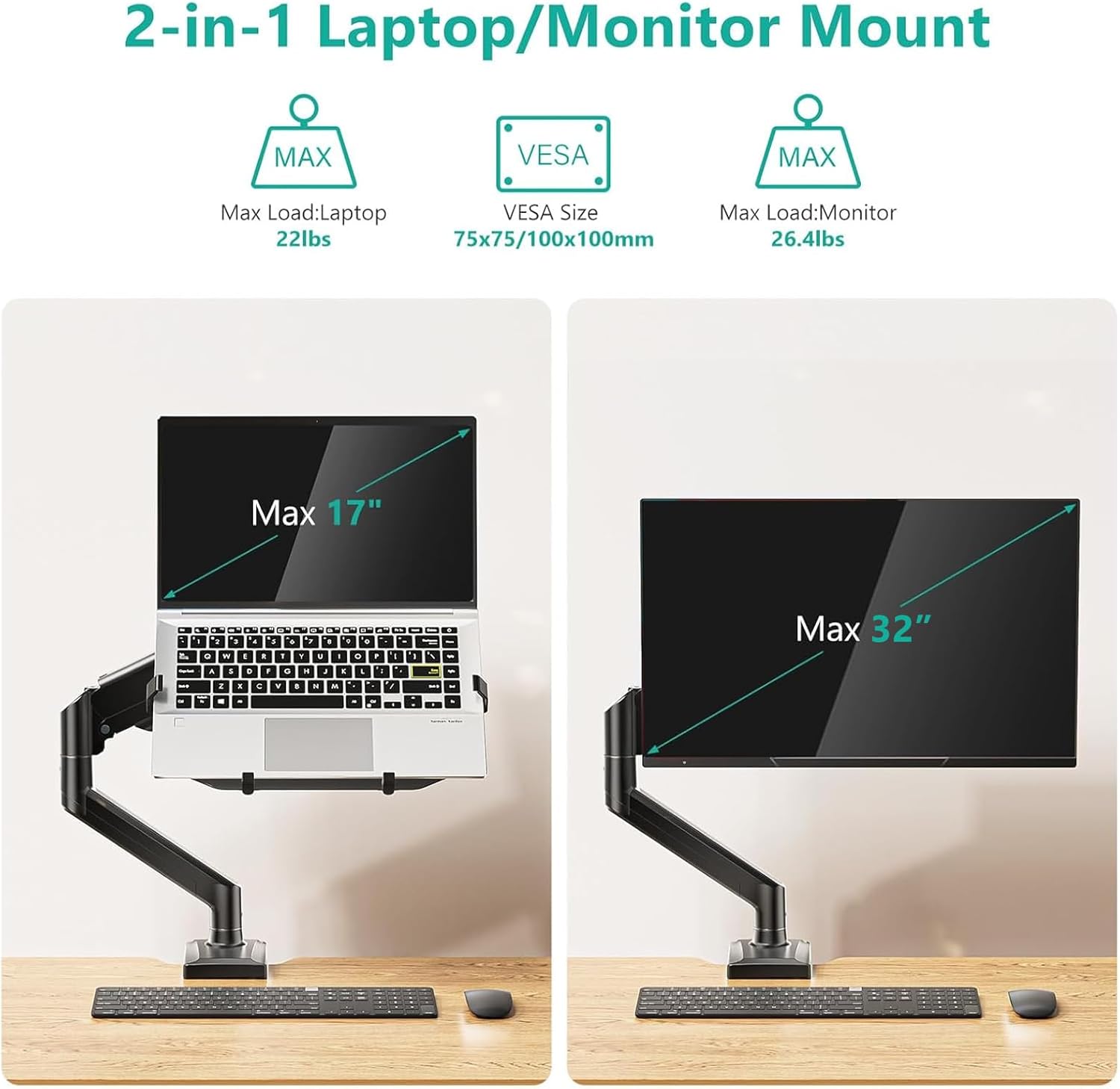
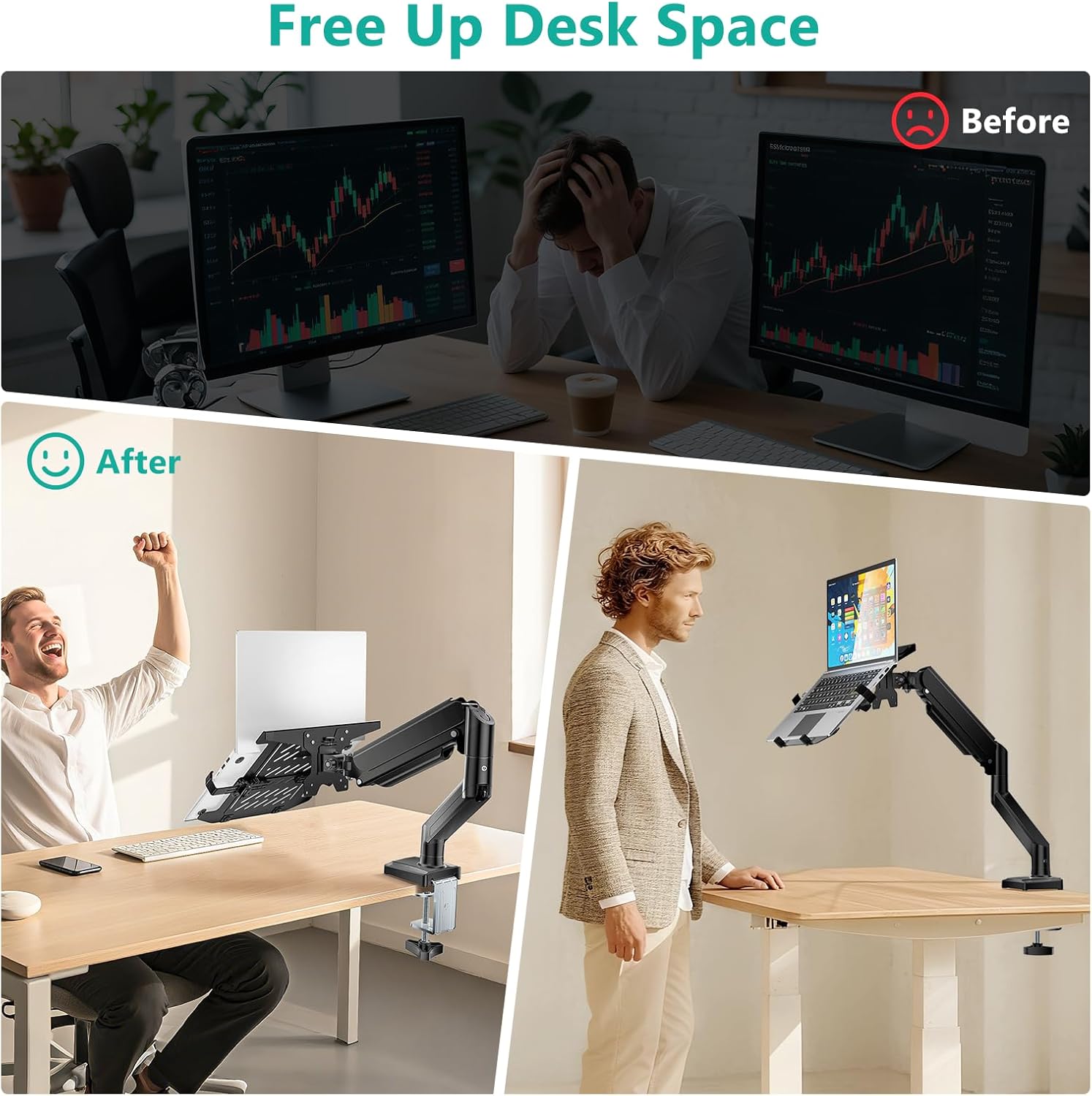
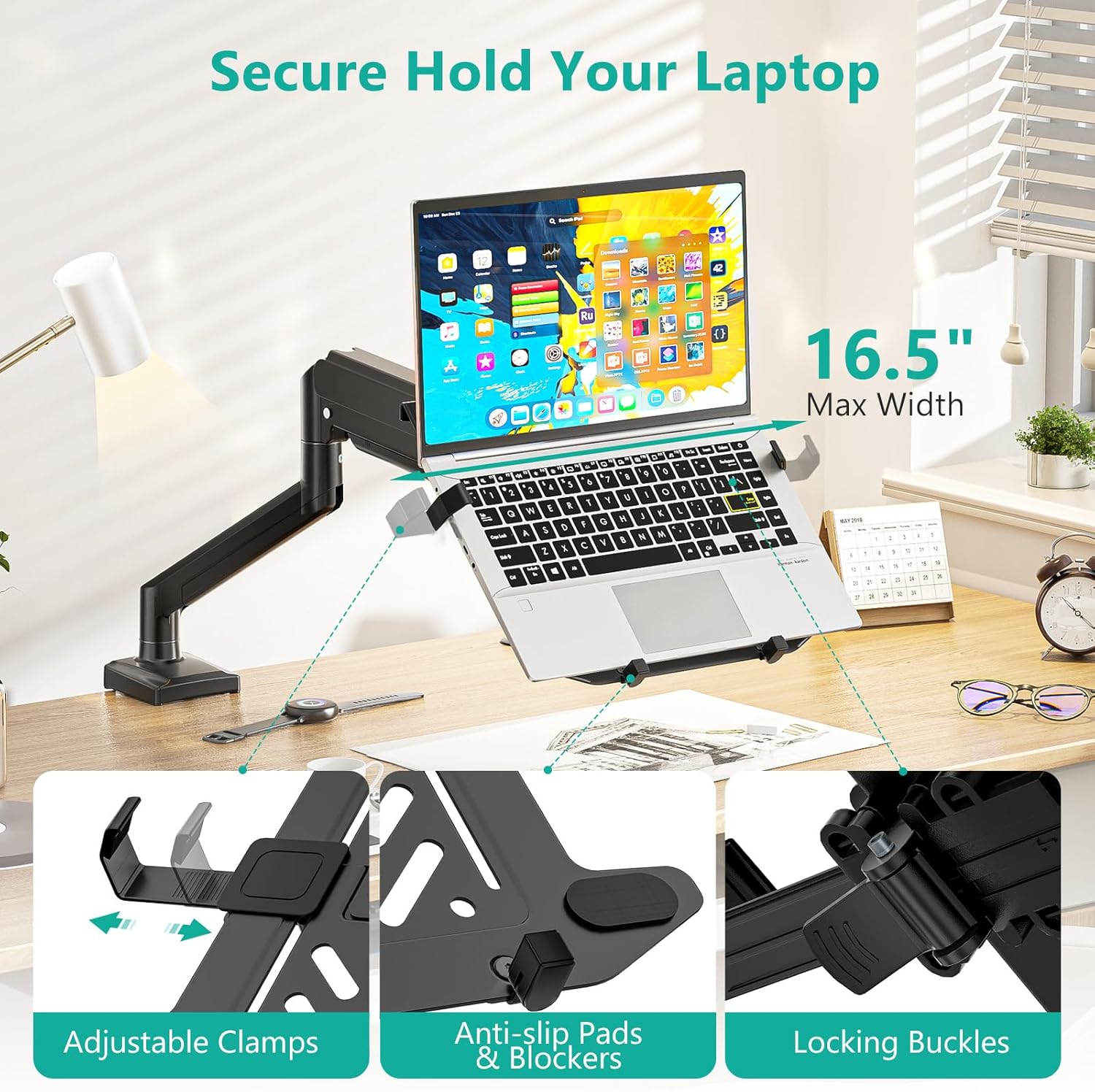
- 2-In-1 Laptop & Monitor Desk Mount: WALI laptop arm mount is compatible with Laptop, Monitor, Macbook and Chromebook. The laptop stand fits max 17" notebook, holds up to 22lbs. And fits 17"- 32" computer monitor screens, up to 26.4lbs,with VESA pattern 75x75mm and 100x100mm. The detachable laptop tray with holes provide better air flow and keep the laptop running cool for heat dissipation. - Full Motion Adjustable Laptop Mount: The laptop arm mount offers -45° to +70° tilt, 180°swivel, 360° rotation, and adjustable height up to 17.3". The maximum extension length is 19.3". With this laptop mount, you can achieve the perfect ergonomic posture and elevate your productivity. - Ergonomic Laptop Stand for Desk:Stable arm allows you to lift the laptop/monitor up to an ergonomic height with proper viewing angle, which is helpful to create a healthy office style and improve work efficiency. This arm with laptop tray help relieve pain of eyes, shoulder and neck by adjusting your position, when you've been working at the computer for long time. - Easy Installation: The laptop stand for desk offers two installation options to ensure stability and full functionality. Depending on your desk situation, you can choose clamp or grommet mounting(suitable for desks from 0.39" to 2.76" thick). The hole diameter for grommet base should be 0.39" to 2.76". - Package Includes: 1 x WALI Laptop Tray Desk Mount (Black), 1 x Mounting Hardware Kit, 1 x User Manual, experienced and friendly US based customer support available to assist 7 days a week
Details
Features & Specs
- Mounting Type
- Tabletop Mount
- Movement Type
- Articulating
- Compatible Devices
- Laptop, Monitor
- Maximum Tilt Angle
- 75 Degrees
Additional Details
- Enclosure Material
- Metal
- Color
- Black
Measurements
- Minimum-Supported Screen Size
- 17 Inches
- Maximum-Supported Screen Size
- 34 Inches
Warranty
- Warranty Description
- 10-year warranty
Item Details
- Brand
- WALI
- Manufacturer
- WALI
- Unit Count
- 1.0 Count
Frequently asked questions
- What is the weight capacity for the laptop and monitor?
- The laptop tray holds up to 22 lbs, and the monitor arm holds up to 26.4 lbs.
- What VESA patterns does this mount support?
- It supports VESA patterns 75x75mm and 100x100mm.
- What is the warranty on this product?
- It comes with a 10-year warranty.
Customer reviews

Superb quality. Couldn't be happier.
I have been looking for a separate monitor and laptop stand for a while now and recently came across this set up from WALI. For under $50, I was a little nervous about the quality before it arrived. I had no reason to be concerned. It is a SOLID set up. Everything is high-quality metal construction and secure when assembled. Set up took some doing but only because I am not the most, um, detailed direction follower...Make sure you tighten the tray and post screws TIGHTLY initially to prevent any kind of movement after you've assembled it (don't ask me how I know). I have a 15'' Asus laptop and the lip on the tray holds it fine as long as I don't tip it too far forward. But it's an unusually thick laptop body so I imagine most won't have an issue. Again, it's not a problem for me at all, just limits slightly the angle I can tilt the tray. If you are ok with the configuration shown in the primary product image (i.e., monitor above tray) then it will be no problem as is. My desk isn't that deep so I had wanted them to be side-by-side. I was able to set it up that way out of the box. But my monitor was just a hair too big and it cast a shadow on the laptop monitor in the side by side configuration. Support was kind enough to send me a second base post and screws so I could use the grommet and clamp bases at the same time (as is you can only use one or the other). This of course only works if you already have a hole in the desk (or are willing to put one in yourself). Many thanks to WALI's support crew for accommodating me. I use a standing desk. If movement while you type is something you're fussy about (I'm not) note there will be some shake, especially in the standing position. But for most, it should be absolutely no problem. Overall a fantastic deal. Highly recommend it!
I have been looking for a separate monitor and laptop stand for a while now and recently came across this set up from WALI. For under $50, I was a little nervous about the quality before it arrived. I had no reason to be concerned. It is a SOLID set up. Everything is high-quality metal construction and secure when assembled. Set up took some doing but only because I am not the most, um, detailed direction follower...Make sure you tighten the tray and post screws TIGHTLY initially to prevent any kind of movement after you've assembled it (don't ask me how I know). I have a 15'' Asus laptop and the lip on the tray holds it fine as long as I don't tip it too far forward. But it's an unusually thick laptop body so I imagine most won't have an issue. Again, it's not a problem for me at all, just limits slightly the angle I can tilt the tray. If you are ok with the configuration shown in the primary product image (i.e., monitor above tray) then it will be no problem as is. My desk isn't that deep so I had wanted them to be side-by-side. I was able to set it up that way out of the box. But my monitor was just a hair too big and it cast a shadow on the laptop monitor in the side by side configuration. Support was kind enough to send me a second base post and screws so I could use the grommet and clamp bases at the same time (as is you can only use one or the other). This of course only works if you already have a hole in the desk (or are willing to put one in yourself). Many thanks to WALI's support crew for accommodating me. I use a standing desk. If movement while you type is something you're fussy about (I'm not) note there will be some shake, especially in the standing position. But for most, it should be absolutely no problem. Overall a fantastic deal. Highly recommend it!

Not as complicated to put together as it seems, and quite sturdy
When I first unpacked this stand, I was initially overwhelmed by the number of parts that were included in the package. I didn’t realize there were extra parts included to offer you two choices for how to mount the stand to your workstation. Once I got that sorted out, I relaxed a bit more and was able to assemble the unit single-handedly and mount two 22” monitors and a laptop to give myself more room on my desk. It was a bit challenging to move the arms to just the right angles and height, but I did get it after a few tries. I used the re-positionable clamp instead of the desk- through grommet mount. It feels very sturdy, and I feel as long as I periodically check the tension and tightness of the bolts, it will hold up everything just fine. I am not thrilled with the cable management clamps that attach to the round center pole, so I’ll probably end up looking for different clamps or even just velcro fasteners to loop around the post. The clamps that snap onto the arms themselves are fine and hold the Displayport and power cords in place well. I thought about dinging this unit a star for the weird center post clamps and also because the black coating on part of the round post is flaking off, but really, I can work with those things/cover up the cosmetic issues. I was super-impressed by the way the hardware was included in labeled, individual plastic compartments. The instructions were pretty good, too, although I would have liked the print to be a little larger - once you hit your forties, you reach for readers or have to get up close and squint to see small print… Overall, I’m pleased with this unit.
When I first unpacked this stand, I was initially overwhelmed by the number of parts that were included in the package. I didn’t realize there were extra parts included to offer you two choices for how to mount the stand to your workstation. Once I got that sorted out, I relaxed a bit more and was able to assemble the unit single-handedly and mount two 22” monitors and a laptop to give myself more room on my desk. It was a bit challenging to move the arms to just the right angles and height, but I did get it after a few tries. I used the re-positionable clamp instead of the desk- through grommet mount. It feels very sturdy, and I feel as long as I periodically check the tension and tightness of the bolts, it will hold up everything just fine. I am not thrilled with the cable management clamps that attach to the round center pole, so I’ll probably end up looking for different clamps or even just velcro fasteners to loop around the post. The clamps that snap onto the arms themselves are fine and hold the Displayport and power cords in place well. I thought about dinging this unit a star for the weird center post clamps and also because the black coating on part of the round post is flaking off, but really, I can work with those things/cover up the cosmetic issues. I was super-impressed by the way the hardware was included in labeled, individual plastic compartments. The instructions were pretty good, too, although I would have liked the print to be a little larger - once you hit your forties, you reach for readers or have to get up close and squint to see small print… Overall, I’m pleased with this unit.

Game changer
**update 2026** Okay I've just upgraded this mount so let me update my review. I am keeping 5 stars because for an entry level budget mount it did its job. Here's why I changed: if your desk is not solid wood, the base of the mount is too narrow and will start to sink in. Also, after a few years one of the arm started to sag. I upgraded for a mount double this price so not outrageous but the base is wider and the arms are sturdier. I am still happy I purchased that one because for my budget it did the job so these years and it's better than not having it. Still recommend if your budget is low and you need to save desk space, it's a great starter. If you can wait and save twice this, I suggest you do and skip to the better ones though. **original review 2020** Been using this mount for about 3 months, time to review: It is an absolute game changer! Cheap, easy to assemble and install, feels sturdy. At first my wife was skeptical because she thought it would be a gimmick but it frees up so much space, it brings both monitors to the same eye-level height, the mouse cable never gets stuck under the laptop anymore, and it holds the cables in place so that when she has to run with the laptop they don't fall behind the desk anymore (see picture). All these little details improved her productivity. And just visually it looks much better I think. Laptop: 15" Monitor: 24"
**update 2026** Okay I've just upgraded this mount so let me update my review. I am keeping 5 stars because for an entry level budget mount it did its job. Here's why I changed: if your desk is not solid wood, the base of the mount is too narrow and will start to sink in. Also, after a few years one of the arm started to sag. I upgraded for a mount double this price so not outrageous but the base is wider and the arms are sturdier. I am still happy I purchased that one because for my budget it did the job so these years and it's better than not having it. Still recommend if your budget is low and you need to save desk space, it's a great starter. If you can wait and save twice this, I suggest you do and skip to the better ones though. **original review 2020** Been using this mount for about 3 months, time to review: It is an absolute game changer! Cheap, easy to assemble and install, feels sturdy. At first my wife was skeptical because she thought it would be a gimmick but it frees up so much space, it brings both monitors to the same eye-level height, the mouse cable never gets stuck under the laptop anymore, and it holds the cables in place so that when she has to run with the laptop they don't fall behind the desk anymore (see picture). All these little details improved her productivity. And just visually it looks much better I think. Laptop: 15" Monitor: 24"


Absolutely fabulous products!
The only downfall of this product is that there is no instant up/down adjustment on the arms. Otherwise this mount is outstanding. It is easy to put together, the only items you'll want that aren't in the box are a screwdriver and a wrench. It went up in just a couple of minutes, and it's sturdy and very well made. I like that I can put it flush to a wall because it does not need any room behind it. This is beyond amazing for the inexpensive cost. I would buy it again in a heartbeat. Also adding to the awesomeness is an array of additional arms and accessories for this you can find from Wali to make your setup perfect for you, all at great prices. I've got my office setup complete with three arms and two laptop trays and the whole thing cost less than a single arm I purchased from Amazon Basics. Handy thought regarding the laptop trays is that they're a nice size, and with the catch at the bottom, I've found I like to use it as a literature tray. I drop a book on there and it holds it at a nice angle to read from when transferring or referencing data. The trays do bounce some when typing, but much less than any other type of arm/tray system I've ever used. Highly recommended!
The only downfall of this product is that there is no instant up/down adjustment on the arms. Otherwise this mount is outstanding. It is easy to put together, the only items you'll want that aren't in the box are a screwdriver and a wrench. It went up in just a couple of minutes, and it's sturdy and very well made. I like that I can put it flush to a wall because it does not need any room behind it. This is beyond amazing for the inexpensive cost. I would buy it again in a heartbeat. Also adding to the awesomeness is an array of additional arms and accessories for this you can find from Wali to make your setup perfect for you, all at great prices. I've got my office setup complete with three arms and two laptop trays and the whole thing cost less than a single arm I purchased from Amazon Basics. Handy thought regarding the laptop trays is that they're a nice size, and with the catch at the bottom, I've found I like to use it as a literature tray. I drop a book on there and it holds it at a nice angle to read from when transferring or referencing data. The trays do bounce some when typing, but much less than any other type of arm/tray system I've ever used. Highly recommended!


